# Seam Components

[Seam Components](https://github.com/seamapi/react) are a set of prebuilt UI components for building your device management flow.

Features include:

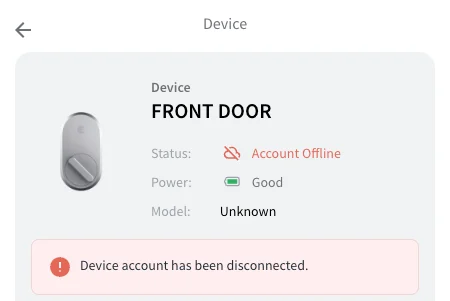
* Device debugging flows that allow your customers to uncover issues
* Responsive design to fit seamlessly on any screen size

## [Getting started with Components ->](/latest/ui-components/overview/getting-started-with-seam-components/get-started-with-client-side-components.md)

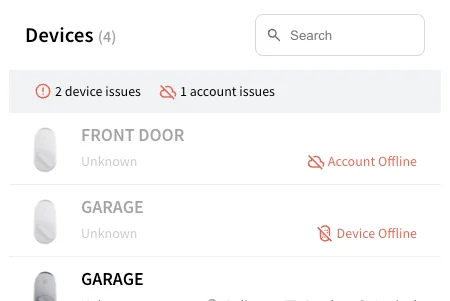
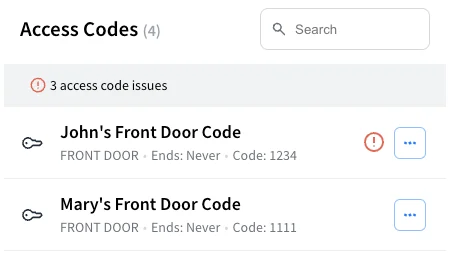
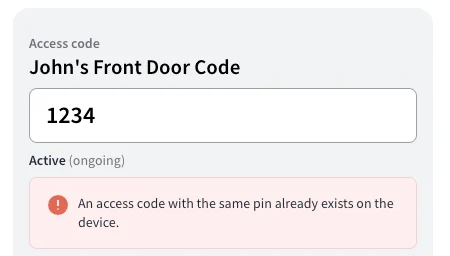
<table data-card-size="large" data-view="cards"><thead><tr><th></th><th></th><th></th><th data-hidden data-card-cover data-type="files"></th><th data-hidden data-card-target data-type="content-ref"></th></tr></thead><tbody><tr><td><strong>Device Table</strong><br>Display a list of devices, and filter for all the devices with issues.</td><td></td><td></td><td><a href="/files/ejTbb3pgXKWFcPDGImuX">/files/ejTbb3pgXKWFcPDGImuX</a></td><td><a href="/pages/2ZiWgPFsrd6fuCjmJImN">/pages/2ZiWgPFsrd6fuCjmJImN</a></td></tr><tr><td><strong>Device Details</strong></td><td>Display a device's properties and settings, alerts, and warnings.</td><td></td><td><a href="/files/HFtYfi2oQzfRI1xqykw2">/files/HFtYfi2oQzfRI1xqykw2</a></td><td><a href="/pages/UXRCp3v9pOHuwK4X2Epn">/pages/UXRCp3v9pOHuwK4X2Epn</a></td></tr><tr><td><strong>Access Code Table</strong><br>Display a list of access codes, and filter for all the access codes with issues.</td><td></td><td></td><td><a href="/files/gcJDDRuh2dsfiw0YyNZu">/files/gcJDDRuh2dsfiw0YyNZu</a></td><td><a href="/pages/boeu4cfZD1ixQpNyskLE">/pages/boeu4cfZD1ixQpNyskLE</a></td></tr><tr><td><strong>Access Code Details</strong></td><td>Display an access code's properties, alerts and warnings.</td><td></td><td><a href="/files/KJglDH1w71tngn4VuuO7">/files/KJglDH1w71tngn4VuuO7</a></td><td><a href="/pages/HbCxij8tZmDCdo7dZRqZ">/pages/HbCxij8tZmDCdo7dZRqZ</a></td></tr><tr><td><strong>Supported Devices Table</strong></td><td>Display a list of all the devices that you support through Seam.</td><td></td><td><a href="/files/f0oJARSAdFLBSxGpJi7D">/files/f0oJARSAdFLBSxGpJi7D</a></td><td><a href="/pages/qiV9MAW87ImPusDQYqJy">/pages/qiV9MAW87ImPusDQYqJy</a></td></tr></tbody></table>

## Next Steps

* [Minimal sample apps](https://github.com/seamapi/seam-components-sample-apps) running Seam Components in various frameworks.
* View our [**Getting Started Guide**](/latest/ui-components/overview/getting-started-with-seam-components/get-started-with-client-side-components.md)
* View and play with other components in the [**interactive storybook component library**](https://react.seam.co/)
* Check out some [**Full Example Apps**](https://github.com/seamapi/react/tree/main/examples)

If you have any questions or want to report an issue, email us at <support@seam.co>.


---

# Agent Instructions: Querying This Documentation

If you need additional information that is not directly available in this page, you can query the documentation dynamically by asking a question.

Perform an HTTP GET request on the current page URL with the `ask` query parameter:

```
GET https://docs.seam.co/latest/ui-components/overview.md?ask=<question>
```

The question should be specific, self-contained, and written in natural language.
The response will contain a direct answer to the question and relevant excerpts and sources from the documentation.

Use this mechanism when the answer is not explicitly present in the current page, you need clarification or additional context, or you want to retrieve related documentation sections.