

- Sharing access with additional guests on the same reservation
- Multi-unit access
- Mid-stay room changes
- Early check in/late check out
- Lost cards
- Check out
Sharing Access
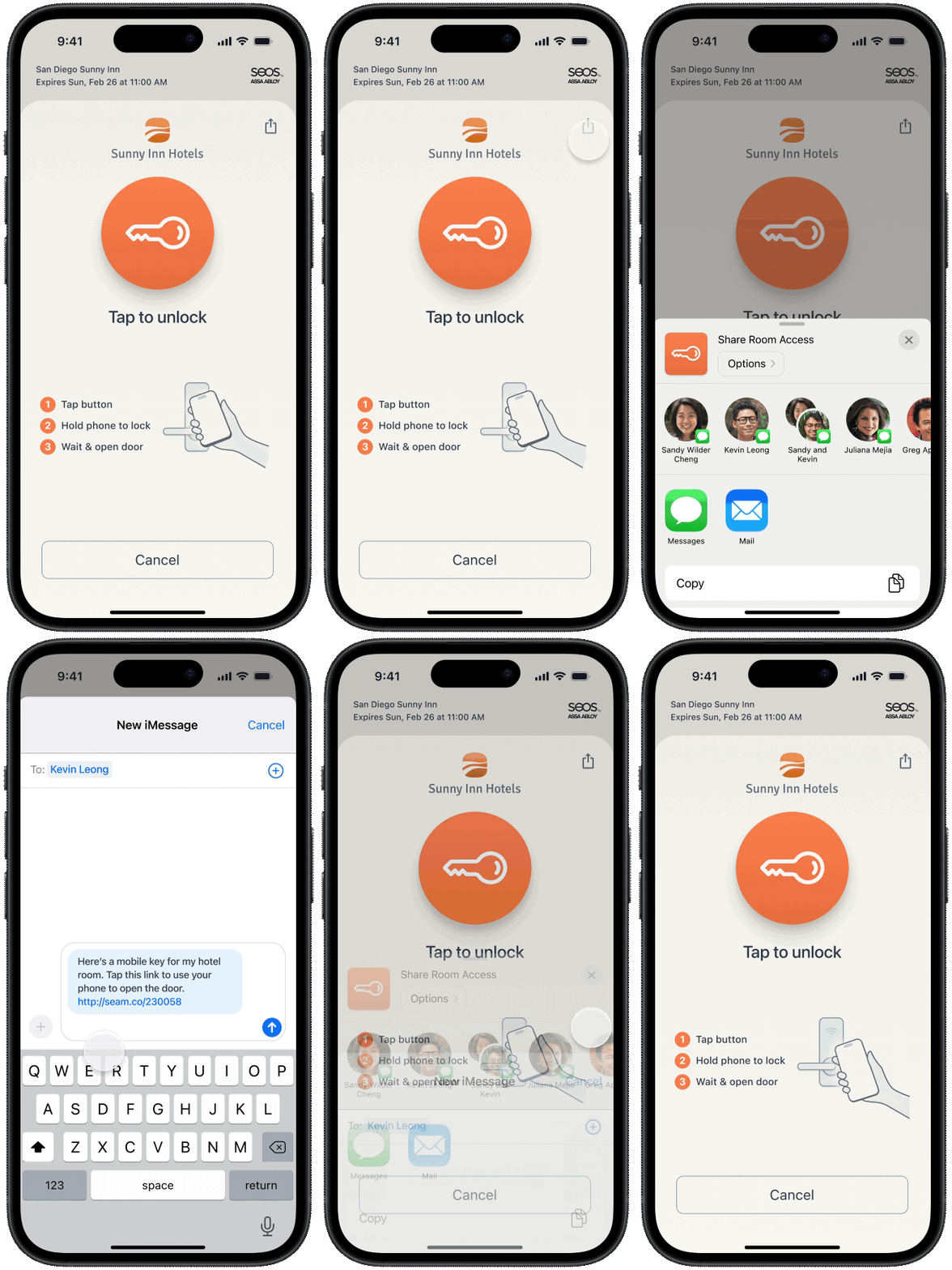
Seam Instant Key supports guest sharing. When you issue an Instant Key, you can configure how many times guests can share it. That is, you configure the desired maximum number of uses for the Instant Key. Users can forward their Instant Key link—using text or email—to others in their reservation group, like a partner or family member. Then, people in the reservation group can use the shared Instant Key, up to the configured maximum number of uses (max_use_count).
Multi-unit Access
Some guests may need access to multiple rooms or amenities (for example, a suite and a gym). You can grant access to multiple sets of doors simply by specifying the desiredacs_entrance_ids when creating an Access Grant for the guest. Alternately, you can assign the desired set of entrances to a space resource and then specify one or more space_ids when creating the Access Grant.
Code:
await seam.accessGrants.create({
  user_identity_id: janeUser.user_identity_id,
  acs_entrance_ids: [
    '48ebfb50-c531-43c5-b9ea-409f26dabbd7',
    'f74e4879-5991-4e2f-a368-888983dcfbfc',
  ],
  space_ids: [
    'c1eb6eb5-58f0-4ba3-8166-f21445ae9427',
    '2b19ddaa-44db-404b-aa2e-d99fa58020c8',
  ],
  requested_access_methods: [{ mode: 'mobile_key' }],
  starts_at: '2025-07-13T15:00:00.000Z',
  ends_at: '2025-07-16T11:00:00.000Z',
})
curl -X 'POST' \
  'https://connect.getseam.com/access_grants/create' \
  -H 'accept: application/json' \
  -H "Authorization: Bearer ${SEAM_API_KEY}" \
  -H 'Content-Type: application/json' \
  -d "{
    \"user_identity_id\": \"$(jq -r '.user_identity.user_identity_id' <<< ${jane_user})\",
    \"acs_entrance_ids\": [
      \"48ebfb50-c531-43c5-b9ea-409f26dabbd7\",
      \"f74e4879-5991-4e2f-a368-888983dcfbfc\"
    ],
    \"space_ids\": [
      \"c1eb6eb5-58f0-4ba3-8166-f21445ae9427\",
      \"2b19ddaa-44db-404b-aa2e-d99fa58020c8\"
    ],
    \"requested_access_methods\": [
      {\"mode\": \"mobile_key\"}
    ],
    \"starts_at\": \"2025-07-13T15:00:00.000Z\",
    \"ends_at\": \"2025-07-16T11:00:00.000Z\"
}"
seam.access_grants.create(
  user_identity_id=jane_user.user_identity_id,
  acs_entrance_ids=[
    "48ebfb50-c531-43c5-b9ea-409f26dabbd7",
    "f74e4879-5991-4e2f-a368-888983dcfbfc"
  ],
  space_ids=[
    "c1eb6eb5-58f0-4ba3-8166-f21445ae9427",
    "2b19ddaa-44db-404b-aa2e-d99fa58020c8"
  ],
  requested_access_methods=[
    {"mode": "mobile_key"}
  ],
  starts_at="2025-07-13T15:00:00.000Z",
  ends_at="2025-07-16T11:00:00.000Z"
)
seam.access_grants.create(
  user_identity_id: jane_user.user_identity_id,
  acs_entrance_ids: %w[48ebfb50-c531-43c5-b9ea-409f26dabbd7 f74e4879-5991-4e2f-a368-888983dcfbfc],
  space_ids: %w[48ebfb50-c531-43c5-b9ea-409f26dabbd7 2b19ddaa-44db-404b-aa2e-d99fa58020c8],
  requested_access_methods: [
    {"mode": "mobile_key"}
  ],
  starts_at: "2025-07-13T15:00:00.000Z",
  ends_at: "2025-07-16T11:00:00.000Z"
)
$seam->access_grants->create(
  user_identity_id: $jane_user->user_identity_id,
  acs_entrance_ids: [
    "48ebfb50-c531-43c5-b9ea-409f26dabbd7",
    "f74e4879-5991-4e2f-a368-888983dcfbfc",
  ],
  space_ids: [
    "c1eb6eb5-58f0-4ba3-8166-f21445ae9427",
    "2b19ddaa-44db-404b-aa2e-d99fa58020c8"
  ],
  requested_access_methods: [
    ["mode" => "mobile_key"],
  ],
  starts_at: "2025-07-13T15:00:00.000Z",
  ends_at: "2025-07-16T11:00:00.000Z"
);
// Coming Soon!
{
  "access_grant_id": "ef83cca9-5fdf-4ac2-93f3-c21c5a8be54b",
  "display_name": "My Access Grant",
  "user_identity_id": "43947360-cdc8-4db6-8b22-e079416d1d8b",
  "starts_at": "2025-07-13T15:00:00.000Z",
  "ends_at": "2025-07-16T11:00:00.000Z",
  ...
}
{
  "access_grant": {
    "access_grant_id": "ef83cca9-5fdf-4ac2-93f3-c21c5a8be54b",
    "display_name": "My Access Grant",
    "user_identity_id": "43947360-cdc8-4db6-8b22-e079416d1d8b",
    "starts_at": "2025-07-13T15:00:00.000Z",
    "ends_at": "2025-07-16T11:00:00.000Z",
    ...
  }
}
AccessGrant(
  access_grant_id="ef83cca9-5fdf-4ac2-93f3-c21c5a8be54b",
  display_name="My Access Grant",
  user_identity_id="43947360-cdc8-4db6-8b22-e079416d1d8b",
  starts_at="2025-07-13T15:00:00.000Z",
  ends_at="2025-07-16T11:00:00.000Z",
  ...
)
{
  "access_grant_id" => "ef83cca9-5fdf-4ac2-93f3-c21c5a8be54b",
  "display_name" => "My Access Grant",
  "user_identity_id" => "43947360-cdc8-4db6-8b22-e079416d1d8b",
  "starts_at" => "2025-07-13T15:00:00.000Z",
  "ends_at" => "2025-07-16T11:00:00.000Z",
  ...
}
[
  "access_grant_id" => "ef83cca9-5fdf-4ac2-93f3-c21c5a8be54b",
  "display_name" => "My Access Grant",
  "user_identity_id" => "43947360-cdc8-4db6-8b22-e079416d1d8b",
  "starts_at" => "2025-07-13T15:00:00.000Z",
  "ends_at" => "2025-07-16T11:00:00.000Z",
  ...
];
// Coming Soon!
Room Changes
If a guest is moved to a different room during their stay, you can create a new Access Grant to update their access. Note that, for some access systems with encoded plastic cards, the guest must tap the card on an online reader to apply the changes.Early Check-In and Late Check-Out
If a guest arrives early or extends their stay, you can adjust the access schedule for access systems that support this feature, such as Salto KS. Update thestarts_at or ends_at property in the Access Grant for the user.
Code:
await seam.accessGrants.update({
  user_identity_id: janeUser.user_identity_id,
  starts_at: '2025-07-14T15:00:00.000Z',
  ends_at: '2025-07-17T11:00:00.000Z',
})
curl -X 'POST' \
  'https://connect.getseam.com/access_grants/update' \
  -H 'accept: application/json' \
  -H "Authorization: Bearer ${SEAM_API_KEY}" \
  -H 'Content-Type: application/json' \
  -d "{
    \"user_identity_id\": \"$(jq -r '.user_identity.user_identity_id' <<< ${jane_user})\",
    \"starts_at\": \"2025-07-14T15:00:00.000Z\",
    \"ends_at\": \"2025-07-17T11:00:00.000Z\"
}"
seam.access_grants.update(
  user_identity_id=jane_user.user_identity_id,
  starts_at="2025-07-14T15:00:00.000Z",
  ends_at="2025-07-17T11:00:00.000Z"
)
seam.access_grants.update(
  user_identity_id: jane_user.user_identity_id,
  starts_at: "2025-07-14T15:00:00.000Z",
  ends_at: "2025-07-17T11:00:00.000Z"
)
$seam->access_grants->update(
  user_identity_id: $jane_user->user_identity_id,
  starts_at: "2025-07-14T15:00:00.000Z",
  ends_at: "2025-07-17T11:00:00.000Z"
);
// Coming Soon!
{
  "access_grant_id": "ef83cca9-5fdf-4ac2-93f3-c21c5a8be54b",
  "display_name": "My Access Grant",
  "user_identity_id": "43947360-cdc8-4db6-8b22-e079416d1d8b",
  "starts_at": "2025-07-14T15:00:00.000Z",
  "ends_at": "2025-07-17T11:00:00.000Z",
  ...
}
{
  "access_grant": {
    "access_grant_id": "ef83cca9-5fdf-4ac2-93f3-c21c5a8be54b",
    "display_name": "My Access Grant",
    "user_identity_id": "43947360-cdc8-4db6-8b22-e079416d1d8b",
    "starts_at": "2025-07-14T15:00:00.000Z",
    "ends_at": "2025-07-17T11:00:00.000Z",
    ...
  }
}
AccessGrant(
  access_grant_id="ef83cca9-5fdf-4ac2-93f3-c21c5a8be54b",
  display_name="My Access Grant",
  user_identity_id="43947360-cdc8-4db6-8b22-e079416d1d8b",
  starts_at="2025-07-14T15:00:00.000Z",
  ends_at="2025-07-17T11:00:00.000Z",
  ...
)
{
  "access_grant_id" => "ef83cca9-5fdf-4ac2-93f3-c21c5a8be54b",
  "display_name" => "My Access Grant",
  "user_identity_id" => "43947360-cdc8-4db6-8b22-e079416d1d8b",
  "starts_at" => "2025-07-14T15:00:00.000Z",
  "ends_at" => "2025-07-17T11:00:00.000Z",
  ...
}
[
  "access_grant_id" => "ef83cca9-5fdf-4ac2-93f3-c21c5a8be54b",
  "display_name" => "My Access Grant",
  "user_identity_id" => "43947360-cdc8-4db6-8b22-e079416d1d8b",
  "starts_at" => "2025-07-14T15:00:00.000Z",
  "ends_at" => "2025-07-17T11:00:00.000Z",
  ...
];
// Coming Soon!
Lost Cards
Once you have encoded an access method onto a card, you cannot reuse the access method for another card. If a guest loses their key card, you can create a new access method and encode it onto a new card. Code:// Create a new Access Grant.
await seam.accessGrants.create({
user_identity_id: janeUser.user_identity_id,
acs_entrance_ids: [
'48ebfb50-c531-43c5-b9ea-409f26dabbd7',
'f74e4879-5991-4e2f-a368-888983dcfbfc',
],
requested_access_methods: [{ mode: 'card' }],
starts_at: '2025-07-13T15:00:00.000Z',
ends_at: '2025-07-16T11:00:00.000Z',
})
// Encode the new card.
const encoder = (
await seam.acs.encoders.list({
acs_system_ids: [hotel_a.acs_system_id],
})
)[0]
const encodingActionAttempt = await seam.accessMethods.encode({
access_method_id: 'ef3a5e10-5a76-4382-96f7-627f810ef849',
acs_encoder_id: encoder.acs_encoder_id,
})
// To confirm that the encoding succeeded,
// poll the returned action attempt
// until its status is success.
await seam.actionAttempts.get({
action_attempt_id: encodingActionAttempt.action_attempt_id,
})
# Create a new Access Grant.
curl -X 'POST' \
  'https://connect.getseam.com/access_grants/create' \
  -H 'accept: application/json' \
  -H "Authorization: Bearer ${SEAM_API_KEY}" \
  -H 'Content-Type: application/json' \
  -d "{
    \"user_identity_id\": \"$(jq -r '.user_identity.user_identity_id' <<< ${jane_user})\",
    \"acs_entrance_ids\": [
      \"48ebfb50-c531-43c5-b9ea-409f26dabbd7\",
      \"f74e4879-5991-4e2f-a368-888983dcfbfc\"
    ],
    \"requested_access_methods\": [
      {\"mode\": \"card\"}
    ],
    \"starts_at\": \"2025-07-13T15:00:00.000Z\",
    \"ends_at\": \"2025-07-16T11:00:00.000Z\"
}"

# Encode the new card.
encoder=$(curl -X 'POST' \
  'https://connect.getseam.com/acs/encoders/list' \
  -H 'accept: application/json' \
  -H "Authorization: Bearer ${SEAM_API_KEY}" \
  -H 'Content-Type: application/json' \
  -d "{
  \"acs_system_id\": \"$(jq -r '.acs_system.acs_system_id' <<< ${hotel_a})\"
}" | jq -r '.acs_encoders[0]')

encoding_action_attempt=$(curl -X 'POST' \
  'https://connect.getseam.com/access_methods/encode' \
  -H 'accept: application/json' \
  -H "Authorization: Bearer ${SEAM_API_KEY}" \
  -H 'Content-Type: application/json' \
  -d "{
  \"access_method_id\": \"ef3a5e10-5a76-4382-96f7-627f810ef849\",
  \"acs_encoder_id\": \"$(jq -r '.acs_encoder_id' <<< ${encoder})\"
}")

# To confirm that the encoding succeeded,
# poll the returned action attempt
# until its status is success.
curl -X 'POST' \
  'https://connect.getseam.com/action_attempts/get' \
  -H 'accept: application/json' \
  -H "Authorization: Bearer ${SEAM_API_KEY}" \
  -H 'Content-Type: application/json' \
  -d "{
  \"action_attempt_id\": \"$(jq -r '.action_attempt.action_attempt_id' <<< ${encoding_action_attempt})\"
}"
# Create a new Access Grant.
seam.access_grants.create(
  user_identity_id=jane_user.user_identity_id,
  acs_entrance_ids=[
    "48ebfb50-c531-43c5-b9ea-409f26dabbd7",
    "f74e4879-5991-4e2f-a368-888983dcfbfc"
  ],
  requested_access_methods=[
    {"mode": "card"}
  ],
  starts_at="2025-07-13T15:00:00.000Z",
  ends_at="2025-07-16T11:00:00.000Z"
)

# Encode the new card.
encoder = seam.acs.encoders.list(
  acs_system_ids = [hotel_a.acs_system_id]
)[0]

encoding_action_attempt = seam.access_methods.encode(
  access_method_id = "ef3a5e10-5a76-4382-96f7-627f810ef849",
  acs_encoder_id = encoder.acs_encoder_id
)

# To confirm that the encoding succeeded,
# poll the returned action attempt
# until its status is success.
seam.action_attempts.get(
  action_attempt_id = encoding_action_attempt.action_attempt_id
)
# Create a new Access Grant.
seam.access_grants.create(
  user_identity_id: jane_user.user_identity_id,
  acs_entrance_ids: %w[48ebfb50-c531-43c5-b9ea-409f26dabbd7 f74e4879-5991-4e2f-a368-888983dcfbfc],
  requested_access_methods: [
    {"mode": "card"}
  ],
  starts_at: "2025-07-13T15:00:00.000Z",
  ends_at: "2025-07-16T11:00:00.000Z"
)

# Encode the new card.
encoder = (seam.acs.encoders.list(
  acs_system_ids: [hotel_a.acs_system_id]
))[0]

encoding_action_attempt = seam.access_methods.encode(
  access_method_id: "ef3a5e10-5a76-4382-96f7-627f810ef849",
  acs_encoder_id: encoder.acs_encoder_id
)

# To confirm that the encoding succeeded,
# poll the returned action attempt
# until its status is success.
seam.action_attempts.get(
  action_attempt_id: encoding_action_attempt.action_attempt_id
)
// Create a new Access Grant.
$seam->access_grants->create(
  user_identity_id: $jane_user->user_identity_id,
  acs_entrance_ids: [
    "48ebfb50-c531-43c5-b9ea-409f26dabbd7",
    "f74e4879-5991-4e2f-a368-888983dcfbfc",
  ],
  requested_access_methods: [
    ["mode" => "card"],
  ],
  starts_at: "2025-07-13T15:00:00.000Z",
  ends_at: "2025-07-16T11:00:00.000Z"
);

// Encode the access method onto a card.
$encoder = $seam->acs->encoders->list(
  acs_system_ids: [$hotel_a->acs_system_id]
)[0];

$encoding_action_attempt = $seam->access_methods->encode(
  access_method_id: "ef3a5e10-5a76-4382-96f7-627f810ef849",
  acs_encoder_id: $encoder->acs_encoder_id
);

// To confirm that the encoding succeeded,
// poll the returned action attempt
// until its status is success.
$seam->action_attempts->get(
  action_attempt_id: $encoding_action_attempt->action_attempt_id
);
// Coming Soon!
{
  "access_grant_id": "ef83cca9-5fdf-4ac2-93f3-c21c5a8be54b",
  "display_name": "My Access Grant",
  "user_identity_id": "43947360-cdc8-4db6-8b22-e079416d1d8b",
  "starts_at": "2025-07-13T15:00:00.000Z",
  "ends_at": "2025-07-16T11:00:00.000Z",
  "requested_access_methods": [
    {
      "display_name": "Plastic Card",
      "mode": "card",
      "created_access_method_ids": ["ef3a5e10-5a76-4382-96f7-627f810ef849"],
      ...
    }
  ],
  ...
}

{
  "status": "success",
  "action_attempt_id": "4f80761b-2bfa-401a-9f73-a08439c970f7",
  "action_type": "ENCODE_ACCESS_METHOD",
  "result": {
    "access_method_id": "ef3a5e10-5a76-4382-96f7-627f810ef849",
    "card_number": "1234abc",
    "is_issued": true,
    "issued_at": "2025-07-14T11:00:00.000Z",
    ...
  },
  "error": null
}
{
  "access_grant": {
    "access_grant_id": "ef83cca9-5fdf-4ac2-93f3-c21c5a8be54b",
    "display_name": "My Access Grant",
    "user_identity_id": "43947360-cdc8-4db6-8b22-e079416d1d8b",
    "starts_at": "2025-07-13T15:00:00.000Z",
    "ends_at": "2025-07-16T11:00:00.000Z",
    "requested_access_methods": [
      {
        "display_name": "Plastic Card",
        "mode": "card",
        "created_access_method_ids": ["ef3a5e10-5a76-4382-96f7-627f810ef849"],
        ...
      }
    ],
    ...
  }
}

{
  "action_attempt":
    {
      "status": "success",
      "action_attempt_id": "4f80761b-2bfa-401a-9f73-a08439c970f7",
      "action_type": "ENCODE_ACCESS_METHOD",
      "result": {
        "access_method_id": "ef3a5e10-5a76-4382-96f7-627f810ef849",
        "card_number": "1234abc",
        "is_issued": true,
        "issued_at": "2025-07-14T11:00:00.000Z",
        ...
      },
      "error": null
    },
  "ok": true
}
AccessGrant(
  access_grant_id="ef83cca9-5fdf-4ac2-93f3-c21c5a8be54b",
  display_name="My Access Grant",
  user_identity_id="43947360-cdc8-4db6-8b22-e079416d1d8b",
  starts_at="2025-07-13T15:00:00.000Z",
  ends_at="2025-07-16T11:00:00.000Z",
  requested_access_methods=[
    {
      "display_name": "Plastic Card",
      "mode": "card",
      "created_access_method_ids": ["ef3a5e10-5a76-4382-96f7-627f810ef849"],
      ...
    }
  ],
  ...
)

ActionAttempt(
  status='success',
  action_attempt_id='4f80761b-2bfa-401a-9f73-a08439c970f7',
  action_type='ENCODE_ACCESS_METHOD',
  result={
    access_method_id='ef3a5e10-5a76-4382-96f7-627f810ef849',
    card_number='1234abc',
    is_issued=True,
    issued_at='2025-07-14T11:00:00.000Z',
    ...
  },
  error=null
)
{
  "access_grant_id" => "ef83cca9-5fdf-4ac2-93f3-c21c5a8be54b",
  "display_name" => "My Access Grant",
  "user_identity_id" => "43947360-cdc8-4db6-8b22-e079416d1d8b",
  "starts_at" => "2025-07-13T15:00:00.000Z",
  "ends_at" => "2025-07-16T11:00:00.000Z",
  "requested_access_methods" => [
    {
      "display_name": "Plastic Card",
      "mode": "card",
      "created_access_method_ids": ["ef3a5e10-5a76-4382-96f7-627f810ef849"],
      ...
    }
  ],
  ...
}

{
  "status" => "success",
  "action_attempt_id" => "4f80761b-2bfa-401a-9f73-a08439c970f7",
  "action_type" => "ENCODE_ACCESS_METHOD",
  "result" => {
    "access_method_id": "ef3a5e10-5a76-4382-96f7-627f810ef849"
    "card_number": "1234abc"
    "is_issued": true,
    issued_at="2025-07-13T14:00:00.000Z"
    ...
  }
  error=nil
}
[
  "access_grant_id" => "ef83cca9-5fdf-4ac2-93f3-c21c5a8be54b",
  "display_name" => "My Access Grant",
  "user_identity_id" => "43947360-cdc8-4db6-8b22-e079416d1d8b",
  "starts_at" => "2025-07-13T15:00:00.000Z",
  "ends_at" => "2025-07-16T11:00:00.000Z",
  "requested_access_methods" => [
    {
      "display_name": "Plastic Card",
      "mode": "card",
      "created_access_method_ids": ["ef3a5e10-5a76-4382-96f7-627f810ef849"],
      ...
    }
  ],
  ...
];

[
  "status" => "success",
  "action_attempt_id" => "4f80761b-2bfa-401a-9f73-a08439c970f7",
  "action_type" => "ENCODE_ACCESS_METHOD",
  "result" => {
    "access_method_id": "ef3a5e10-5a76-4382-96f7-627f810ef849"
    "card_number": "1234abc"
    "is_issued": true,
    issued_at="2025-07-13T14:00:00.000Z"
    ...
  }
  error=nil
];
// Coming Soon!
Check Out
For some access systems, such as Salto KS, you can specify an ending time for a guest’s access. Set theends_at parameter when creating an Access Grant.
Code:
await seam.accessGrants.create({
  user_identity_id: janeUser.user_identity_id,
  acs_entrance_ids: [
    '48ebfb50-c531-43c5-b9ea-409f26dabbd7',
    'f74e4879-5991-4e2f-a368-888983dcfbfc',
  ],
  requested_access_methods: [{ mode: 'mobile_key' }],
  starts_at: '2025-07-13T15:00:00.000Z',
  ends_at: '2025-07-16T11:00:00.000Z',
})
curl -X 'POST' \
  'https://connect.getseam.com/access_methods/get' \
  -H 'accept: application/json' \
  -H "Authorization: Bearer ${SEAM_API_KEY}" \
  -H 'Content-Type: application/json' \
  -d "{
    \"user_identity_id\": \"$(jq -r '.user_identity.user_identity_id' <<< ${jane_user})\",
    \"acs_entrance_ids\": [
      \"48ebfb50-c531-43c5-b9ea-409f26dabbd7\",
      \"f74e4879-5991-4e2f-a368-888983dcfbfc\"
    ],
    \"requested_access_methods\": [
      {\"mode\": \"mobile_key\"}
    ],
    \"starts_at\": \"2025-07-13T15:00:00.000Z\",
    \"ends_at\": \"2025-07-16T11:00:00.000Z\"
}"
seam.access_grants.create(
  user_identity_id=jane_user.user_identity_id,
  acs_entrance_ids=[
    "48ebfb50-c531-43c5-b9ea-409f26dabbd7",
    "f74e4879-5991-4e2f-a368-888983dcfbfc"
  ],
  requested_access_methods=[
    {"mode": "mobile_key"}
  ],
  starts_at="2025-07-13T15:00:00.000Z",
  ends_at="2025-07-16T11:00:00.000Z"
)
seam.access_grants.create(
  user_identity_id: jane_user.user_identity_id,
  acs_entrance_ids: %w[48ebfb50-c531-43c5-b9ea-409f26dabbd7 f74e4879-5991-4e2f-a368-888983dcfbfc],
  requested_access_methods: [
    {"mode": "mobile_key"}
  ],
  starts_at: "2025-07-13T15:00:00.000Z",
  ends_at: "2025-07-16T11:00:00.000Z"
)
$seam->access_grants->create(
  user_identity_id: $jane_user->user_identity_id,
  acs_entrance_ids: [
    "48ebfb50-c531-43c5-b9ea-409f26dabbd7",
    "f74e4879-5991-4e2f-a368-888983dcfbfc",
  ],
  requested_access_methods: [
    ["mode" => "mobile_key"],
  ],
  starts_at: "2025-07-13T15:00:00.000Z",
  ends_at: "2025-07-16T11:00:00.000Z"
);
// Coming Soon!
{
  "access_grant_id": "ef83cca9-5fdf-4ac2-93f3-c21c5a8be54b",
  "display_name": "My Access Grant",
  "user_identity_id": "43947360-cdc8-4db6-8b22-e079416d1d8b",
  "starts_at": "2025-07-13T15:00:00.000Z",
  "ends_at": "2025-07-16T11:00:00.000Z",
  "instant_key_url": "https://ik.seam.co/ABCXYZ",
  ...
}
{
  "access_grant": {
    "access_grant_id": "ef83cca9-5fdf-4ac2-93f3-c21c5a8be54b",
    "display_name": "My Access Grant",
    "user_identity_id": "43947360-cdc8-4db6-8b22-e079416d1d8b",
    "starts_at": "2025-07-13T15:00:00.000Z",
    "ends_at": "2025-07-16T11:00:00.000Z",
    "instant_key_url": "https://ik.seam.co/ABCXYZ",
    ...
  }
}
AccessGrant(
  access_grant_id="ef83cca9-5fdf-4ac2-93f3-c21c5a8be54b",
  display_name="My Access Grant",
  user_identity_id="43947360-cdc8-4db6-8b22-e079416d1d8b",
  starts_at="2025-07-13T15:00:00.000Z",
  ends_at="2025-07-16T11:00:00.000Z",
  instant_key_url="https://ik.seam.co/ABCXYZ",
  ...
)
{
  "access_grant_id" => "ef83cca9-5fdf-4ac2-93f3-c21c5a8be54b",
  "display_name" => "My Access Grant",
  "user_identity_id" => "43947360-cdc8-4db6-8b22-e079416d1d8b",
  "starts_at" => "2025-07-13T15:00:00.000Z",
  "ends_at" => "2025-07-16T11:00:00.000Z",
  "instant_key_url" => "https://ik.seam.co/ABCXYZ",
  ...
}
[
  "access_grant_id" => "ef83cca9-5fdf-4ac2-93f3-c21c5a8be54b",
  "display_name" => "My Access Grant",
  "user_identity_id" => "43947360-cdc8-4db6-8b22-e079416d1d8b",
  "starts_at" => "2025-07-13T15:00:00.000Z",
  "ends_at" => "2025-07-16T11:00:00.000Z",
  "instant_key_url" => "https://ik.seam.co/ABCXYZ",
  ...
];
// Coming Soon!