> ## Documentation Index
> Fetch the complete documentation index at: https://docs.seam.co/llms.txt
> Use this file to discover all available pages before exploring further.
# Creating Access Codes
> Learn how to program an access code onto a smart lock with a keypad, and ensure the code is successfully set.
This is a low-level API. For granting a person access, use [Access
Grants](/use-cases/granting-access/index)—the default and recommended way to
grant access to any physical space, across both standalone smart locks and
access systems. We don't recommend building on the Access Codes API directly
unless you specifically need low-level control over individual PIN codes (or
have discussed your use case with the Seam team at
[support@seam.co](mailto:support@seam.co)).
## Overview
This guide explains how to create online access codes on an online smart lock. With the [Access Codes](/api/access_codes/object) API, generate PIN codes on a door lock and share it with visitors, allowing them keyless access.
Seam supports programming two types of online access codes for online door locks:
1. **Ongoing**: Ideal for residents or long-term users. Ongoing codes remain active on a device until removed. Create one by omitting both `starts_at` and `ends_at`. To remove the code, use the [Delete Access Code](/api/access_codes/delete) endpoint.
2. **Time Bound**: Suitable for temporary access like guest visits or service appointments. These codes operate between a designated `starts_at` and `ends_at` time window, granting access only during that period.
For more information about creating offline access codes, see [Managing
Offline Access
Codes](../../../../low-level-apis/smart-locks/access-codes/offline-access-codes).
***
## Before You Begin: Confirm Capabilities
Before you attempt to create an [online](/low-level-apis/smart-locks/access-codes/index#what-is-an-access-code) or [offline](/low-level-apis/smart-locks/access-codes/index#offline-access-codes) access code, be sure to confirm that your device has the capability to perform these operations. You can inspect the capabilities of a device by checking the following [capability flags](/capability-guides/device-and-system-capabilities#capability-flags) for the device:
* `device.can_program_online_access_codes`
* `device.can_program_offline_access_codes`
Use [Get Device](/api/devices/get) for a specific device to return these capability flags. Then, use an `if` statement or similar check to confirm that the relevant flag is both present and `true` before attempting to create an access code.
If either of these capability flags is `false` or not present, you can view the [properties](/core-concepts/devices) of the device, [errors](/core-concepts/devices) or [warnings](/core-concepts/devices) for the device, and [events](/api/events/object) related to the device to learn more about the cause of these issues. For example, you could examine the following device properties:
* `device.properties.model.has_built_in_keypad`
* `device.properties.model.can_connect_accessory_keypad`
* `device.properties.accessory_keypad.is_connected`
* `device.properties.accessory_keypad.battery.level`
In addition, you could look for a `device.accessory_keypad_disconnected` event.
**Request:**
```javascript JavaScript theme={null}
await seam.devices.get({ device_id: '11111111-1111-1111-1111-444444444444' })
```
```bash cURL theme={null}
# Use GET or POST.
curl -X 'GET' \
'https://connect.getseam.com/devices/get' \
-H 'accept: application/json' \
-H 'Authorization: Bearer ${API_KEY}' \
-H 'Content-Type: application/json' \
-d '{
"device_id": "11111111-1111-1111-1111-444444444444"
}'
```
```python Python theme={null}
seam.devices.get(device_id="11111111-1111-1111-1111-444444444444")
```
```ruby Ruby theme={null}
client.devices.get(device_id: "11111111-1111-1111-1111-444444444444")
```
```php PHP theme={null}
$seam->devices->get(device_id: "11111111-1111-1111-1111-444444444444");
```
```csharp C# theme={null}
seam.Devices.Get(deviceId: "11111111-1111-1111-1111-444444444444");
```
**Response:**
```json JavaScript theme={null}
{
device_id: '11111111-1111-1111-1111-444444444444',
can_program_online_access_codes: true, // You can create online access codes for this device.
can_program_offline_access_codes: true, // You can create offline access codes for this device.
...
}
```
```json cURL theme={null}
{
"lock": {
"device_id": "11111111-1111-1111-1111-444444444444",
"can_program_online_access_codes": true, // You can create online access codes for this device.
"can_program_offline_access_codes": true, // You can create offline access codes for this device.
...
},
"ok": true
}
```
```json Python theme={null}
Device(
device_id='11111111-1111-1111-1111-444444444444',
can_program_online_access_codes=True, // You can create online access codes for this device.
can_program_offline_access_codes=True, // You can create offline access codes for this device.
...
)
```
```json Ruby theme={null}
```
```json PHP theme={null}
{
"device_id": "11111111-1111-1111-1111-444444444444",
"can_program_online_access_codes": true, // You can create online access codes for this device.
"can_program_offline_access_codes": true, // You can create offline access codes for this device.
...
}
```
```json C# theme={null}
{
"device_id": "11111111-1111-1111-1111-444444444444",
"can_program_online_access_codes": true, // You can create online access codes for this device.
"can_program_offline_access_codes": true, // You can create offline access codes for this device.
...
}
```
***
## Programming an Ongoing Online Access Code
Ongoing online access codes are ideal for long-term users that wish to keep the same code. Ongoing codes remain active on a device until removed.
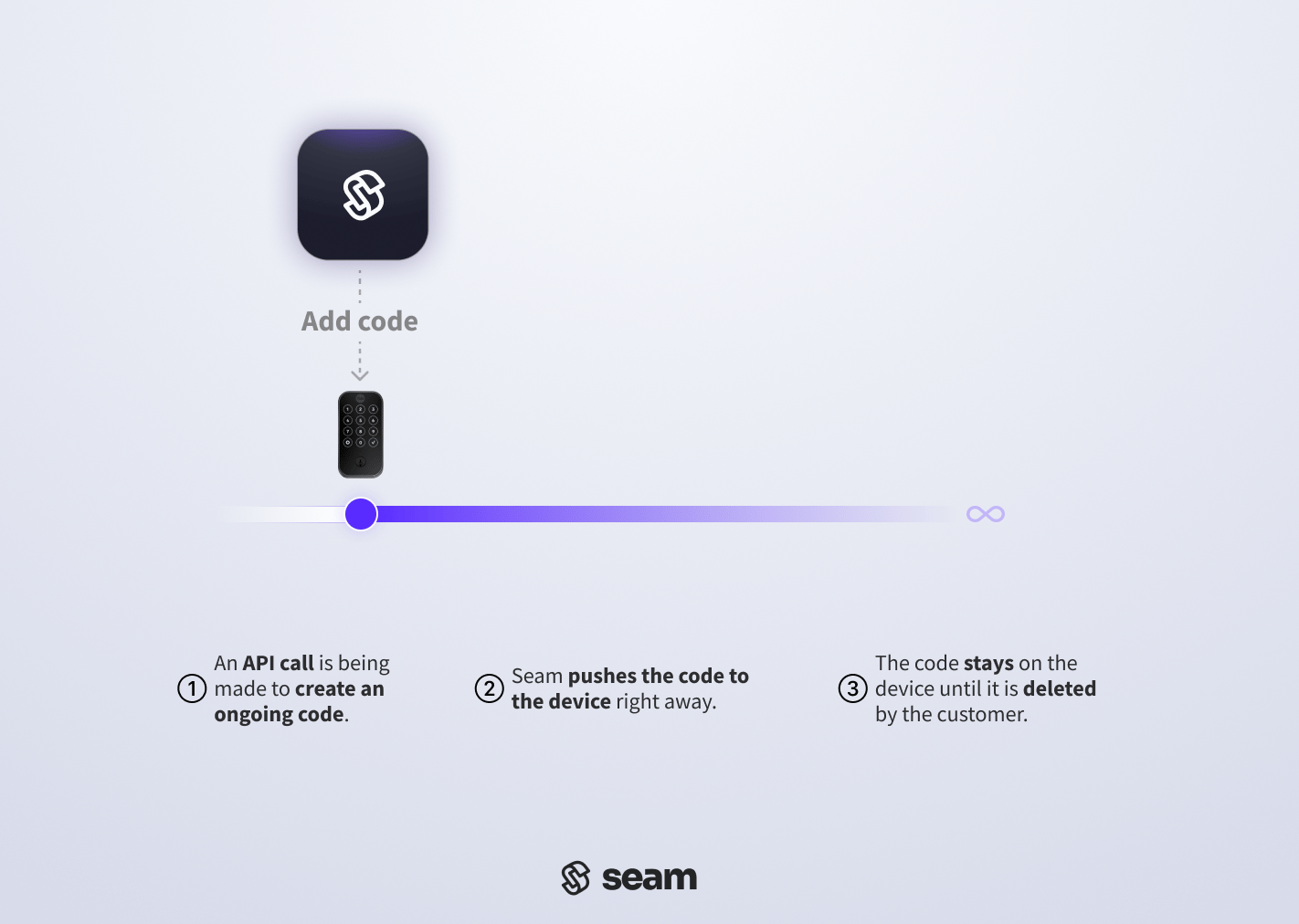 ### 1. Create an Ongoing Online Access Code
Set an ongoing online access code by providing the `device_id` of the smart lock on which you want to [create an access code](/api/access_codes/create). Assign an optional `name` to the access code for easier identification within the [Seam Console](https://console.seam.co) and smart lock app.
To customize the PIN code, specify a desired PIN for the `code` property. If you do not specify a `code`, you can set the `preferred_code_length`, and Seam generates a code of this length if the affected device supports the specified preferred code length. See [Access Code Requirements for Door Locks](../../../../low-level-apis/smart-locks/access-codes/access-code-requirements-for-door-locks) to understand any requirements specific to the door lock.
**Request:**
```javascript JavaScript theme={null}
// Get the device.
const device = await seam.devices.get({
device_id: '11111111-1111-1111-1111-444444444444',
})
// Confirm that the device supports online access codes.
if (device.can_program_online_access_codes) {
// Create the ongoing online access code.
await seam.accessCodes.create({
device_id: device.device_id,
name: 'my ongoing code',
code: '1234',
})
}
```
```bash cURL theme={null}
# Get the device.
device=$(
# Use GET or POST.
curl -X 'GET' \
'https://connect.getseam.com/devices/get' \
-H 'accept: application/json' \
-H "Authorization: Bearer ${API_KEY}" \
-H 'Content-Type: application/json' \
-d '{
"device_id": "11111111-1111-1111-1111-444444444444"
}')
# Confirm that the device supports online access codes.
if $(jq -r '.device.can_program_online_access_codes' <<< ${device}); then \
# Create the ongoing online access code.
curl -X 'POST' \
'https://connect.getseam.com/access_codes/create' \
-H 'accept: application/json' \
-H "Authorization: Bearer ${API_KEY}" \
-H 'Content-Type: application/json' \
-d "{
\"device_id\": \"$(jq -r '.device.device_id' <<< ${device})\",
\"name\": \"my ongoing code\",
\"code\": \"1234\"
}";
fi
```
```python Python theme={null}
# Get the device.
device = seam.devices.get(
device_id="11111111-1111-1111-1111-444444444444"
)
# Confirm that the device supports online access codes.
if device.can_program_online_access_codes:
# Create the ongoing online access code.
seam.access_codes.create(
device_id = device.device_id,
name = "my ongoing code",
code = "1234"
)
```
```ruby Ruby theme={null}
# Get the device.
device = client.devices.get(device_id: "11111111-1111-1111-1111-444444444444")
# Confirm that the device supports online access codes.
if (device.can_program_online_access_codes)
# Create the ongoing online access code.
client.access_codes.create(
device_id: device.device_id,
name: "my ongoing code",
code: "1234"
)
end
```
```php PHP theme={null}
// Get the device.
$device = $seam->devices->get(device_id: "11111111-1111-1111-1111-444444444444");
// Confirm that the device supports online access codes.
if ($device->can_program_online_access_codes) {
// Create the ongoing online access code.
$seam->access_codes->create(
device_id: $device->device_id,
name: "my ongoing code",
code: "1234"
);
}
```
```csharp C# theme={null}
// Get the device.
Device device = seam.Devices.Get(deviceId: "11111111-1111-1111-1111-444444444444");
// Confirm that the device supports online access codes.
if (device.CanProgramOnlineAccessCodes == true) {
// Create the ongoing online access code.
seam.AccessCodes.Create(
deviceId: device.DeviceId,
name: "my ongoing code",
code: "1234"
);
}
```
**Response:**
```json JavaScript theme={null}
{
access_code_id: '11111111-1111-1111-1111-555555555555',
device_id: '11111111-1111-1111-1111-444444444444',
name: 'my ongoing code',
code: '1234',
type: 'ongoing',
...
}
```
```json cURL theme={null}
{
"action_attempt":{
"status":"pending",
"action_type":"CREATE_ACCESS_CODE",
"action_attempt_id":"11111111-2222-3333-4444-555555555555",
"result":null,
"error":null
},
"access_code":{
"access_code_id":"11111111-1111-1111-1111-555555555555",
"device_id":"11111111-1111-1111-1111-444444444444",
"name":"my ongoing code",
"code":"1234",
"type":"ongoing",
...
},
"ok":true
}
```
```json Python theme={null}
AccessCode(
access_code_id='11111111-1111-1111-1111-555555555555',
device_id='11111111-1111-1111-1111-444444444444',
type='ongoing',
code='1234',
name='my ongoing code',
...
)
```
```json Ruby theme={null}
```
```json PHP theme={null}
{
"access_code_id": "11111111-1111-1111-1111-555555555555",
"device_id": "11111111-1111-1111-1111-444444444444",
"name": "my ongoing code",
"type": "ongoing",
"code": "1234",
...
}
```
```json C# theme={null}
{
"type": "ongoing",
"access_code_id": "11111111-1111-1111-1111-555555555555",
"device_id": "11111111-1111-1111-1111-444444444444",
"name": "my ongoing code",
"code": "1234",
...
}
```
### 2. Verify Successful Ongoing Code Programming
Seam may encounter some problems when setting an access code onto the lock. This could be due to weak internet connectivity, a low battery in the door lock, or someone unplugging the bridge that links the lock to the internet. **Given these potential challenges, it's essential to verify that a code has been successfully programmed on to the lock** to prevent unexpected complications later.
There are two methods to verify that an ongoing access code has been set on the device:
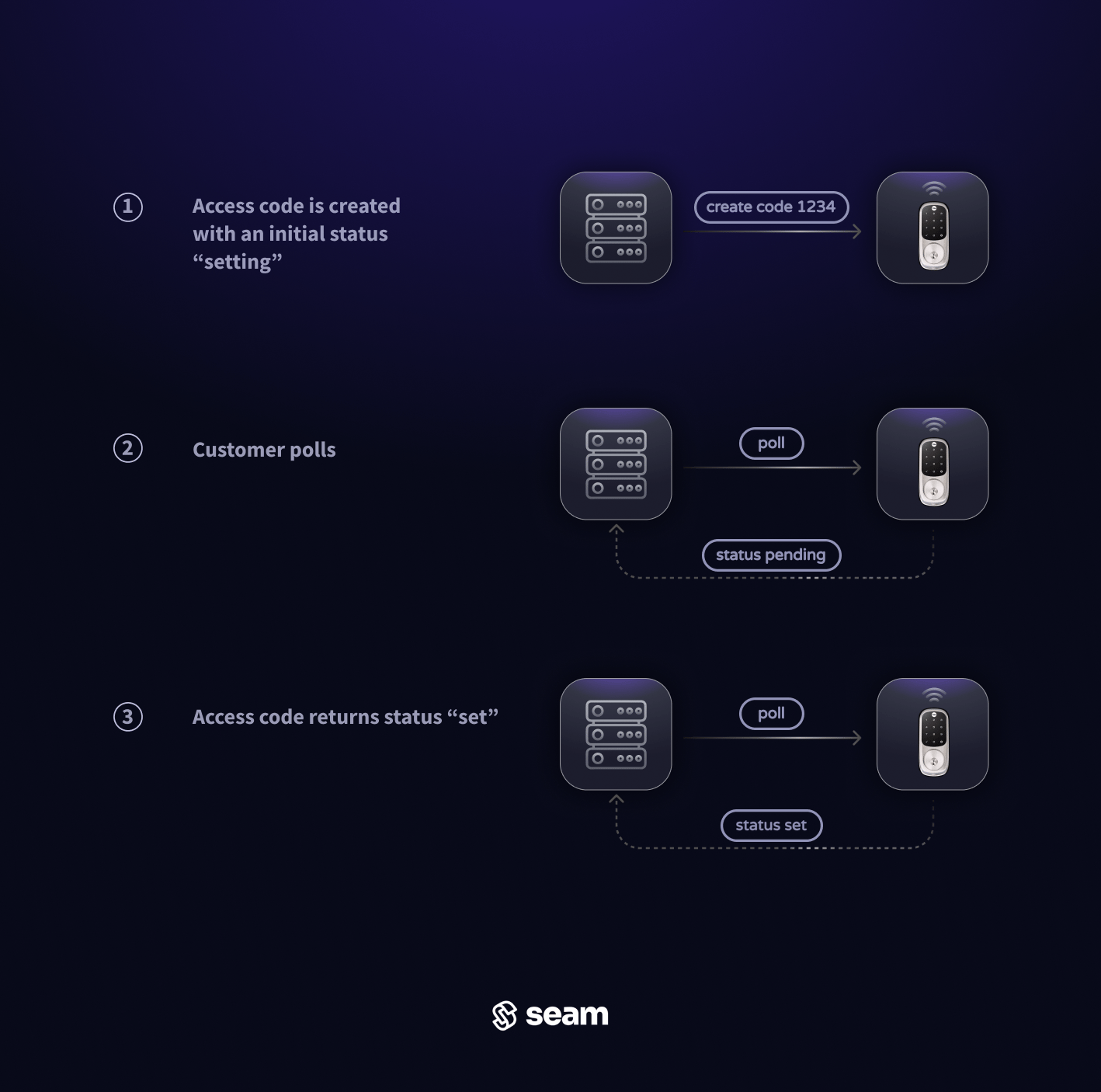
* **Polling**: continuously query the access code until its `status` is updated
* **Webhook**: wait for updates to arrive via webhook requests from the Seam API
### **Polling Method**
Use the `access_code` reference returned by the create function to call the [Get Access Code](/api/access_codes/get) function. A basic implementation would involve polling this endpoint until the `status` of the access code updates to `set`.
If the `status` remains `setting` for a very long time, or if the `access_code` object contains any `warnings` or `errors` properties, consult [the guide on "Troubleshooting Access Code Issues"](../../../../low-level-apis/smart-locks/access-codes/troubleshooting-access-code-issues) for further guidance.
### 1. Create an Ongoing Online Access Code
Set an ongoing online access code by providing the `device_id` of the smart lock on which you want to [create an access code](/api/access_codes/create). Assign an optional `name` to the access code for easier identification within the [Seam Console](https://console.seam.co) and smart lock app.
To customize the PIN code, specify a desired PIN for the `code` property. If you do not specify a `code`, you can set the `preferred_code_length`, and Seam generates a code of this length if the affected device supports the specified preferred code length. See [Access Code Requirements for Door Locks](../../../../low-level-apis/smart-locks/access-codes/access-code-requirements-for-door-locks) to understand any requirements specific to the door lock.
**Request:**
```javascript JavaScript theme={null}
// Get the device.
const device = await seam.devices.get({
device_id: '11111111-1111-1111-1111-444444444444',
})
// Confirm that the device supports online access codes.
if (device.can_program_online_access_codes) {
// Create the ongoing online access code.
await seam.accessCodes.create({
device_id: device.device_id,
name: 'my ongoing code',
code: '1234',
})
}
```
```bash cURL theme={null}
# Get the device.
device=$(
# Use GET or POST.
curl -X 'GET' \
'https://connect.getseam.com/devices/get' \
-H 'accept: application/json' \
-H "Authorization: Bearer ${API_KEY}" \
-H 'Content-Type: application/json' \
-d '{
"device_id": "11111111-1111-1111-1111-444444444444"
}')
# Confirm that the device supports online access codes.
if $(jq -r '.device.can_program_online_access_codes' <<< ${device}); then \
# Create the ongoing online access code.
curl -X 'POST' \
'https://connect.getseam.com/access_codes/create' \
-H 'accept: application/json' \
-H "Authorization: Bearer ${API_KEY}" \
-H 'Content-Type: application/json' \
-d "{
\"device_id\": \"$(jq -r '.device.device_id' <<< ${device})\",
\"name\": \"my ongoing code\",
\"code\": \"1234\"
}";
fi
```
```python Python theme={null}
# Get the device.
device = seam.devices.get(
device_id="11111111-1111-1111-1111-444444444444"
)
# Confirm that the device supports online access codes.
if device.can_program_online_access_codes:
# Create the ongoing online access code.
seam.access_codes.create(
device_id = device.device_id,
name = "my ongoing code",
code = "1234"
)
```
```ruby Ruby theme={null}
# Get the device.
device = client.devices.get(device_id: "11111111-1111-1111-1111-444444444444")
# Confirm that the device supports online access codes.
if (device.can_program_online_access_codes)
# Create the ongoing online access code.
client.access_codes.create(
device_id: device.device_id,
name: "my ongoing code",
code: "1234"
)
end
```
```php PHP theme={null}
// Get the device.
$device = $seam->devices->get(device_id: "11111111-1111-1111-1111-444444444444");
// Confirm that the device supports online access codes.
if ($device->can_program_online_access_codes) {
// Create the ongoing online access code.
$seam->access_codes->create(
device_id: $device->device_id,
name: "my ongoing code",
code: "1234"
);
}
```
```csharp C# theme={null}
// Get the device.
Device device = seam.Devices.Get(deviceId: "11111111-1111-1111-1111-444444444444");
// Confirm that the device supports online access codes.
if (device.CanProgramOnlineAccessCodes == true) {
// Create the ongoing online access code.
seam.AccessCodes.Create(
deviceId: device.DeviceId,
name: "my ongoing code",
code: "1234"
);
}
```
**Response:**
```json JavaScript theme={null}
{
access_code_id: '11111111-1111-1111-1111-555555555555',
device_id: '11111111-1111-1111-1111-444444444444',
name: 'my ongoing code',
code: '1234',
type: 'ongoing',
...
}
```
```json cURL theme={null}
{
"action_attempt":{
"status":"pending",
"action_type":"CREATE_ACCESS_CODE",
"action_attempt_id":"11111111-2222-3333-4444-555555555555",
"result":null,
"error":null
},
"access_code":{
"access_code_id":"11111111-1111-1111-1111-555555555555",
"device_id":"11111111-1111-1111-1111-444444444444",
"name":"my ongoing code",
"code":"1234",
"type":"ongoing",
...
},
"ok":true
}
```
```json Python theme={null}
AccessCode(
access_code_id='11111111-1111-1111-1111-555555555555',
device_id='11111111-1111-1111-1111-444444444444',
type='ongoing',
code='1234',
name='my ongoing code',
...
)
```
```json Ruby theme={null}
```
```json PHP theme={null}
{
"access_code_id": "11111111-1111-1111-1111-555555555555",
"device_id": "11111111-1111-1111-1111-444444444444",
"name": "my ongoing code",
"type": "ongoing",
"code": "1234",
...
}
```
```json C# theme={null}
{
"type": "ongoing",
"access_code_id": "11111111-1111-1111-1111-555555555555",
"device_id": "11111111-1111-1111-1111-444444444444",
"name": "my ongoing code",
"code": "1234",
...
}
```
### 2. Verify Successful Ongoing Code Programming
Seam may encounter some problems when setting an access code onto the lock. This could be due to weak internet connectivity, a low battery in the door lock, or someone unplugging the bridge that links the lock to the internet. **Given these potential challenges, it's essential to verify that a code has been successfully programmed on to the lock** to prevent unexpected complications later.
There are two methods to verify that an ongoing access code has been set on the device:
* **Polling**: continuously query the access code until its `status` is updated
* **Webhook**: wait for updates to arrive via webhook requests from the Seam API
### **Polling Method**
Use the `access_code` reference returned by the create function to call the [Get Access Code](/api/access_codes/get) function. A basic implementation would involve polling this endpoint until the `status` of the access code updates to `set`.
If the `status` remains `setting` for a very long time, or if the `access_code` object contains any `warnings` or `errors` properties, consult [the guide on "Troubleshooting Access Code Issues"](../../../../low-level-apis/smart-locks/access-codes/troubleshooting-access-code-issues) for further guidance.
 ### **Webhook Events Method**
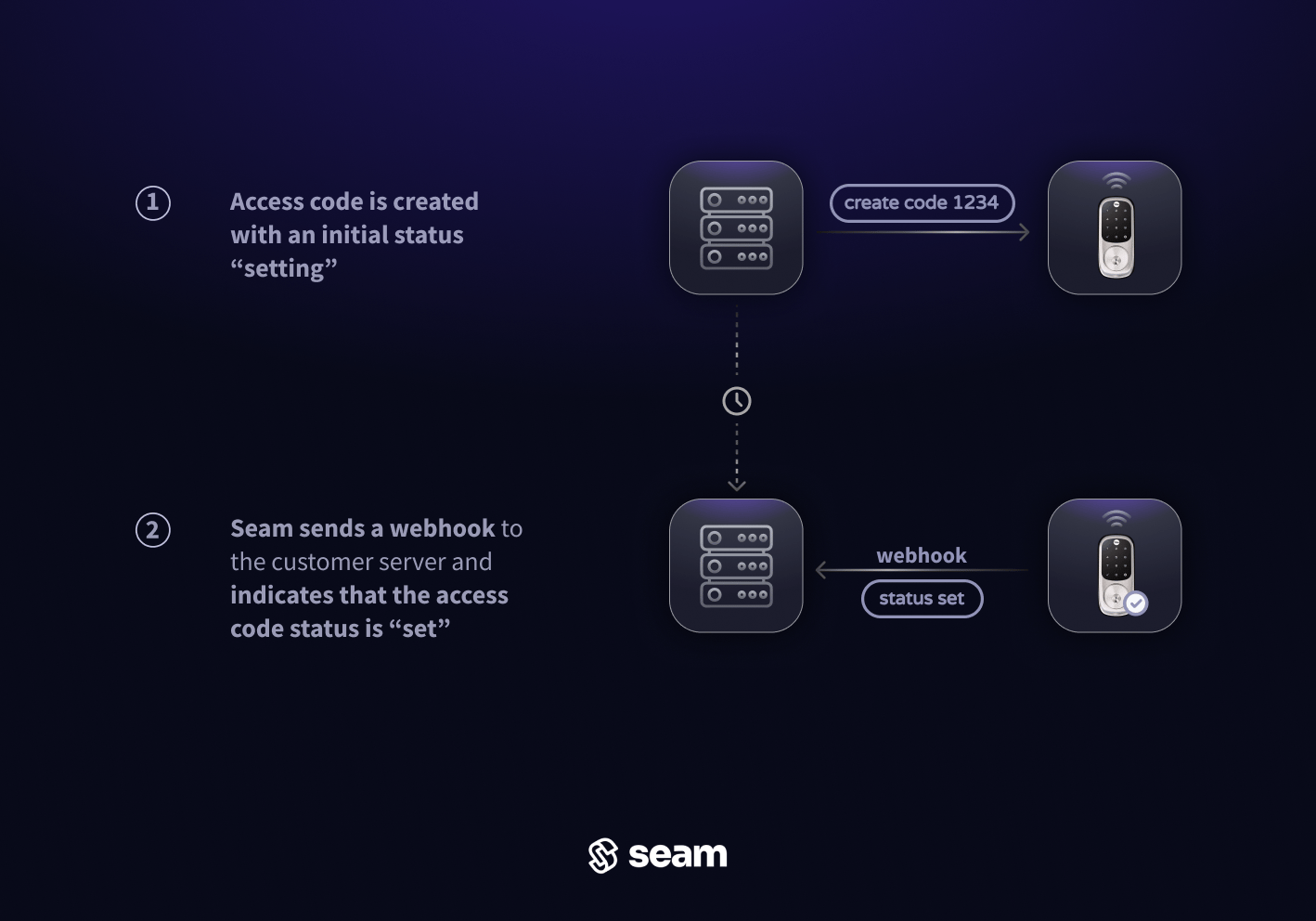
To avoid polling, monitor for incoming Seam webhook events related to the code status:
* The `access_code.set_on_device` event indicates the successful setting of the access code on the device.
* The `access_code.failed_to_set_on_device` or `access_code.delay_in_setting_on_device` events indicate a delay or failure.
In the event of delay or failure, refer to [the "Troubleshooting access code issues" guide](../../../../low-level-apis/smart-locks/access-codes/troubleshooting-access-code-issues) for assistance and mitigation strategies.
### **Webhook Events Method**
To avoid polling, monitor for incoming Seam webhook events related to the code status:
* The `access_code.set_on_device` event indicates the successful setting of the access code on the device.
* The `access_code.failed_to_set_on_device` or `access_code.delay_in_setting_on_device` events indicate a delay or failure.
In the event of delay or failure, refer to [the "Troubleshooting access code issues" guide](../../../../low-level-apis/smart-locks/access-codes/troubleshooting-access-code-issues) for assistance and mitigation strategies.
 ***
## Scheduling Time-Bound Online Access Codes
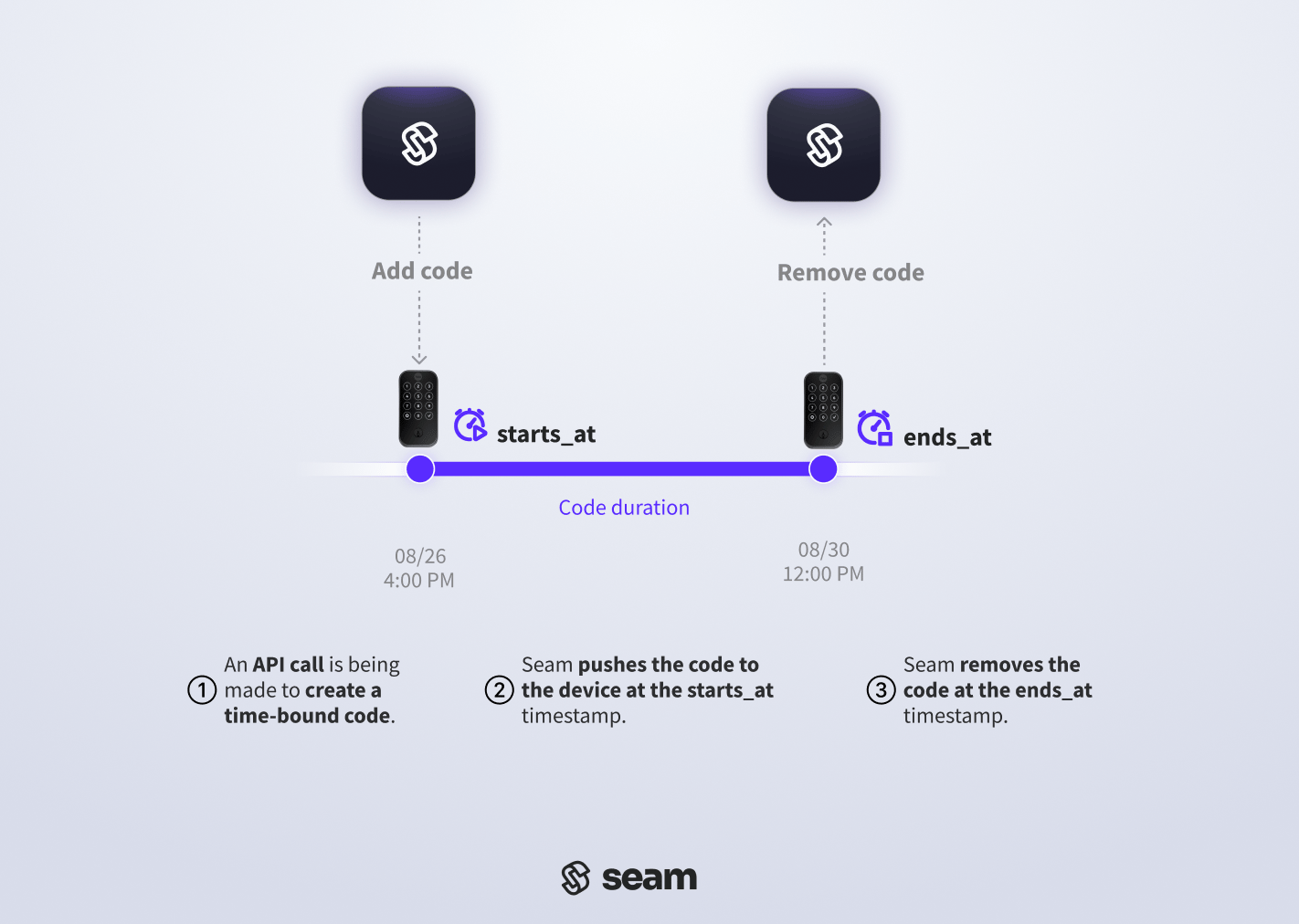
Time-bound online access codes are suitable for temporary access, like guest visits or service appointments. These codes operate between designated `starts_at` and `ends_at` timestamps, granting access only during that period. Seam automatically ensures that the code is programmed on the device at the `starts_at` time and unprogrammed at the `ends_at` time.
***
## Scheduling Time-Bound Online Access Codes
Time-bound online access codes are suitable for temporary access, like guest visits or service appointments. These codes operate between designated `starts_at` and `ends_at` timestamps, granting access only during that period. Seam automatically ensures that the code is programmed on the device at the `starts_at` time and unprogrammed at the `ends_at` time.
 ### 1. Create a Time-Bound Online Access Code
To set a time-bound online access code, provide the `device_id` of the smart lock on which you want to program a code, along with `starts_at` and `ends_at` [ISO 8601](https://www.iso.org/iso-8601-date-and-time-format.html) timestamps to define the active time window for the code. For more details, see the [Create Access Code](/api/access_codes/create) endpoint.
As with ongoing codes, you can assign an optional `name` to the access code. A clear name helps users to identify the access code quickly within their smart lock app.
Similarly, to customize the PIN code, specify a desired PIN in the `code` property. If you do not specify a `code`, you can set the `preferred_code_length`, and Seam generates a code of this length if the affected device supports the specified preferred code length. See the [Access Code Requirements for Door Locks](../../../../low-level-apis/smart-locks/access-codes/access-code-requirements-for-door-locks) to understand any requirements specific to the door lock brand.
**Request:**
```javascript JavaScript theme={null}
// Get the device.
const device = await seam.devices.get({
device_id: '11111111-1111-1111-1111-444444444444',
})
// Confirm that the device supports online access codes.
if (device.can_program_online_access_codes) {
// Create the time-bound online access code.
await seam.accessCodes.create({
device_id: device.device_id,
name: 'my time-bound code',
starts_at: '2025-01-01T16:00:00Z',
ends_at: '2025-01-22T12:00:00Z',
code: '2345',
})
}
```
```sh cURL theme={null}
# Get the device.
device=$(
# Use GET or POST.
curl -X 'GET' \
'https://connect.getseam.com/devices/get' \
-H 'accept: application/json' \
-H "Authorization: Bearer ${API_KEY}" \
-H 'Content-Type: application/json' \
-d '{
"device_id": "11111111-1111-1111-1111-444444444444"
}')
# Confirm that the device supports online access codes.
if $(jq -r '.device.can_program_online_access_codes' <<< ${device}); then \
# Create the time-bound online access code.
curl -X 'POST' \
'https://connect.getseam.com/access_codes/create' \
-H 'accept: application/json' \
-H "Authorization: Bearer ${API_KEY}" \
-H 'Content-Type: application/json' \
-d "{
\"device_id\": \"$(jq -r '.device.device_id' <<< ${device})\",
\"name\": \"my time-bound code\",
\"starts_at\": \"2025-01-01T16:00:00Z\",
\"ends_at\": \"2025-01-22T12:00:00Z\",
\"code\": \"2345\"
}";
fi
```
```python Python theme={null}
# Get the device.
device = seam.devices.get(
device_id="11111111-1111-1111-1111-444444444444"
)
# Confirm that the device supports online access codes.
if device.can_program_online_access_codes:
# Create the time-bound online access code.
seam.access_codes.create(
device_id = device.device_id,
name = "my time-bound code",
starts_at = "2025-01-01T16:00:00Z",
ends_at = "2025-01-22T12:00:00Z",
code = "2345"
)
```
```ruby Ruby theme={null}
# Get the device.
device = client.devices.get(device_id: "11111111-1111-1111-1111-444444444444")
# Confirm that the device supports online access codes.
if (device.can_program_online_access_codes)
# Create the time-bound online access code.
client.access_codes.create(
device_id: device.device_id,
name: "my time-bound code",
starts_at: "2025-01-01T16:00:00Z",
ends_at: "2025-01-22T12:00:00Z",
code: "2345"
)
end
```
```php PHP theme={null}
// Get the device.
$device = $seam->devices->get(device_id: "11111111-1111-1111-1111-444444444444");
// Confirm that the device supports online access codes.
if ($device->can_program_online_access_codes) {
// Create the time-bound online access code.
$seam->access_codes->create(
device_id: $device->device_id,
name: "my time-bound code",
starts_at: "2025-01-01T16:00:00Z",
ends_at: "2025-01-22T12:00:00Z",
code: "2345"
);
}
```
```csharp C# theme={null}
// Get the device.
Device device = seam.Devices.Get(deviceId: "11111111-1111-1111-1111-444444444444");
// Confirm that the device supports online access codes.
if (device.CanProgramOnlineAccessCodes == true) {
// Create the time-bound online access code.
seam.AccessCodes.Create(
deviceId: device.DeviceId,
name: "my time-bound code",
startsAt: "2025-01-01T16:00:00Z",
endsAt: "2025-01-22T12:00:00Z",
code: "2345"
);
}
```
**Response:**
```json JavaScript theme={null}
{
access_code_id: '11111111-1111-1111-1111-666666666666',
device_id: '11111111-1111-1111-1111-444444444444',
name: 'my time-bound code',
code: '2345',
type: 'time_bound',
starts_at: '2025-01-01T16:00:00.000Z',
ends_at: '2025-01-22T12:00:00.000Z',
...
}
```
```json cURL theme={null}
{
"action_attempt": {
"status": "pending",
"action_type": "CREATE_ACCESS_CODE",
"action_attempt_id": "11111111-2222-3333-4444-555555555555",
"result": null,
"error": null
},
"access_code": {
"access_code_id": "11111111-1111-1111-1111-666666666666",
"device_id": "11111111-1111-1111-1111-444444444444",
"name": "my time-bound code",
"code": "2345",
"type": "time_bound",
"starts_at": "2025-01-01T16:00:00.000Z",
"ends_at": "2025-01-22T12:00:00.000Z",
...
},
"ok": true
}
```
```json Python theme={null}
AccessCode(
access_code_id='11111111-1111-1111-1111-666666666666',
device_id='11111111-1111-1111-1111-444444444444',
type='time_bound',
code='2345',
starts_at='2025-01-01T16:00:00.000Z',
ends_at='2025-01-22T12:00:00.000Z',
name='my time-bound code',
...
)
```
```json Ruby theme={null}
```
```json PHP theme={null}
{
"access_code_id": "11111111-1111-1111-1111-666666666666",
"device_id": "11111111-1111-1111-1111-444444444444",
"name": "my time-bound code",
"type": "time_bound",
"starts_at": "2025-01-01T16:00:00.000Z",
"ends_at": "2025-01-22T12:00:00.000Z",
"code": "2345"
}
```
```json C# theme={null}
{
"type": "time_bound",
"access_code_id": "11111111-1111-1111-1111-666666666666",
"device_id": "11111111-1111-1111-1111-444444444444",
"name": "my time-bound code",
"starts_at": "2025-01-01T16:00:00Z",
"ends_at": "2025-01-22T12:00:00Z",
"code": "2345",
...
}
```
### 2. Verify Successful Time-Bound Code Programming
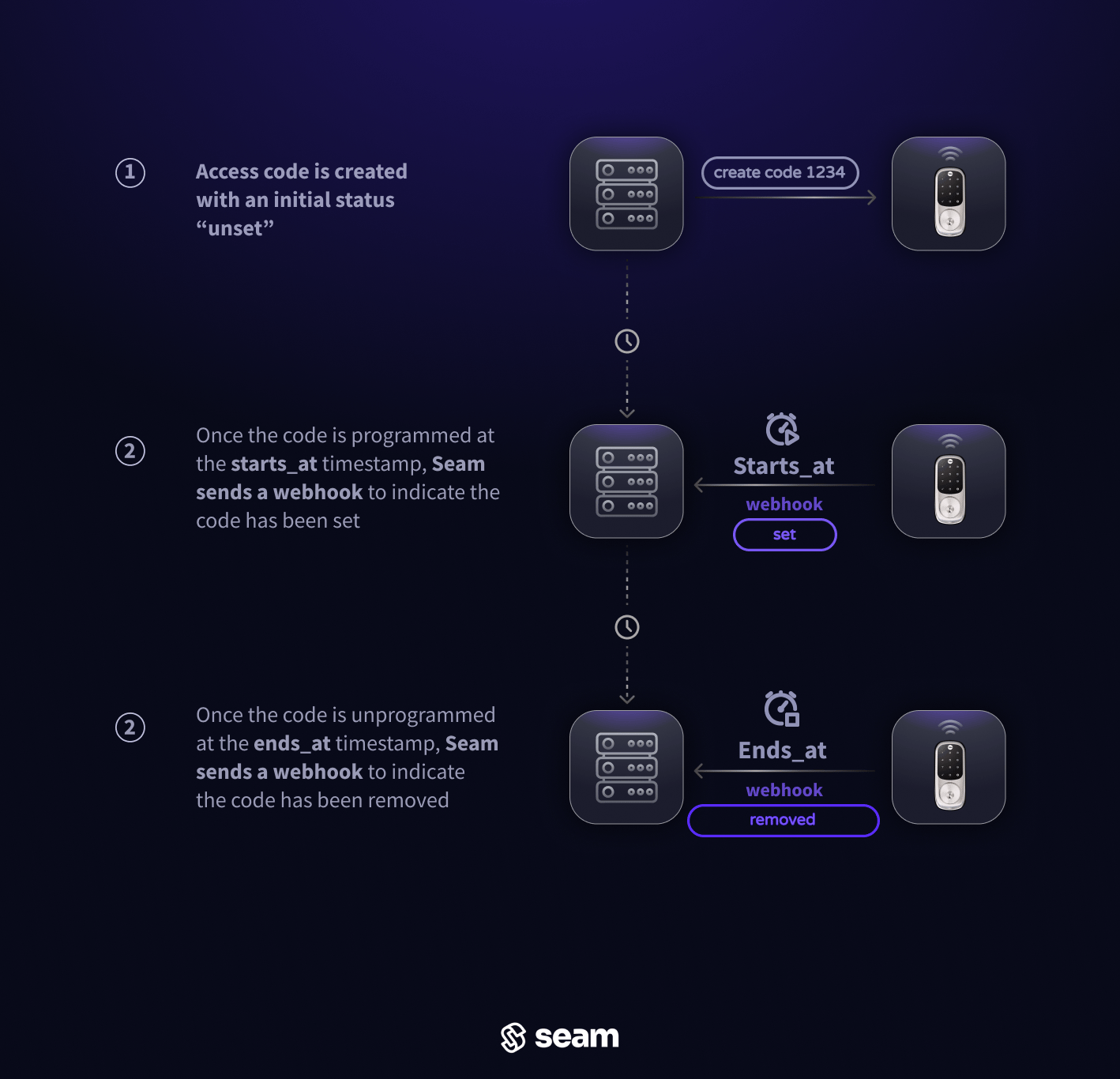
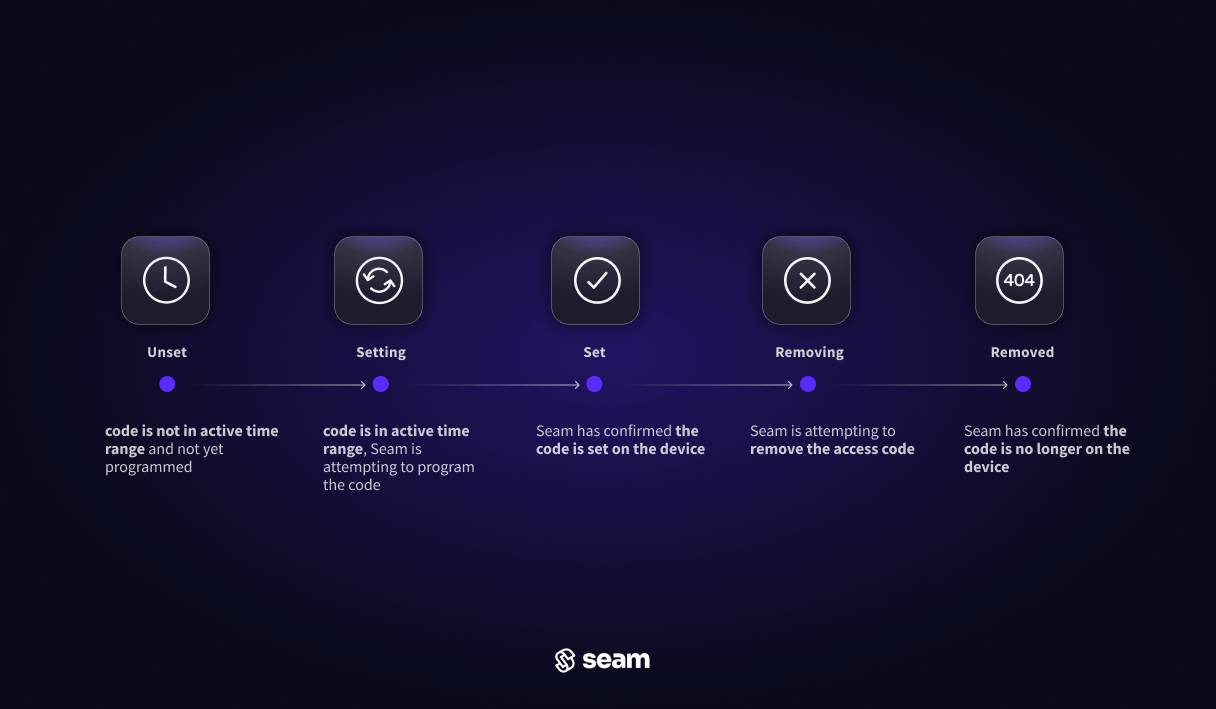
The [lifecycle of a time-bound access code](../../../../low-level-apis/smart-locks/access-codes/lifecycle-of-access-codes) is marked by distinct phases:
1. `Unset`: When initially created on Seam, the access code remains in an `unset` state, indicating it has not yet been programmed onto the door lock due to its future activation time.
2. `Setting`: As the scheduled `starts_at` time approaches, Seam initiates the process of programming the code onto the lock, transitioning the code's `status` to `setting`.
3. `Set`: Upon successful programming, the status updates to `set`, signaling that the code is loaded onto the lock, and may grant the designated user the ability to unlock the door.
### 1. Create a Time-Bound Online Access Code
To set a time-bound online access code, provide the `device_id` of the smart lock on which you want to program a code, along with `starts_at` and `ends_at` [ISO 8601](https://www.iso.org/iso-8601-date-and-time-format.html) timestamps to define the active time window for the code. For more details, see the [Create Access Code](/api/access_codes/create) endpoint.
As with ongoing codes, you can assign an optional `name` to the access code. A clear name helps users to identify the access code quickly within their smart lock app.
Similarly, to customize the PIN code, specify a desired PIN in the `code` property. If you do not specify a `code`, you can set the `preferred_code_length`, and Seam generates a code of this length if the affected device supports the specified preferred code length. See the [Access Code Requirements for Door Locks](../../../../low-level-apis/smart-locks/access-codes/access-code-requirements-for-door-locks) to understand any requirements specific to the door lock brand.
**Request:**
```javascript JavaScript theme={null}
// Get the device.
const device = await seam.devices.get({
device_id: '11111111-1111-1111-1111-444444444444',
})
// Confirm that the device supports online access codes.
if (device.can_program_online_access_codes) {
// Create the time-bound online access code.
await seam.accessCodes.create({
device_id: device.device_id,
name: 'my time-bound code',
starts_at: '2025-01-01T16:00:00Z',
ends_at: '2025-01-22T12:00:00Z',
code: '2345',
})
}
```
```sh cURL theme={null}
# Get the device.
device=$(
# Use GET or POST.
curl -X 'GET' \
'https://connect.getseam.com/devices/get' \
-H 'accept: application/json' \
-H "Authorization: Bearer ${API_KEY}" \
-H 'Content-Type: application/json' \
-d '{
"device_id": "11111111-1111-1111-1111-444444444444"
}')
# Confirm that the device supports online access codes.
if $(jq -r '.device.can_program_online_access_codes' <<< ${device}); then \
# Create the time-bound online access code.
curl -X 'POST' \
'https://connect.getseam.com/access_codes/create' \
-H 'accept: application/json' \
-H "Authorization: Bearer ${API_KEY}" \
-H 'Content-Type: application/json' \
-d "{
\"device_id\": \"$(jq -r '.device.device_id' <<< ${device})\",
\"name\": \"my time-bound code\",
\"starts_at\": \"2025-01-01T16:00:00Z\",
\"ends_at\": \"2025-01-22T12:00:00Z\",
\"code\": \"2345\"
}";
fi
```
```python Python theme={null}
# Get the device.
device = seam.devices.get(
device_id="11111111-1111-1111-1111-444444444444"
)
# Confirm that the device supports online access codes.
if device.can_program_online_access_codes:
# Create the time-bound online access code.
seam.access_codes.create(
device_id = device.device_id,
name = "my time-bound code",
starts_at = "2025-01-01T16:00:00Z",
ends_at = "2025-01-22T12:00:00Z",
code = "2345"
)
```
```ruby Ruby theme={null}
# Get the device.
device = client.devices.get(device_id: "11111111-1111-1111-1111-444444444444")
# Confirm that the device supports online access codes.
if (device.can_program_online_access_codes)
# Create the time-bound online access code.
client.access_codes.create(
device_id: device.device_id,
name: "my time-bound code",
starts_at: "2025-01-01T16:00:00Z",
ends_at: "2025-01-22T12:00:00Z",
code: "2345"
)
end
```
```php PHP theme={null}
// Get the device.
$device = $seam->devices->get(device_id: "11111111-1111-1111-1111-444444444444");
// Confirm that the device supports online access codes.
if ($device->can_program_online_access_codes) {
// Create the time-bound online access code.
$seam->access_codes->create(
device_id: $device->device_id,
name: "my time-bound code",
starts_at: "2025-01-01T16:00:00Z",
ends_at: "2025-01-22T12:00:00Z",
code: "2345"
);
}
```
```csharp C# theme={null}
// Get the device.
Device device = seam.Devices.Get(deviceId: "11111111-1111-1111-1111-444444444444");
// Confirm that the device supports online access codes.
if (device.CanProgramOnlineAccessCodes == true) {
// Create the time-bound online access code.
seam.AccessCodes.Create(
deviceId: device.DeviceId,
name: "my time-bound code",
startsAt: "2025-01-01T16:00:00Z",
endsAt: "2025-01-22T12:00:00Z",
code: "2345"
);
}
```
**Response:**
```json JavaScript theme={null}
{
access_code_id: '11111111-1111-1111-1111-666666666666',
device_id: '11111111-1111-1111-1111-444444444444',
name: 'my time-bound code',
code: '2345',
type: 'time_bound',
starts_at: '2025-01-01T16:00:00.000Z',
ends_at: '2025-01-22T12:00:00.000Z',
...
}
```
```json cURL theme={null}
{
"action_attempt": {
"status": "pending",
"action_type": "CREATE_ACCESS_CODE",
"action_attempt_id": "11111111-2222-3333-4444-555555555555",
"result": null,
"error": null
},
"access_code": {
"access_code_id": "11111111-1111-1111-1111-666666666666",
"device_id": "11111111-1111-1111-1111-444444444444",
"name": "my time-bound code",
"code": "2345",
"type": "time_bound",
"starts_at": "2025-01-01T16:00:00.000Z",
"ends_at": "2025-01-22T12:00:00.000Z",
...
},
"ok": true
}
```
```json Python theme={null}
AccessCode(
access_code_id='11111111-1111-1111-1111-666666666666',
device_id='11111111-1111-1111-1111-444444444444',
type='time_bound',
code='2345',
starts_at='2025-01-01T16:00:00.000Z',
ends_at='2025-01-22T12:00:00.000Z',
name='my time-bound code',
...
)
```
```json Ruby theme={null}
```
```json PHP theme={null}
{
"access_code_id": "11111111-1111-1111-1111-666666666666",
"device_id": "11111111-1111-1111-1111-444444444444",
"name": "my time-bound code",
"type": "time_bound",
"starts_at": "2025-01-01T16:00:00.000Z",
"ends_at": "2025-01-22T12:00:00.000Z",
"code": "2345"
}
```
```json C# theme={null}
{
"type": "time_bound",
"access_code_id": "11111111-1111-1111-1111-666666666666",
"device_id": "11111111-1111-1111-1111-444444444444",
"name": "my time-bound code",
"starts_at": "2025-01-01T16:00:00Z",
"ends_at": "2025-01-22T12:00:00Z",
"code": "2345",
...
}
```
### 2. Verify Successful Time-Bound Code Programming
The [lifecycle of a time-bound access code](../../../../low-level-apis/smart-locks/access-codes/lifecycle-of-access-codes) is marked by distinct phases:
1. `Unset`: When initially created on Seam, the access code remains in an `unset` state, indicating it has not yet been programmed onto the door lock due to its future activation time.
2. `Setting`: As the scheduled `starts_at` time approaches, Seam initiates the process of programming the code onto the lock, transitioning the code's `status` to `setting`.
3. `Set`: Upon successful programming, the status updates to `set`, signaling that the code is loaded onto the lock, and may grant the designated user the ability to unlock the door.
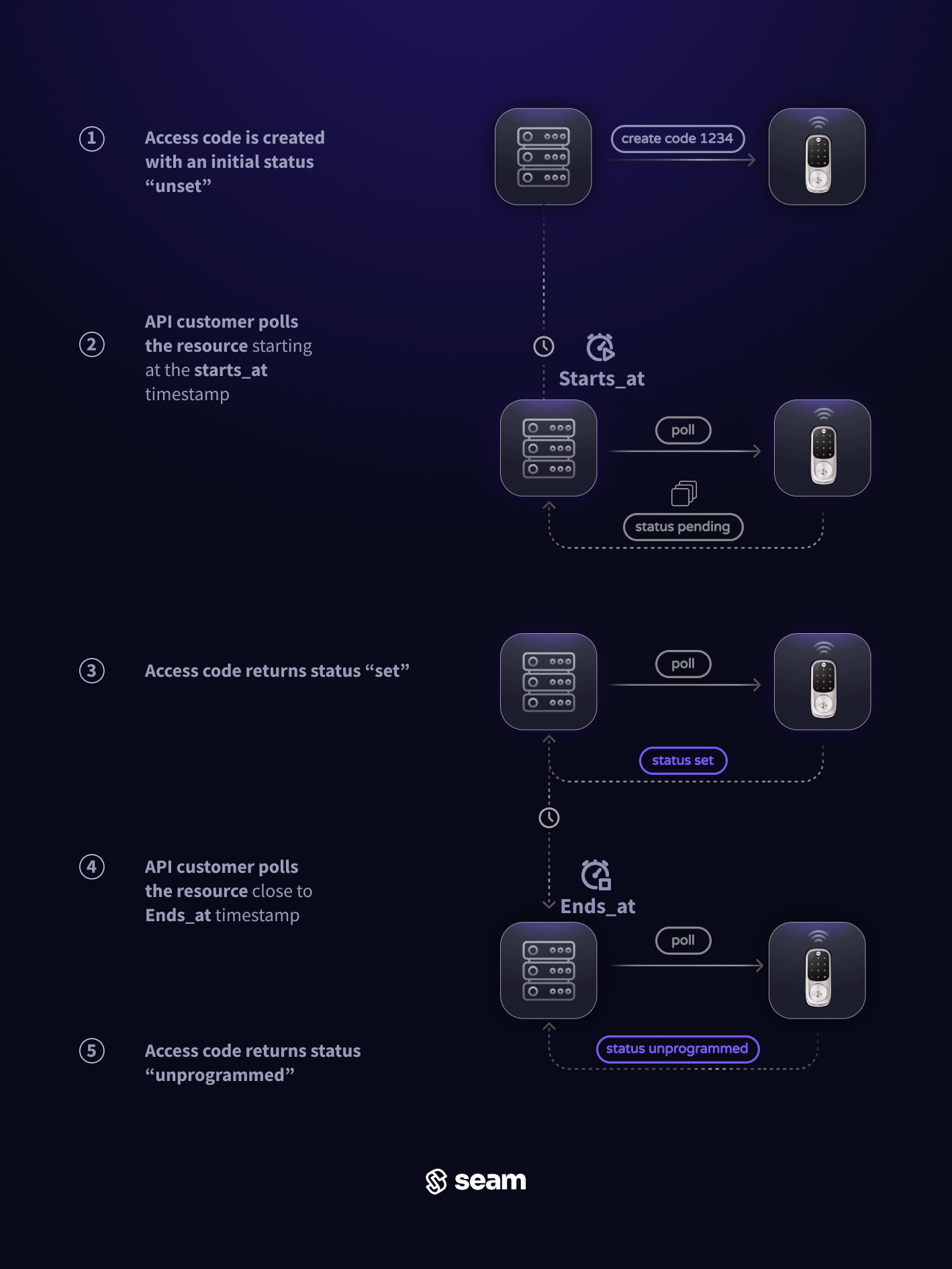
 On door locks that support [natively scheduled](/low-level-apis/smart-locks/access-codes/index#native-scheduling) access codes, Seam will preload the access code into the device's internal memory bank **72 hours ahead** of the `starts_at` time. Even if preloaded in memory, the access code will remain in an `unset` state ahead of the `starts_at` time and await the precise activation moment to toggle its status. When the `starts_at` time arrives, the access code becomes active and transition to a `set` status, granting the designated user the ability to utilize it for entry. If there's an issue programming the natively-scheduled code by its `starts_at` time, the code's status will display as `setting`. For more information on the lifecycle of access codes, [please refer to this guide](../../../../low-level-apis/smart-locks/access-codes/lifecycle-of-access-codes).
There are two methods to verify that an time-bound access code has been set on the device:
* **Polling**: continuously query the access code until its `status` is updated
* **Webhook**: wait for updates to arrive via webhook requests from the Seam API
### **Polling Method**
Use the `access_code` reference returned by the create function to call the [Get Access Code](/api/access_codes/get) function. In a basic implementation, you would poll this endpoint at the `starts_at` time to check if the access code's status is updated to `set`.
If the `status` remains `setting`, or if the `access_code` object displays any `warnings` or `errors`, refer to [the "Troubleshooting Access Code Issues" guide](../../../../low-level-apis/smart-locks/access-codes/troubleshooting-access-code-issues) for assistance.
On door locks that support [natively scheduled](/low-level-apis/smart-locks/access-codes/index#native-scheduling) access codes, Seam will preload the access code into the device's internal memory bank **72 hours ahead** of the `starts_at` time. Even if preloaded in memory, the access code will remain in an `unset` state ahead of the `starts_at` time and await the precise activation moment to toggle its status. When the `starts_at` time arrives, the access code becomes active and transition to a `set` status, granting the designated user the ability to utilize it for entry. If there's an issue programming the natively-scheduled code by its `starts_at` time, the code's status will display as `setting`. For more information on the lifecycle of access codes, [please refer to this guide](../../../../low-level-apis/smart-locks/access-codes/lifecycle-of-access-codes).
There are two methods to verify that an time-bound access code has been set on the device:
* **Polling**: continuously query the access code until its `status` is updated
* **Webhook**: wait for updates to arrive via webhook requests from the Seam API
### **Polling Method**
Use the `access_code` reference returned by the create function to call the [Get Access Code](/api/access_codes/get) function. In a basic implementation, you would poll this endpoint at the `starts_at` time to check if the access code's status is updated to `set`.
If the `status` remains `setting`, or if the `access_code` object displays any `warnings` or `errors`, refer to [the "Troubleshooting Access Code Issues" guide](../../../../low-level-apis/smart-locks/access-codes/troubleshooting-access-code-issues) for assistance.
 ### **Webhook Events Method**
To avoid polling, monitor for incoming Seam webhook events related to the code status:
* The `access_code.set_on_device` event indicates the successful setting of the access code on the device.
* The `access_code.failed_to_set_on_device` or `access_code.delay_in_setting_on_device` events indicate a delay or failure.
In the event of delay or failure, refer to [the "Troubleshooting access code issues" guide](../../../../low-level-apis/smart-locks/access-codes/troubleshooting-access-code-issues) for assistance and mitigation strategies.
### **Webhook Events Method**
To avoid polling, monitor for incoming Seam webhook events related to the code status:
* The `access_code.set_on_device` event indicates the successful setting of the access code on the device.
* The `access_code.failed_to_set_on_device` or `access_code.delay_in_setting_on_device` events indicate a delay or failure.
In the event of delay or failure, refer to [the "Troubleshooting access code issues" guide](../../../../low-level-apis/smart-locks/access-codes/troubleshooting-access-code-issues) for assistance and mitigation strategies.