> ## Documentation Index
> Fetch the complete documentation index at: https://docs.seam.co/llms.txt
> Use this file to discover all available pages before exploring further.

# Access Control System Resources

> Learn about the Seam resources that you use to manage your ACS.

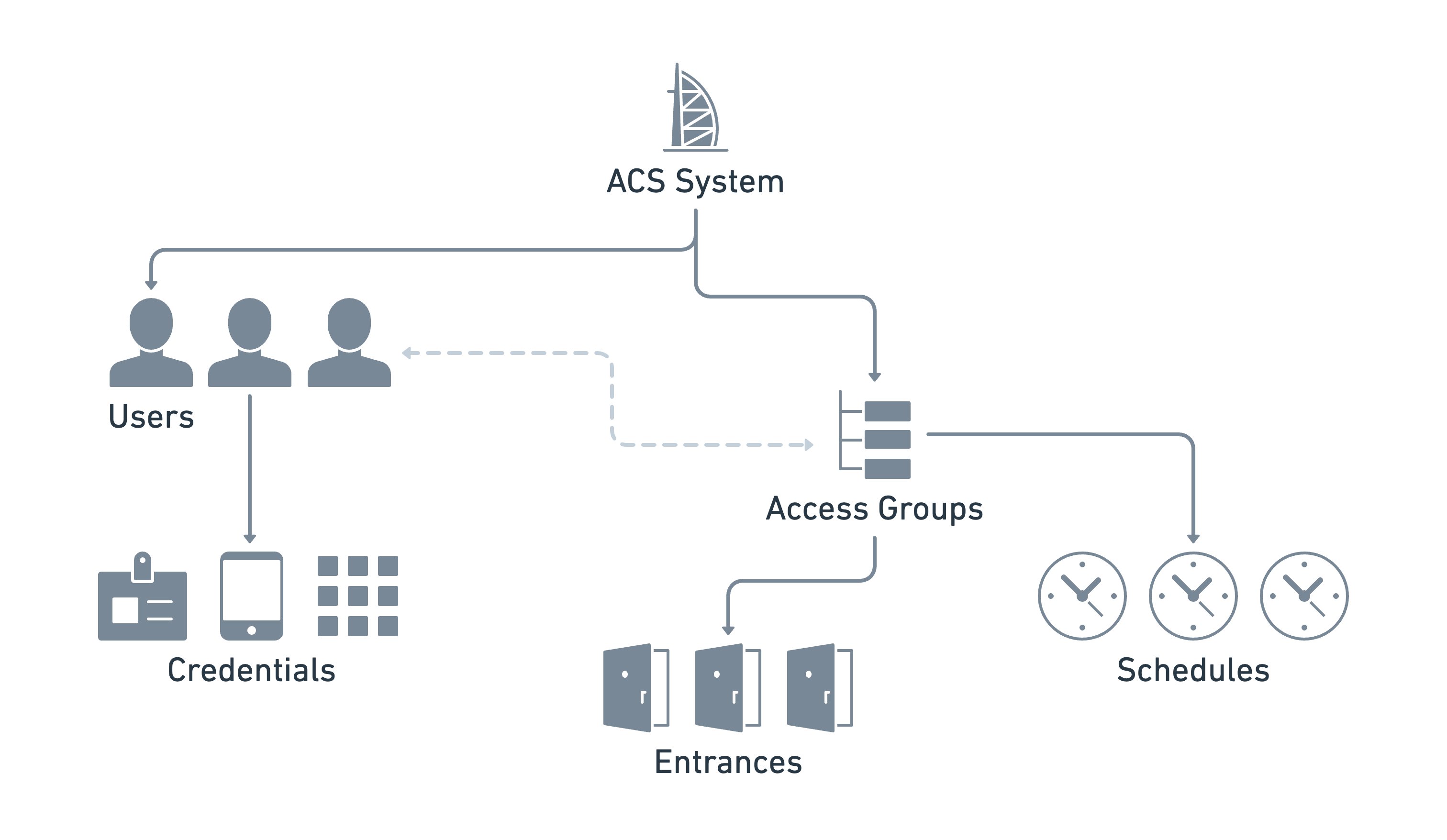
The Seam ACS schema consists of a series of resources. These resources interact intuitively, enabling you to manage your ACS in a logical, efficient manner. Seam's universal API provides the flexibility to manage a variety of [ACSs](./understanding-access-control-system-differences), each of which may have manufacturer-specific differences. For details about your ACS, see the corresponding [system integration guide](/device-and-system-integration-guides#access-control-systems).

The following diagram shows an example of one ACS, including the ACS resources and the relationships between them:

<img
  src="https://mintcdn.com/seam/3MkQAe40a-b0KYcA/images/acs-arch-access-group-based.png?fit=max&auto=format&n=3MkQAe40a-b0KYcA&q=85&s=d45001174bb35413aa09dc75d4433721"
  alt="Seam's ACS resources provide the flexibility to manage your ACS
intuitively, regardless of the differences between various ACS
manufacturers."
  width="3024"
  height="1756"
  data-path="images/acs-arch-access-group-based.png"
/>

The following table provides a brief description of each of the Seam ACS resources:
<table>
  <thead>
    <tr>
      <th width="248">ACS Resource</th>
      <th>Description</th>
    </tr>
  </thead>

  <tbody>
    <tr>
      <td>
        <p>
          <img src="https://mintcdn.com/seam/3MkQAe40a-b0KYcA/images/acs-system_light.png?fit=max&auto=format&n=3MkQAe40a-b0KYcA&q=85&s=8008e33d54a64049dbee30bdc64049b8" alt="" data-size="original" width="96" height="130" data-path="images/acs-system_light.png" />
        </p>

        <p>
          <a href="/api/acs/systems/object">
            <code>acs\_system</code>
          </a>
        </p>
      </td>

      <td>
        The top-level object. Represents one or more buildings, residential
        locations, or other sites that you manage using this ACS.

        <br />

        For more information, see{' '}

        <a href="/low-level-apis/access-systems/connect-an-acs-to-seam/retrieving-acs-system-details">
          Retrieving ACS System Details
        </a>

        .
      </td>
    </tr>

    <tr>
      <td>
        <p>
          <img src="https://mintcdn.com/seam/3MkQAe40a-b0KYcA/images/acs-user_light.png?fit=max&auto=format&n=3MkQAe40a-b0KYcA&q=85&s=1e6de54ba97288e069adade7e7b6bd98" alt="" data-size="original" width="122" height="131" data-path="images/acs-user_light.png" />
        </p>

        <p>
          <a href="/api/acs/users/object">
            <code>acs\_user</code>
          </a>
        </p>
      </td>

      <td>
        <p>The set of users who access the entrances.</p>

        <p>
          If you manage multiple ACSs and need to grant the same user access to{' '}
          <a href="/low-level-apis/access-systems/retrieving-entrance-details">entrances</a> in multiple
          ACSs, you can also use Seam{' '}

          <a href="/api/user_identities/object">
            user identities
          </a>

          . With user identities, you can link an application user in your own
          system to one or more Seam ACS users.

          <br />

          For more information, see{' '}

          <a href="/low-level-apis/access-systems/user-management">
            Managing ACS Users
          </a>

          .
        </p>
      </td>
    </tr>

    <tr>
      <td>
        <p>
          <img src="https://mintcdn.com/seam/3MkQAe40a-b0KYcA/images/acs-access-group_light.png?fit=max&auto=format&n=3MkQAe40a-b0KYcA&q=85&s=0906f69ae15f7c4e1f60738106583737" alt="" data-size="original" width="105" height="130" data-path="images/acs-access-group_light.png" />
        </p>

        <p>
          <a href="/api/acs/access_groups/object">
            <code>acs\_access\_group</code>
          </a>
        </p>
      </td>

      <td>
        Some ACSs use access groups as an efficient way to grant sets of
        scheduled entrance access to one or more users.

        <br />

        For more information, see{' '}

        <a href="/low-level-apis/access-systems/user-management/assigning-users-to-access-groups">
          Assigning ACS Users to Access Groups
        </a>

        .
      </td>
    </tr>

    <tr>
      <td>
        <p>
          <img src="https://mintcdn.com/seam/3MkQAe40a-b0KYcA/images/acs-credential_light.png?fit=max&auto=format&n=3MkQAe40a-b0KYcA&q=85&s=6131fcbc4293e7187fe5759889451d49" alt="" data-size="original" width="93" height="131" data-path="images/acs-credential_light.png" />
        </p>

        <p>
          <a href="/api/acs/credentials/object">
            <code>acs\_credential</code>
          </a>
        </p>
      </td>

      <td>
        A digital means that authorizes a user to access one or more entrances
        at specific days and times. Examples of credentials include RFID cards,
        mobile keys, and PIN codes.

        <br />

        For more information, see{' '}
        <a href="/low-level-apis/access-systems/managing-credentials">Managing Credentials</a>.
      </td>
    </tr>

    <tr>
      <td>
        <p>
          <img src="https://mintcdn.com/seam/3MkQAe40a-b0KYcA/images/acs-entrance_light.png?fit=max&auto=format&n=3MkQAe40a-b0KYcA&q=85&s=c8269aeaa23026ca2c89ff71120ee87d" alt="" data-size="original" width="97" height="130" data-path="images/acs-entrance_light.png" />
        </p>

        <p>
          <a href="/api/acs/entrances/object">
            <code>acs\_entrance</code>
          </a>
        </p>
      </td>

      <td>
        The set of entrances, doors, or zones that you want to manage. You
        identify each entrance by the corresponding lock object.

        <br />

        For more information, see{' '}

        <a href="/low-level-apis/access-systems/retrieving-entrance-details">
          Retrieving Entrance Details
        </a>

        .
      </td>
    </tr>
  </tbody>
</table>

<Info>
  You configure the access schedules for your ACS users either through access
  groups or credentials, depending on your specific ACS. There is no separate
  schedule resource in the Seam API.
</Info>