# Seam Components

[Seam Components](https://github.com/seamapi/react) are a set of prebuilt UI components for building your device management flow.

Features include:

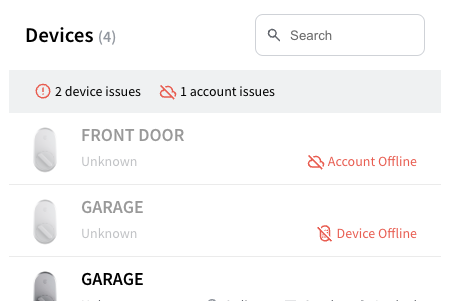
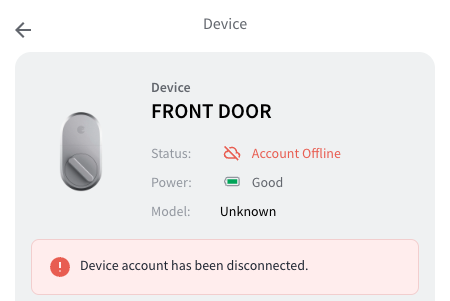
* Device debugging flows that allow your customers to uncover issues
* Responsive design to fit seamlessly on any screen size

## [Getting started with Components ->](https://docs.seam.co/latest/~/revisions/WnT0iExlRmVG3JXMNm4C/ui-components/overview/getting-started-with-seam-components/get-started-with-client-side-components)

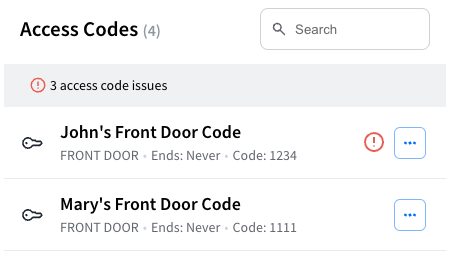
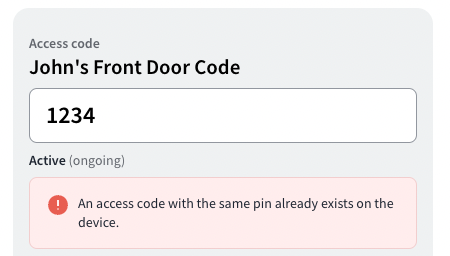
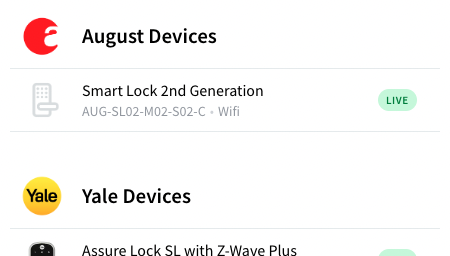
<table data-card-size="large" data-view="cards"><thead><tr><th></th><th></th><th></th><th data-hidden data-card-cover data-type="files"></th><th data-hidden data-card-target data-type="content-ref"></th></tr></thead><tbody><tr><td><strong>Device Table</strong><br>Display a list of devices, and filter for all the devices with issues.</td><td></td><td></td><td><a href="https://2727122207-files.gitbook.io/~/files/v0/b/gitbook-x-prod.appspot.com/o/spaces%2FxnN2A67918om1UthYWsF%2Fuploads%2Fgit-blob-a35abf4dc0a52a27c210a91e3ae2a18a2d867909%2Fseam-component-device-table.png?alt=media">seam-component-device-table.png</a></td><td><a href="overview/react-components/device-table">device-table</a></td></tr><tr><td><strong>Device Details</strong></td><td>Display a device's properties and settings, alerts, and warnings.</td><td></td><td><a href="https://2727122207-files.gitbook.io/~/files/v0/b/gitbook-x-prod.appspot.com/o/spaces%2FxnN2A67918om1UthYWsF%2Fuploads%2Fgit-blob-45fc6f5951add1eb17025eeba7c1819d20a1f161%2Fseam-component-device-details.png?alt=media">seam-component-device-details.png</a></td><td><a href="overview/react-components/device-details">device-details</a></td></tr><tr><td><strong>Access Code Table</strong><br>Display a list of access codes, and filter for all the access codes with issues.</td><td></td><td></td><td><a href="https://2727122207-files.gitbook.io/~/files/v0/b/gitbook-x-prod.appspot.com/o/spaces%2FxnN2A67918om1UthYWsF%2Fuploads%2Fgit-blob-2caae2fd5b03edc9eb33a938183f977000a485d5%2Fseam-component-access-code-table.png?alt=media">seam-component-access-code-table.png</a></td><td><a href="overview/react-components/access-code-table">access-code-table</a></td></tr><tr><td><strong>Access Code Details</strong></td><td>Display an access code's properties, alerts and warnings.</td><td></td><td><a href="https://2727122207-files.gitbook.io/~/files/v0/b/gitbook-x-prod.appspot.com/o/spaces%2FxnN2A67918om1UthYWsF%2Fuploads%2Fgit-blob-2fefb8be81692379ed9a7640faae6c95882fe08c%2Fseam-component-access-code-details.png?alt=media">seam-component-access-code-details.png</a></td><td><a href="overview/react-components/access-code-details">access-code-details</a></td></tr><tr><td><strong>Supported Devices Table</strong></td><td>Display a list of all the devices that you support through Seam.</td><td></td><td><a href="https://2727122207-files.gitbook.io/~/files/v0/b/gitbook-x-prod.appspot.com/o/spaces%2FxnN2A67918om1UthYWsF%2Fuploads%2Fgit-blob-250ab6bf6ba56ecdcb7852bd85889c9d9ed371b1%2Fseam-component-supported-devices-table.png?alt=media">seam-component-supported-devices-table.png</a></td><td><a href="overview/react-components/supported-devices-table">supported-devices-table</a></td></tr></tbody></table>

## Next Steps

* [Minimal sample apps](https://github.com/seamapi/seam-components-sample-apps) running Seam Components in various frameworks.
* View our [**Getting Started Guide**](https://docs.seam.co/latest/~/revisions/WnT0iExlRmVG3JXMNm4C/ui-components/overview/getting-started-with-seam-components/get-started-with-client-side-components)
* View and play with other components in the [**interactive storybook component library**](https://react.seam.co/)
* Check out some [**Full Example Apps**](https://github.com/seamapi/react/tree/main/examples)

If you have any questions or want to report an issue, email us at <support@seam.co>.