# Get started with Vue
## Overview
This guide will show you how to use Seam Components inside a Vue application. Seam Components are implemented in React, but may be used anywhere as native web components.
## 1 - Get a Publishable Key from the Seam Console
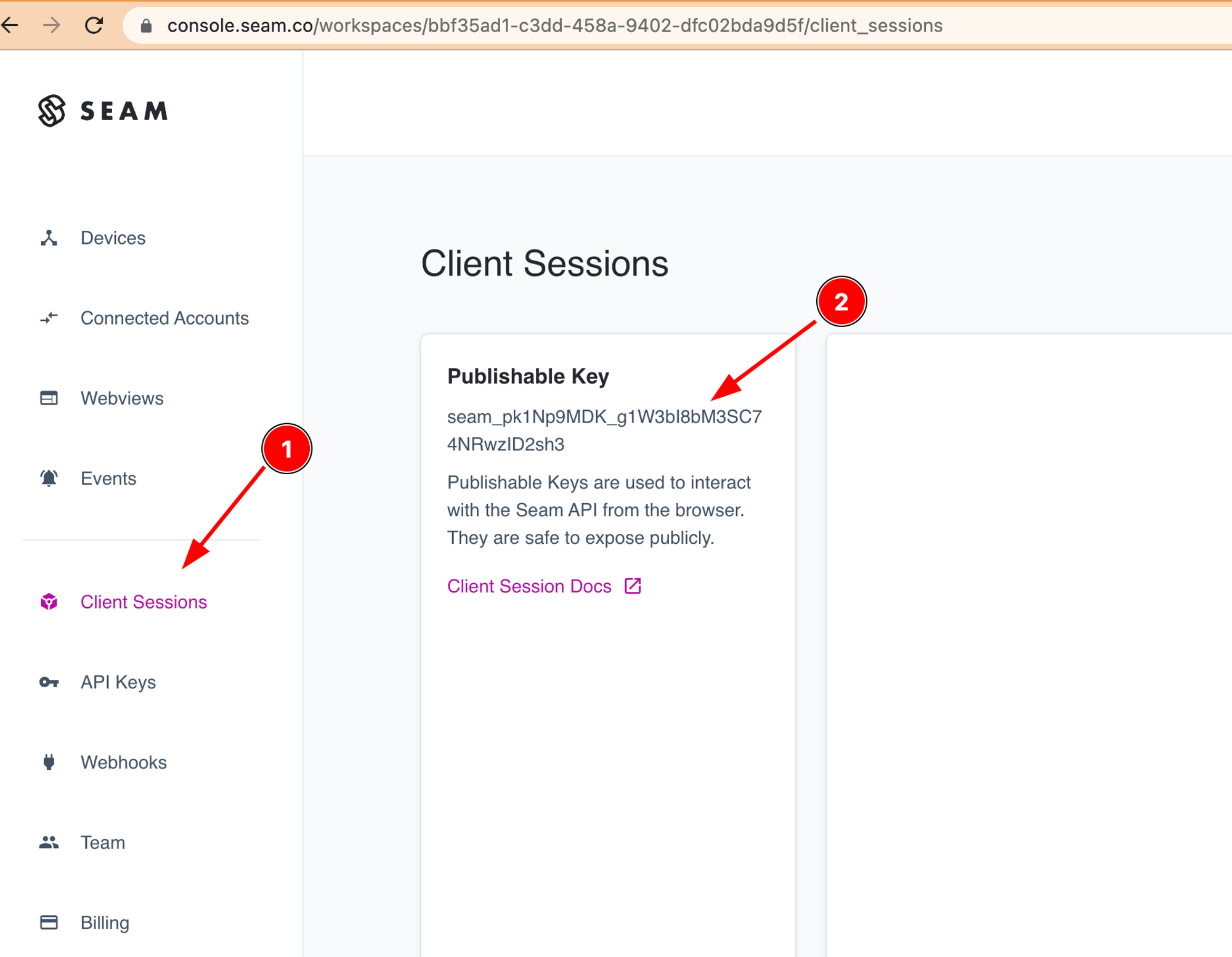
To access the Seam API, you'll need a publishable key. This key identifies your application when making requests to Seam and is safe to embed in your frontend code.
Go to [console.seam.co](https://console.seam.co) and select "Client Sessions" from the sidebar. You should then see a "Publishable Key" that you can copy.
## 2 - Install `@seamapi/react` in your Vue application
Install the npm package
```bash
npm install --save @seamapi/react
```
Then import the custom elements bundle in you `main.js` application entrypoint:
```javascript
import "@seamapi/react/elements.js"
import './assets/main.css'
import { createApp } from 'vue'
```
## 3 — Skip Component Resolution
From the [Vue Docs](https://vuejs.org/guide/extras/web-components.html#skipping-component-resolution):
> By default, Vue will attempt to resolve a non-native HTML tag as a registered Vue component before falling back to rendering it as a custom element. This will cause Vue to emit a "failed to resolve component" warning during development. To let Vue know that certain elements should be treated as custom elements and skip component resolution, we can specify the `compilerOptions.isCustomElement` option.
{% tabs %}
{% tab title="Vue 3 In-Browser Config" %}
```javascript
// Only works if using in-browser compilation.
// If using build tools, see config examples below.
app.config.compilerOptions.isCustomElement = (tag) => tag.startsWith('seam-')
```
{% endtab %}
{% tab title="Vue 3 Vite Config" %}
```javascript
// vite.config.js
import vue from '@vitejs/plugin-vue'
export default {
plugins: [
vue({
template: {
compilerOptions: {
isCustomElement: (tag) => tag.startsWith('seam-')
}
}
})
]
}
```
{% endtab %}
{% tab title="Vue 3 CLI Config" %}
```javascript
// vue.config.js
module.exports = {
chainWebpack: config => {
config.module
.rule('vue')
.use('vue-loader')
.tap(options => ({
...options,
compilerOptions: {
isCustomElement: tag => tag.startsWith('seam-')
}
}))
}
}
```
{% endtab %}
{% tab title="Vue 2 Config" %}
```javascript
// Before calling new Vue(...)
Vue.config.ignoredElements = [/^seam-/]
```
{% endtab %}
{% endtabs %}
## 4 - Use the component
Use the components in `App.vue`:
```html
```
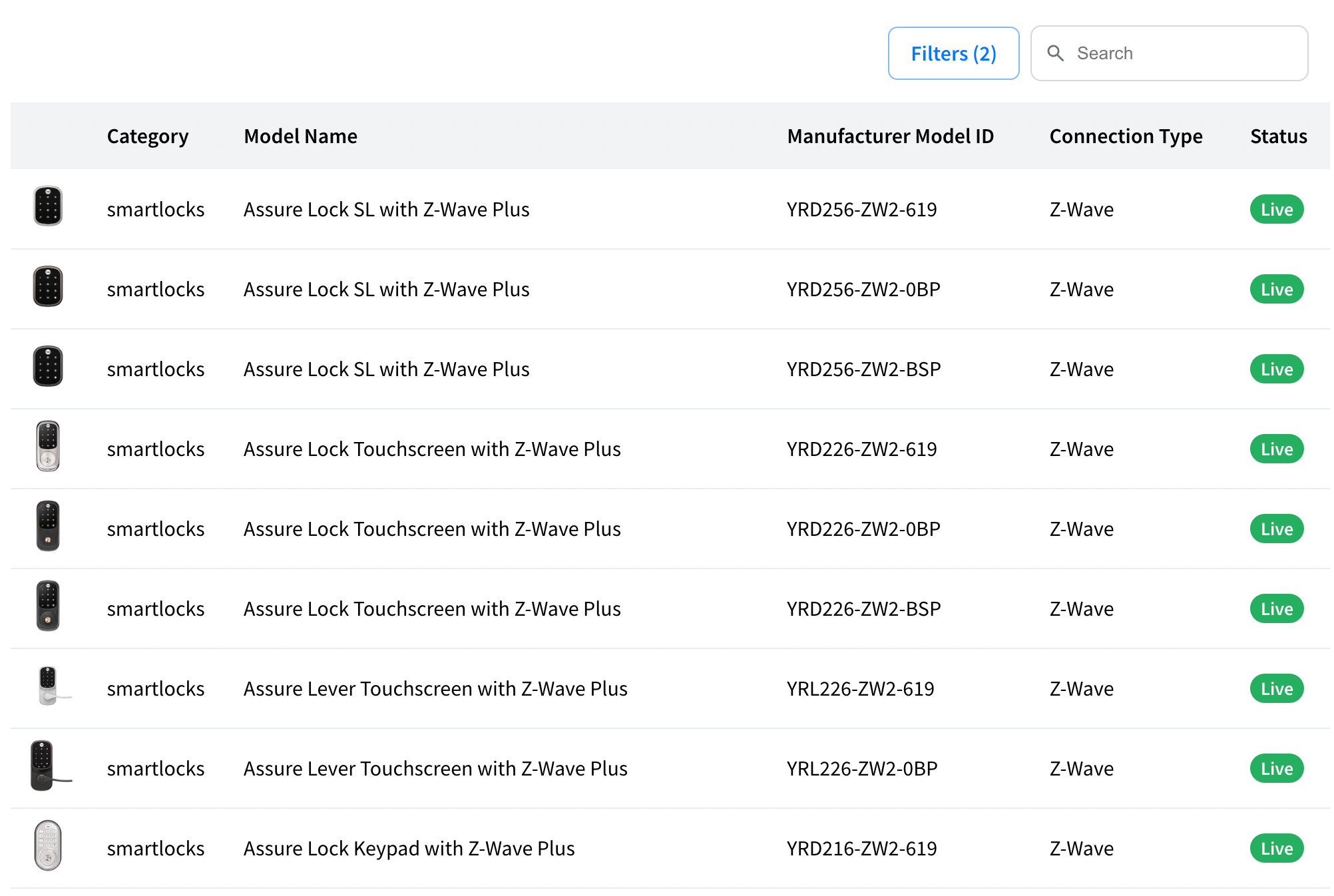
You should see a list of device models like what's shown below:
## Next Steps
* [Minimal sample app](https://github.com/seamapi/seam-components-sample-apps/tree/main/vue-web-components) running Seam Web Components in Vue 3.
* [Minimal sample app](https://github.com/seamapi/seam-components-sample-apps/tree/main/vue-2-web-components) running Seam Web Components in Vue 2.
* Start connecting devices using [Client Side Components](https://docs.seam.co/latest/~/revisions/DFdrUdS2jQOnbJTNDT5a/ui-components/overview/getting-started-with-seam-components/get-started-with-client-side-components) or with [Client Session Tokens](https://docs.seam.co/latest/~/revisions/DFdrUdS2jQOnbJTNDT5a/ui-components/overview/getting-started-with-seam-components/get-started-with-react-components-and-client-session-tokens).
* View and play with other components in the [interactive storybook component library](https://react.seam.co/)
* Check out some [Full Example Apps](https://github.com/seamapi/react/tree/main/examples)
If you have any questions or want to report an issue, email us at .