# Kwikset Locks

## Overview

Kwikset produces smart locks suitable for residential homes, rental properties, and vacation rentals. The Kwikset Halo and Halo Touch series offer Wi-Fi-enabled smart locks that connect directly to the existing Wi-Fi router for a property, eliminating the need for a separate smart home hub. On the other hand, the Kwikset SmartCode series provides multiple connectivity options, including Zigbee and Z-Wave. For SmartCode series locks, the Seam integration requires the use of a hub. The Seam integration enables the remote unlocking feature and the ability to set customizable access codes for the Kwikset Halo, Halo Touch, and SmartCode series.

***

## Supported Devices

This integration supports the Kwikset [Halo](https://www.kwikset.com/halo), [Halo Touch](https://www.kwikset.com/halo-touch), and [SmartCode](https://www.kwikset.com/products/electronic/electronic-smart-locks) lines of smart locks.

For detailed information about the Kwikset devices that Seam supports, see our [Kwikset Supported Devices page](https://www.seam.co/manufacturers/kwikset).

***

## Supported Features

We support the following features:

* [Triggering web lock and unlock actions](https://docs.seam.co/latest/~/revisions/DFdrUdS2jQOnbJTNDT5a/capability-guides/smart-locks/lock-and-unlock)
* [Programming access codes](https://docs.seam.co/latest/~/revisions/DFdrUdS2jQOnbJTNDT5a/capability-guides/smart-locks/access-codes)

{% hint style="info" %}
Seam does not support [unmanaged access codes](https://docs.seam.co/latest/~/revisions/DFdrUdS2jQOnbJTNDT5a/capability-guides/smart-locks/access-codes/migrating-existing-access-codes) for Kwikset.
{% endhint %}

***

### Device Provider Key

To create a [Connect Webview](https://docs.seam.co/latest/~/revisions/DFdrUdS2jQOnbJTNDT5a/core-concepts/connect-webviews) that enables your users to connect their Kwikset devices to Seam, include the `kwikset` device provider key in the `accepted_providers` list. For more information, see [Customize the Brands to Display in Your Connect Webviews](https://docs.seam.co/latest/~/revisions/DFdrUdS2jQOnbJTNDT5a/core-concepts/connect-webviews/customizing-connect-webviews#customize-the-brands-to-display-in-your-connect-webviews).

***

## Setup Instructions

To control Kwikset devices using Seam, you must prompt owners of these devices to perform the following steps:

### Setup Instructions for Halo and Halo Touch Locks

1. Create an account in the [Kwikset App](https://www.kwikset.com/smart-locks/app) if you have not done so already.
2. In the Kwikset App, add your Kwikset devices.
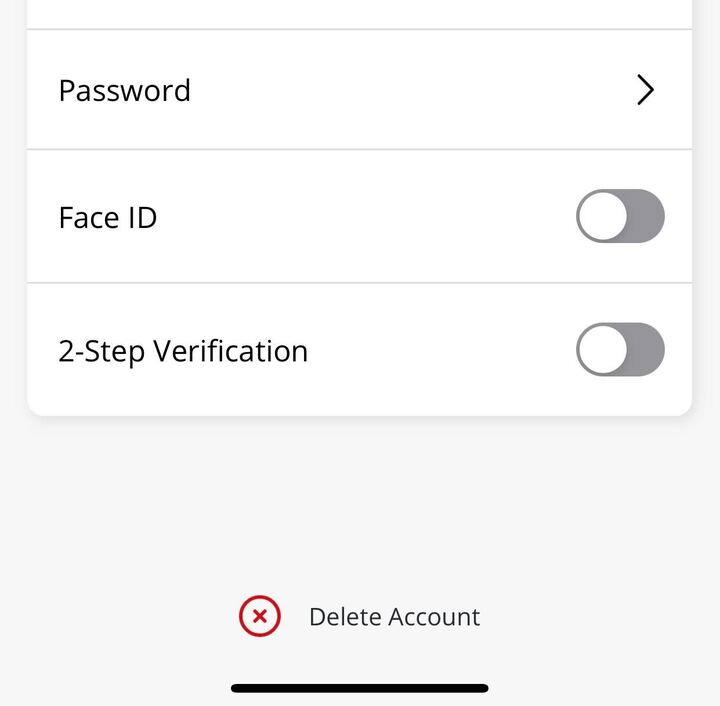
3. In the Kwikset App, click on the top left menu button, navigate to **Account Settings** and disable **2-Step Verification**.

   <figure><img src="https://2727122207-files.gitbook.io/~/files/v0/b/gitbook-x-prod.appspot.com/o/spaces%2FxnN2A67918om1UthYWsF%2Fuploads%2Fgit-blob-27a75a657dbcdcce7153b33a267a3d4cfc1cf3a1%2Fkwikset-MFA-settings.png?alt=media" alt="Disable 2-Step Verification before connecting your Kwikset account to Seam." width="180"><figcaption><p>Disable 2-Step Verification before connecting your Kwikset account to Seam.</p></figcaption></figure>

{% hint style="warning" %}
You must disable **2-Step Verification**—that is, multifactor authentication (MFA)—before connecting your Kwikset account to Seam using the [Seam Connect Webview](https://docs.seam.co/latest/~/revisions/DFdrUdS2jQOnbJTNDT5a/core-concepts/connect-webviews).

Enabling MFA in the Kwikset App can block the Seam login process from performing successful authorization using your Kwikset account. After you connect your Kwikset account to Seam, you can reenable **2-Step Verification** in the Kwikset App **Account Settings**.
{% endhint %}

4. Note your login credentials for the Kwikset App, and use these credentials to log in to the Seam Connect Webview to add your devices to Seam.

***

## Brand-Specific Restrictions

In the Kwikset app, you cannot see access codes that were set from an external source (such as Seam) unless you are connected through Bluetooth to the lock. If you're connected through Wi-Fi and not Bluetooth, the Kwikset app only shows the access codes that you have set from the app itself and not the codes set from Seam.

***

## Brand-Specific Access Code Constraints

Kwikset locks place the following constraints on access code attributes:

* Access code name must contain 2-14 characters.

  You can create a Seam access code for Kwikset with a name longer than 14 characters. The full name is stored in Seam, but on the Kwikset device, the name is truncated to 14 characters.
* PIN code length must be 4-8 digits.
* A `timebound` code requires both a `starts_at` timestamp and an `ends_at` timestamp.
* A `timebound` code's `starts_at` timestamp must be greater than the current time. For best results, set `starts_at` at least 15 minutes ahead of the current time.

***

## Brand-Specific Events

Seam supports the following events and event property values for Kwikset devices:

### Kwikset Auto-Lock

Kwikset devices have an auto-lock feature that automatically locks the device after a configurable period of time, for example, 30 seconds. The Seam API reports these auto-lock occurrences by emitting a [`lock.locked` event](https://docs.seam.co/latest/~/revisions/DFdrUdS2jQOnbJTNDT5a/api/events#event-types) with `automatic` as the value for the [`method` property](https://docs.seam.co/latest/~/revisions/DFdrUdS2jQOnbJTNDT5a/api/events#lock-events).

### Kwikset Access Denied Event

The Seam API emits a [`lock.access_denied` event](https://docs.seam.co/latest/~/revisions/DFdrUdS2jQOnbJTNDT5a/api/events#event-types) when an incorrect access code is entered three times in a row on a Kwikset device. The Kwikset device also emits warning beeps for approximately 15 seconds, and the keypad is locked during this time. The keypad remains locked for one minute after the warning beeps end.

***

## Where to Order

Order Kwikset locks from Amazon.

<table data-view="cards"><thead><tr><th></th><th></th><th></th><th data-hidden data-card-target data-type="content-ref"></th><th data-hidden data-card-cover data-type="files"></th></tr></thead><tbody><tr><td></td><td><strong>Kwikset Halo, Halo Touch, and SmartCode Locks on Amazon</strong></td><td></td><td><a href="https://www.amazon.com/s?k=kwikset+halo+or+smartcode+lock">https://www.amazon.com/s?k=kwikset+halo+or+smartcode+lock</a></td><td><a href="https://2727122207-files.gitbook.io/~/files/v0/b/gitbook-x-prod.appspot.com/o/spaces%2FxnN2A67918om1UthYWsF%2Fuploads%2FOHIdsBebWMhVCZgs9w8n%2Fkwikset-on-amazon.jpg?alt=media&#x26;token=00be08f9-c345-4cfb-96b5-49273d08f438">kwikset-halo-halo-touch-on-amazon.jpg</a></td></tr></tbody></table>

***
