# Creating and Managing Smart Lock Access Codes

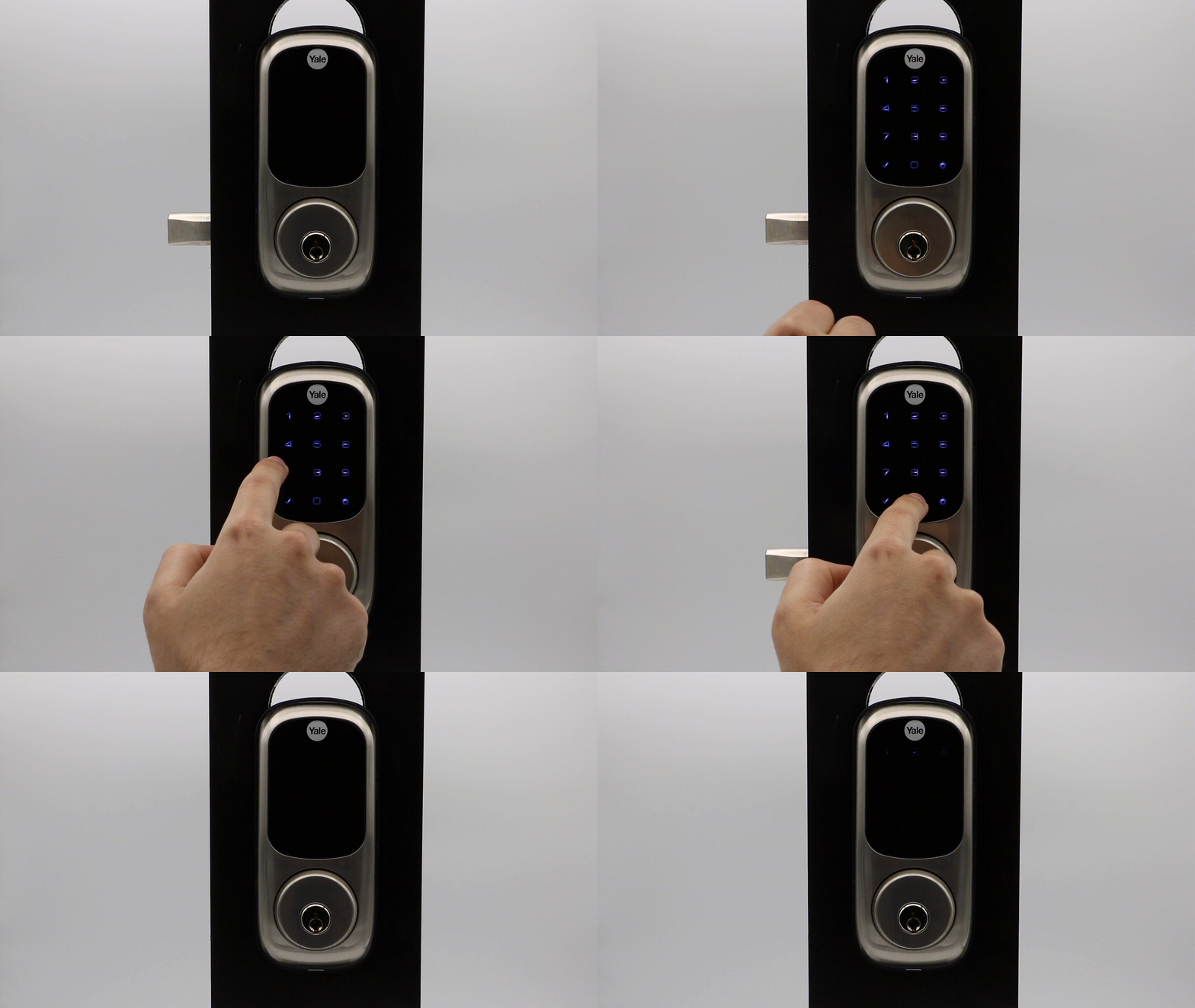
<figure><img src="https://2727122207-files.gitbook.io/~/files/v0/b/gitbook-x-prod.appspot.com/o/spaces%2FxnN2A67918om1UthYWsF%2Fuploads%2FtKBtYjArW4iTlZLcVewo%2Fcode_unlock.gif?alt=media&#x26;token=ab96ce1e-5314-4b82-80d7-e00c149df07b" alt=""><figcaption></figcaption></figure>

## What Is an Access Code?

An access code is a code used for a keypad or pinpad device. Unlike physical keys, which can easily be lost or duplicated, PIN codes can be customized, tracked, and altered on the fly. Using the Seam [Access Code API](https://docs.seam.co/latest/~/revisions/DFdrUdS2jQOnbJTNDT5a/api/access_codes), you can easily generate access codes on the hundreds of door lock models with which we integrate.

Seam supports programming two types of access codes: [ongoing](#ongoing-access-codes) and [time-bound](#time-bound-access-codes). To differentiate between the two, refer to the `type` property of the access code. Ongoing codes display as `ongoing`, whereas time-bound codes are labeled `time_bound`.

In addition, for certain devices, Seam also supports [offline access codes](#offline-access-codes).

### **Ongoing Access Codes**

Ongoing access code are ideal for residents or long-term users. Ongoing codes start right away and remain active on a device until they are removed.

<figure><picture><source srcset="https://2727122207-files.gitbook.io/~/files/v0/b/gitbook-x-prod.appspot.com/o/spaces%2FxnN2A67918om1UthYWsF%2Fuploads%2FvwFO1X9yVgEKhDLNBlO5%2Fongoing-access-code-dark.png?alt=media&#x26;token=6d0d77ed-bd01-4d21-ae1c-f8931fe74129" media="(prefers-color-scheme: dark)"><img src="https://2727122207-files.gitbook.io/~/files/v0/b/gitbook-x-prod.appspot.com/o/spaces%2FxnN2A67918om1UthYWsF%2Fuploads%2F4rlp1kurtY2DIZT1vptf%2Fongoing-access-code-light.png?alt=media&#x26;token=81231074-6892-4626-aa03-194a15d26669" alt="Timeline of an ongoing access code. The code remains active until you ask Seam to remove it."></picture><figcaption><p>Timeline of an ongoing access code. The code remains active until you ask Seam to remove it.</p></figcaption></figure>

### **Time-Bound Access Codes**

Time-bound access codes are suitable for temporary access, like guest visits or service appointments. These codes operate between designated `starts_at` and `ends_at` timestamps, granting access only during this period.

<figure><picture><source srcset="https://2727122207-files.gitbook.io/~/files/v0/b/gitbook-x-prod.appspot.com/o/spaces%2FxnN2A67918om1UthYWsF%2Fuploads%2FwnjKziBFO8gjGkSYHQGY%2Ftime-bound-access-code-dark.png?alt=media&#x26;token=6e3e8609-8b79-48f0-a1f5-5b96850ef3a8" media="(prefers-color-scheme: dark)"><img src="https://2727122207-files.gitbook.io/~/files/v0/b/gitbook-x-prod.appspot.com/o/spaces%2FxnN2A67918om1UthYWsF%2Fuploads%2FBnwsn561Zi3bOmBgp9gE%2Ftime-bound-access-code-light.png?alt=media&#x26;token=b39f0ec6-e2ed-4247-b2a4-9c186c27a494" alt="Timeline of a time-bound access code. The code remains active until the ends_at timestamp that you provide to Seam."></picture><figcaption><p>Timeline of a time-bound access code. The code remains active until the <code>ends_at</code> timestamp that you provide to Seam.</p></figcaption></figure>

### Offline Access Codes

Offline access (PIN) codes are designed for door locks that might not always maintain an internet connection. Currently, Seam supports offline access codes for [igloohome locks](https://docs.seam.co/latest/~/revisions/DFdrUdS2jQOnbJTNDT5a/device-and-system-integration-guides/igloohome-locks), [dormakaba Oracode locks](https://docs.seam.co/latest/~/revisions/DFdrUdS2jQOnbJTNDT5a/device-and-system-integration-guides/dormakaba-oracode-locks), and [Lockly locks](https://docs.seam.co/latest/~/revisions/DFdrUdS2jQOnbJTNDT5a/device-and-system-integration-guides/lockly-locks). For this type of access code, the device manufacturer uses encryption keys (tokens) to create server-based registries of algorithmically-generated offline PIN codes. Because the tokens remain synchronized with the managed devices, the locks do not require an active internet connection—and you do not need to be near the locks—to create an offline access code. Then, owners or managers can share these offline codes with users through a variety of mechanisms, such as messaging applications. That is, lock users do not need to install a smartphone application to receive an offline access code.

{% hint style="info" %}
You cannot modify a created offline access code. In addition, you cannot revoke a created offline access code before the configured expiration date for the code. To invalidate an offline access code before the expiration date, you must either perform a factory reset on the device or re-pair your smartphone with the device.
{% endhint %}

Seam supports two types of offline access codes: [time-bound](#time-bound-offline-access-codes) and [one-time-use](#one-time-use-offline-access-codes). Note that this support varies based on the device manufacturer. Before creating an offline access code, it is imperative to understand any manufacturer- or device-specific constraints, such as the maximum number of access codes, any time slot or activation requirements, and so on. For details, see the corresponding device guide.

* [igloohome Locks device guide](https://docs.seam.co/latest/~/revisions/DFdrUdS2jQOnbJTNDT5a/device-and-system-integration-guides/igloohome-locks)
* [dormakaba Oracode Locks device guide](https://docs.seam.co/latest/~/revisions/DFdrUdS2jQOnbJTNDT5a/device-and-system-integration-guides/dormakaba-oracode-locks)
* [Lockly Locks device guide](https://docs.seam.co/latest/~/revisions/DFdrUdS2jQOnbJTNDT5a/device-and-system-integration-guides/lockly-locks)

#### Time-Bound Offline Access Codes

For [igloohome locks](https://docs.seam.co/latest/~/revisions/DFdrUdS2jQOnbJTNDT5a/device-and-system-integration-guides/igloohome-locks) and [dormakaba Oracode locks](https://docs.seam.co/latest/~/revisions/DFdrUdS2jQOnbJTNDT5a/device-and-system-integration-guides/dormakaba-oracode-locks), you can create time-bound offline access codes with validity durations at either the hour level or the day level. For [Lockly locks](https://docs.seam.co/latest/~/revisions/DFdrUdS2jQOnbJTNDT5a/device-and-system-integration-guides/lockly-locks), you can create generic time-bound offline access codes that do not differentiate between hourly-bound and daily-bound codes.

Hourly-bound offline access codes are intended for shorter durations, while daily-bound offline codes are intended for longer durations. Device manufacturers set the bounds for these short- and long-term access codes, and some device manufacturers enforce a maximum duration for hourly-bound offline access codes. See the corresponding device guide for more information.

To [create a time-bound offline access code](https://docs.seam.co/latest/~/revisions/DFdrUdS2jQOnbJTNDT5a/capability-guides/smart-locks/offline-access-codes#creating-time-bound-offline-access-codes), specify the desired `starts_at` and `ends_at` date and time. To [create a daily-bound offline access code](https://docs.seam.co/latest/~/revisions/DFdrUdS2jQOnbJTNDT5a/capability-guides/smart-locks/offline-access-codes#program-a-daily-bound-offline-access-code), you must specify the same time in the `starts_at` and `ends_at` properties.

#### One-Time-Use Offline Access Codes

For [igloohome locks](https://docs.seam.co/latest/~/revisions/DFdrUdS2jQOnbJTNDT5a/device-and-system-integration-guides/igloohome-locks) and [Lockly locks](https://docs.seam.co/latest/~/revisions/DFdrUdS2jQOnbJTNDT5a/device-and-system-integration-guides/lockly-locks), you can create [one-time-use offline access codes](https://docs.seam.co/latest/~/revisions/DFdrUdS2jQOnbJTNDT5a/capability-guides/smart-locks/offline-access-codes#creating-one-time-use-offline-access-codes). igloohome one-time-use offline access codes are valid for 24 hours from the `starts_at` timestamp that you configure. Lockly offline access codes are valid for the time period that you specify using the `starts_at` and `ends_at` timestamps. These codes expire after a single use.

***

## How Seam Programs Codes onto the Lock

Seam ensures access reliability by initiating the programming of access codes onto the lock ahead of its `starts_at` time. This approach minimizes the risks of delays or disruptions during the programming process.

### **Native Scheduling**

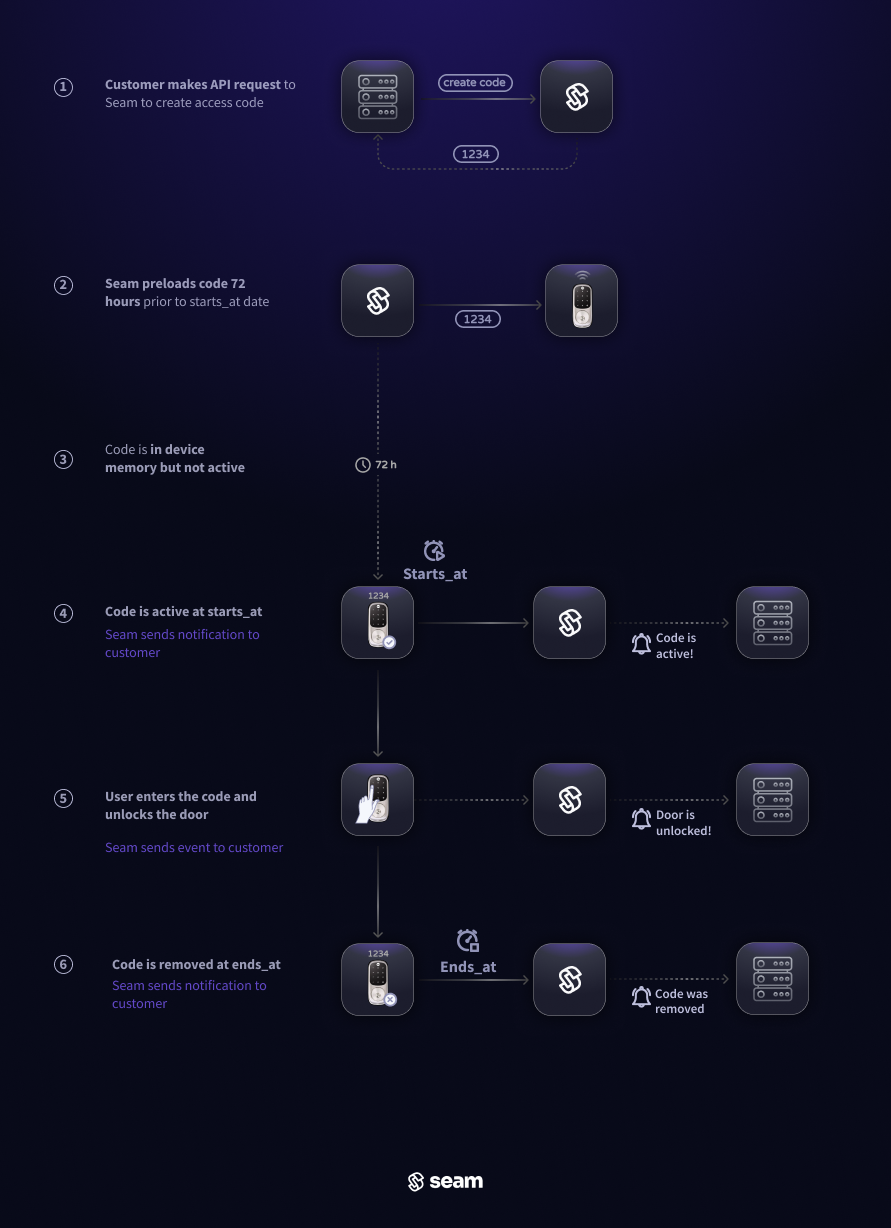
For locks that support setting codes with a schedule, Seam will preload access codes onto the device a full **72 hours** before the `starts_at` timestamp of a time-bound code. When the `starts_at` time arrives, the code automatically activates and will remain active until its `ends_at` time. We enable this "native scheduling" functionality by default for all providers that support it. See [Native Scheduling—Supported Providers](#native-scheduling-supported-providers) for a list of supported providers. You can choose to override this default behavior and have Seam perform "just-in-time scheduling" by setting `prefer_native_scheduling` to `false` when creating a code.

<figure><img src="https://2727122207-files.gitbook.io/~/files/v0/b/gitbook-x-prod.appspot.com/o/spaces%2FxnN2A67918om1UthYWsF%2Fuploads%2FEWCLgfDtD3nYTfksSIXa%2Fnative-code-programming-dark.png?alt=media&#x26;token=7c7941f5-ec58-40cd-98b2-3336753b277e" alt=""><figcaption><p>72 hours before the <code>starts_at</code> timestamp, Seam inserts the code into the device's internal memory. When the <code>starts_at</code> time arrives, the device automatically activates the code. It is then automatically deactivated at the <code>ends_at</code> timestamp.</p></figcaption></figure>

#### Native Scheduling—Supported Providers

| ✅ Supported | ✖️ Not Supported  |
| ----------- | ----------------- |
| 2N          | Dormakaba Oracode |
| August      | Lockly            |
| Igloohome   | SmartThings       |
| Kwikset     |                   |
| Nuki        |                   |
| Salto       |                   |
| Schlage     |                   |
| Tedee       |                   |
| TTLock      |                   |
| Yale        |                   |
| Wyze        |                   |

### **Just-in-time Scheduling**

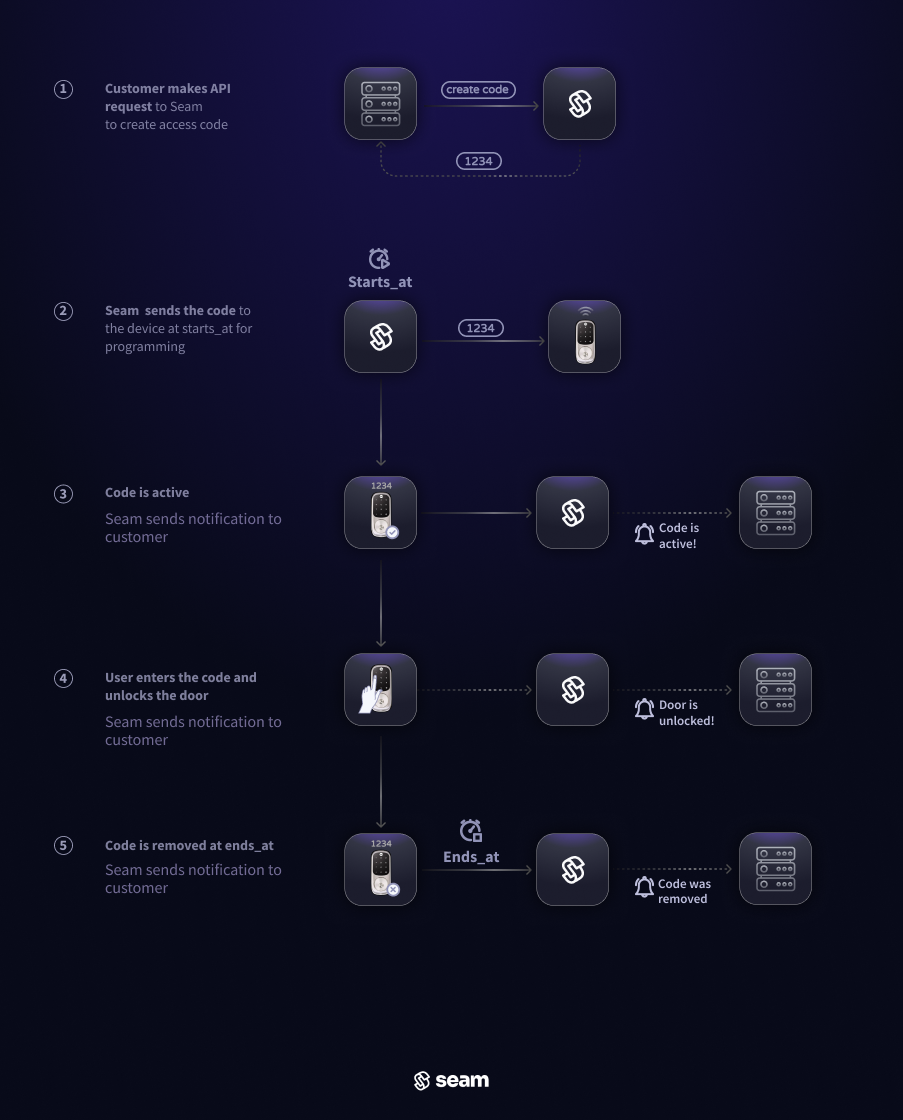
For those locks that lack native scheduling functionality, Seam will use its own scheduling infrastructure to program the code 60 minutes before the `starts_at` time, and remove it at the `ends_at` time.

<figure><img src="https://2727122207-files.gitbook.io/~/files/v0/b/gitbook-x-prod.appspot.com/o/spaces%2FxnN2A67918om1UthYWsF%2Fuploads%2FK52Sdc6dMGBVXoE9B3OI%2Fjust-in-time-programming-dark.png?alt=media&#x26;token=e9d6418d-63ca-447c-8869-8645d59d5ef5" alt=""><figcaption><p>When the <code>starts_at</code> time arrives, Seam adds the code to the device and activates it. It is then automatically deactivated at the <code>ends_at</code> timestamp.</p></figcaption></figure>

***

## Access Code Names <a href="#access-code-names" id="access-code-names"></a>

Note that the `name` provided on Seam is used to identify the code on Seam and is not necessarily the name that appears on the lock provider's app or on the device. This is because lock providers may have constraints on names, such as length, uniqueness, or characters that can be used. In addition, some lock providers may break names down into components, such as `first_name` and `last_name`.

To provide a consistent experience, Seam identifies an access code on Seam by its `name` but may modify the name that appears on the lock provider's app or on the device. For example, Seam may add additional characters or truncate the name to meet provider constraints.

To help your users identify codes set by Seam, Seam provides the name exactly as it appears on the lock provider's app or on the device as a separate property called `appearance`. This is an object with a `name` property and, optionally, `first_name` and `last_name` properties (for providers that break a name down into components).

***

## Linking Unlock Events and Access Codes

When a user unlocks a door using an access code, Seam issues a [`lock.unlocked` event](https://docs.seam.co/latest/~/revisions/DFdrUdS2jQOnbJTNDT5a/api/events#event-types). Some device manufacturers include the ID of the access code in [lock-related events](https://docs.seam.co/latest/~/revisions/DFdrUdS2jQOnbJTNDT5a/api/events#lock-events). This information is useful for troubleshooting and logging. Further, if you name access codes in a way that identifies the associated users, you can use these `lock.unlocked` events to identify the users who unlocked the doors.

Currently, the following device manufacturers send the `access_code_id` in the `lock.unlocked` event:

* August
* Kwikset
* Salto KS
* Schlage
* Tedee
* TTLock
* Yale

***

## External Modification <a href="#external-modification" id="external-modification"></a>

Seam attempts to keep an access code on a device in sync with the declared state of the access code on Seam. For example, the start time and end time of the access code are set to match the declared state of the access code on Seam. Any updates to the access code timings on Seam are reflected on the device. In general, if the access code is modified externally to Seam (through the lock provider's app, for example), Seam attempts to re-set the access code on the device to match the declared state of the access code on Seam. This also applies if the access code is removed from the device. Seam attempts to re-set the access code on the device, until the declared ending time of the access code has passed.

When external modifications are detected, Seam sends an `access_code.modified_external_to_seam` event and adds a `code_modified_external_to_seam` error on the access code.

This behavior can sometimes be surprising to users, so we recommend that you inform your users that Seam attempts to re-set access codes on the device if they are modified or removed externally. If you want to disable this behavior, you can set the `allow_external_modification` flag to `true` when creating an access code. When this flag is set to `true`, Seam sets `code_modified_external_to_seam` as a warning on the code instead of an error.

***

## Advanced Feature: Backup Access Codes

Occasionally, Seam may encounter issues when programming codes onto locks. Such hiccups can arise from device connectivity issues, manual interventions from the lock or its accompanying app, or service disruptions from the lock providers. Given these issues, we strongly advise preprogramming a set of backup codes onto the door lock. Should you detect a failure in access code programming, these backup codes can be promptly shared.

Seam offers a Backup Access Code service. When activated, this service automatically maintain a pool of pre-programmed access codes on a device. These codes are programmed in addition to the regular access codes on Seam, acting as a safety net in case of any issues with the primary codes. Please read about [how to enable and request a back up code here](https://docs.seam.co/latest/~/revisions/DFdrUdS2jQOnbJTNDT5a/capability-guides/smart-locks/access-codes/backup-access-codes).

<table data-card-size="large" data-view="cards"><thead><tr><th></th><th></th><th></th><th data-hidden data-card-cover data-type="files"></th><th data-hidden data-card-target data-type="content-ref"></th></tr></thead><tbody><tr><td><p><a href="access-codes/backup-access-codes"><strong>Backup Access Code Pool</strong></a></p><p>Use our backup code pool service to automatically maintain a set of back up codes on your device.</p></td><td></td><td></td><td><a href="https://2727122207-files.gitbook.io/~/files/v0/b/gitbook-x-prod.appspot.com/o/spaces%2FxnN2A67918om1UthYWsF%2Fuploads%2Ft6V1E9VUWB5EkDv07L95%2Fspaces_xnN2A67918om1UthYWsF_uploads_6mrS1LVdcoGmXAagf0SI_recycle%20key.webp?alt=media&#x26;token=7eff80e4-6750-4a1b-8b6c-8f7a9330314a">spaces_xnN2A67918om1UthYWsF_uploads_6mrS1LVdcoGmXAagf0SI_recycle key.webp</a></td><td><a href="access-codes/backup-access-codes">backup-access-codes</a></td></tr></tbody></table>