# Access Control System Resources

The Seam ACS schema consists of a series of resources. These resources interact intuitively, enabling you to manage your ACS in a logical, efficient manner. Seam's universal API provides the flexibility to manage a variety of [ACSs](https://docs.seam.co/latest/~/revisions/DFdrUdS2jQOnbJTNDT5a/capability-guides/access-systems/connect-an-acs-to-seam/understanding-access-control-system-differences), each of which may have manufacturer-specific differences. For details about your ACS, see the corresponding [system integration guide](https://docs.seam.co/latest/~/revisions/DFdrUdS2jQOnbJTNDT5a/device-and-system-integration-guides/overview#access-control-systems).

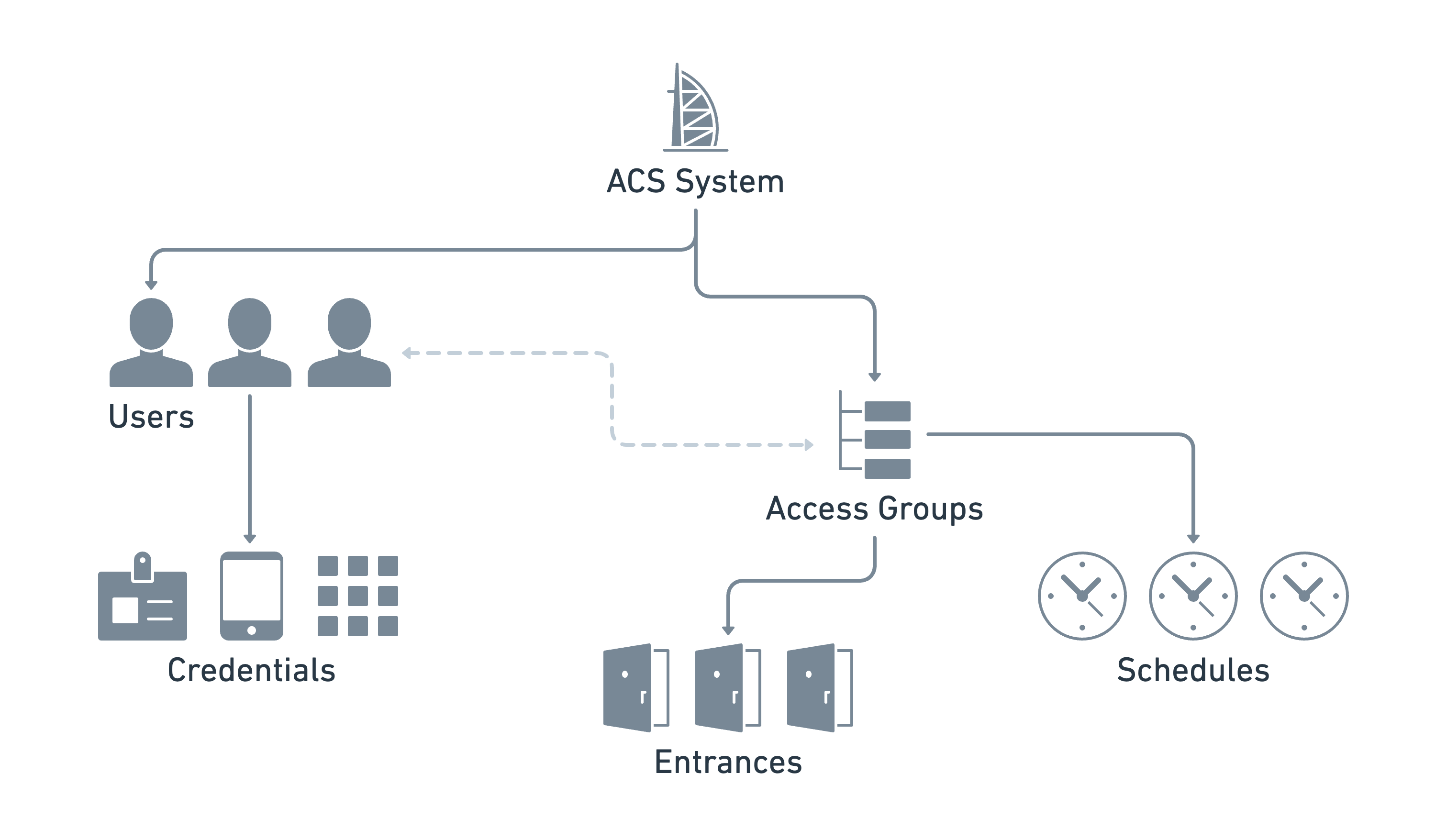
The following diagram shows an example of one ACS, including the ACS resources and the relationships between them:

<figure><img src="https://2727122207-files.gitbook.io/~/files/v0/b/gitbook-x-prod.appspot.com/o/spaces%2FxnN2A67918om1UthYWsF%2Fuploads%2FL1bXDuG09kc2uWRLpWEL%2Fimage.png?alt=media&#x26;token=8fc67326-5645-4b92-ba84-715cf5797fb9" alt="Seam&#x27;s ACS resources provide the flexibility to manage your ACS intuitively, regardless of the differences between various ACS manufacturers."><figcaption><p>Seam's ACS resources provide the flexibility to manage your ACS intuitively, regardless of the differences between various ACS manufacturers.</p></figcaption></figure>

The following table provides a brief description of each of the Seam ACS resources:

<table><thead><tr><th width="248">ACS Resource</th><th>Description</th></tr></thead><tbody><tr><td><p><img src="https://2727122207-files.gitbook.io/~/files/v0/b/gitbook-x-prod.appspot.com/o/spaces%2FxnN2A67918om1UthYWsF%2Fuploads%2F9SpGdq7bcspGcFWVFenz%2Facs-system_light.png?alt=media&#x26;token=5caaabe9-adc5-4287-833c-ce6327b6b80c" alt="" data-size="original"></p><p><a href="../../../api/acs/systems"><code>acs_system</code></a></p></td><td>The top-level object. Represents one or more buildings, residential locations, or other sites that you manage using this ACS.<br>For more information, see <a href="retrieving-acs-system-details">Retrieving ACS System Details</a>.</td></tr><tr><td><p><img src="https://2727122207-files.gitbook.io/~/files/v0/b/gitbook-x-prod.appspot.com/o/spaces%2FxnN2A67918om1UthYWsF%2Fuploads%2FqJTGaEtXKkEHVMuLOOSg%2Facs-user_light.png?alt=media&#x26;token=0a46b6fa-704c-4ddc-ae8d-af2f599e40e0" alt="" data-size="original"></p><p><a href="../../../api/acs/users"><code>acs_user</code></a></p></td><td><p>The set of users who access the entrances.</p><p>If you manage multiple ACSs and need to grant the same user access to <a href="../retrieving-entrance-details">entrances</a> in multiple ACSs, you can also use Seam <a href="../../../api/user_identities">user identities</a>. With user identities, you can link an application user in your own system to one or more Seam ACS users.<br>For more information, see <a href="../user-management">Managing ACS Users</a>.</p></td></tr><tr><td><p><img src="https://2727122207-files.gitbook.io/~/files/v0/b/gitbook-x-prod.appspot.com/o/spaces%2FxnN2A67918om1UthYWsF%2Fuploads%2FBzVPU1tuopgCRnAZTIa9%2Facs-access-group_light.png?alt=media&#x26;token=2705ddec-7577-4923-82f0-659f731e03ad" alt="" data-size="original"></p><p><a href="https://github.com/seamapi/docs/blob/main/docs/api/acs/access-groups/README.md"><code>acs_access_group</code></a></p></td><td>Some ACSs use access groups as an efficient way to grant sets of scheduled entrance access to one or more users.<br>For more information, see <a href="../user-management/assigning-users-to-access-groups">Assigning ACS Users to Access Groups</a>.</td></tr><tr><td><p><img src="https://2727122207-files.gitbook.io/~/files/v0/b/gitbook-x-prod.appspot.com/o/spaces%2FxnN2A67918om1UthYWsF%2Fuploads%2F4gqMDVS68BfwFZrL7dAs%2Facs-credential_light.png?alt=media&#x26;token=922ffd2b-b984-4d3d-8da2-d8d50896579a" alt="" data-size="original"></p><p><a href="../../../api/acs/credentials"><code>acs_credential</code></a></p></td><td>A digital means that authorizes a user to access one or more entrances at specific days and times. Examples of credentials include RFID cards, mobile keys, and PIN codes.<br>For more information, see <a href="../managing-credentials">Managing Credentials</a>.</td></tr><tr><td><p><img src="https://2727122207-files.gitbook.io/~/files/v0/b/gitbook-x-prod.appspot.com/o/spaces%2FxnN2A67918om1UthYWsF%2Fuploads%2FCSWpb5yakcud0BPHsh05%2Facs-entrance_light.png?alt=media&#x26;token=6d908af3-dc07-4796-997c-cd0dc241cb78" alt="" data-size="original"></p><p><a href="../../../api/acs/entrances"><code>acs_entrance</code></a></p></td><td>The set of entrances, doors, or zones that you want to manage. You identify each entrance by the corresponding lock object.<br>For more information, see <a href="../retrieving-entrance-details">Retrieving Entrance Details</a>.</td></tr></tbody></table>

{% hint style="info" %}
You configure the access schedules for your ACS users either through access groups or credentials, depending on your specific ACS. There is no separate schedule resource in the Seam API.
{% endhint %}