# Access Control Systems

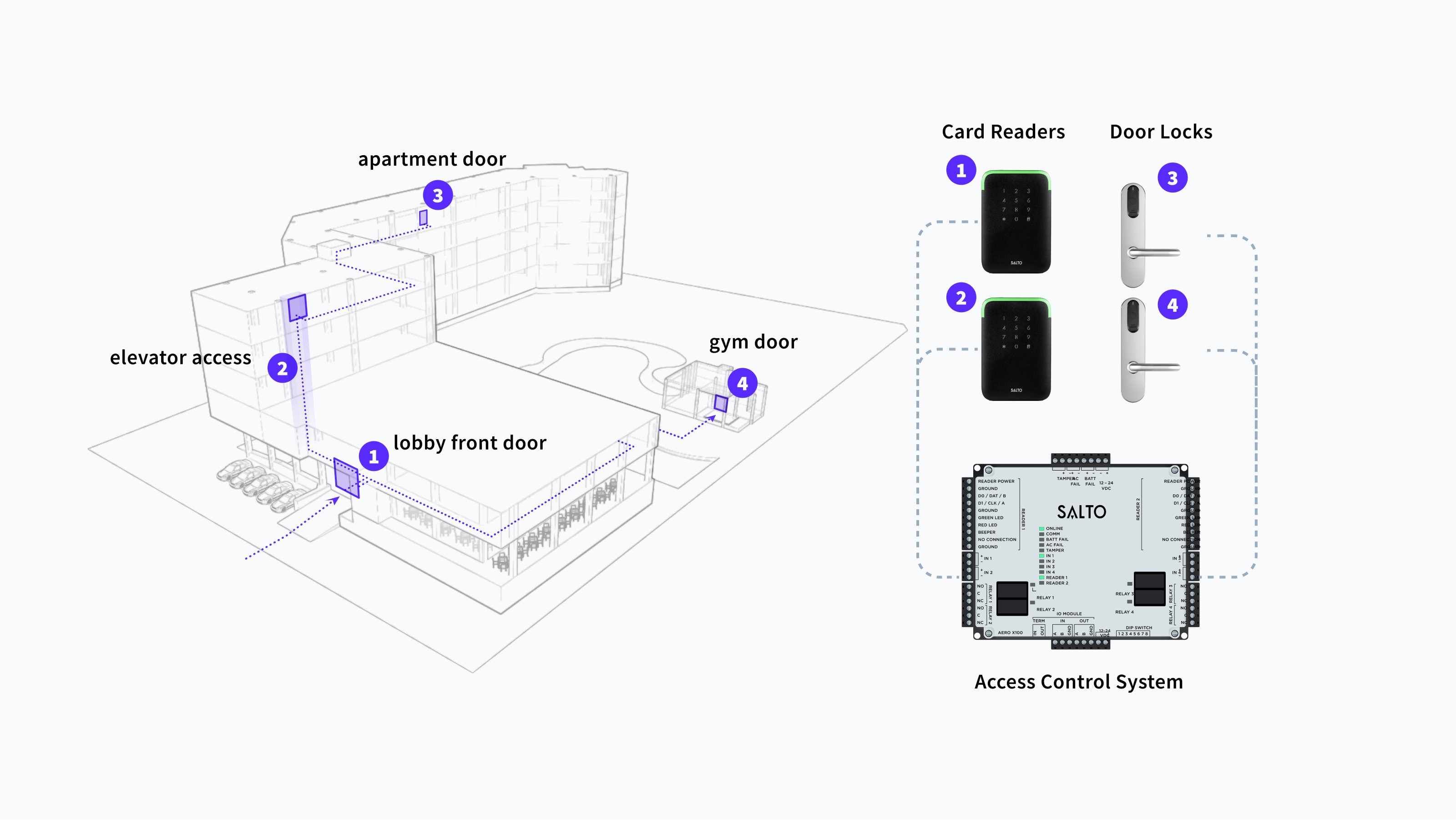
<figure><img src="https://2727122207-files.gitbook.io/~/files/v0/b/gitbook-x-prod.appspot.com/o/spaces%2FxnN2A67918om1UthYWsF%2Fuploads%2FrOBDScH2BGHl9wcYiXgs%2Fbuilding-acs-example.png?alt=media&#x26;token=e3ceacb2-fd35-4cdf-84da-fb05425308c3" alt="With Seam, you can manage your ACS system, granting users access to multiple entrances using credentials."><figcaption><p>With Seam, you can manage your access control system, granting users access to multiple entrances using credentials.</p></figcaption></figure>

Use the Seam access control system (ACS) API to grant and manage access to apartment buildings, hotels, commercial offices, warehouses, special-purpose facilities, and much more. Seam integrates with multiple ACS systems and brands, and the Seam API standardizes key functions.

***

## What Is an Access Control System?

Access control systems centralize access authorization for buildings, which means that you can use a single system to grant users access to one or more entrances. An access control system manages the following elements:

* Who has access
* The entrances to which users have access
* The access schedule for each user and entrance
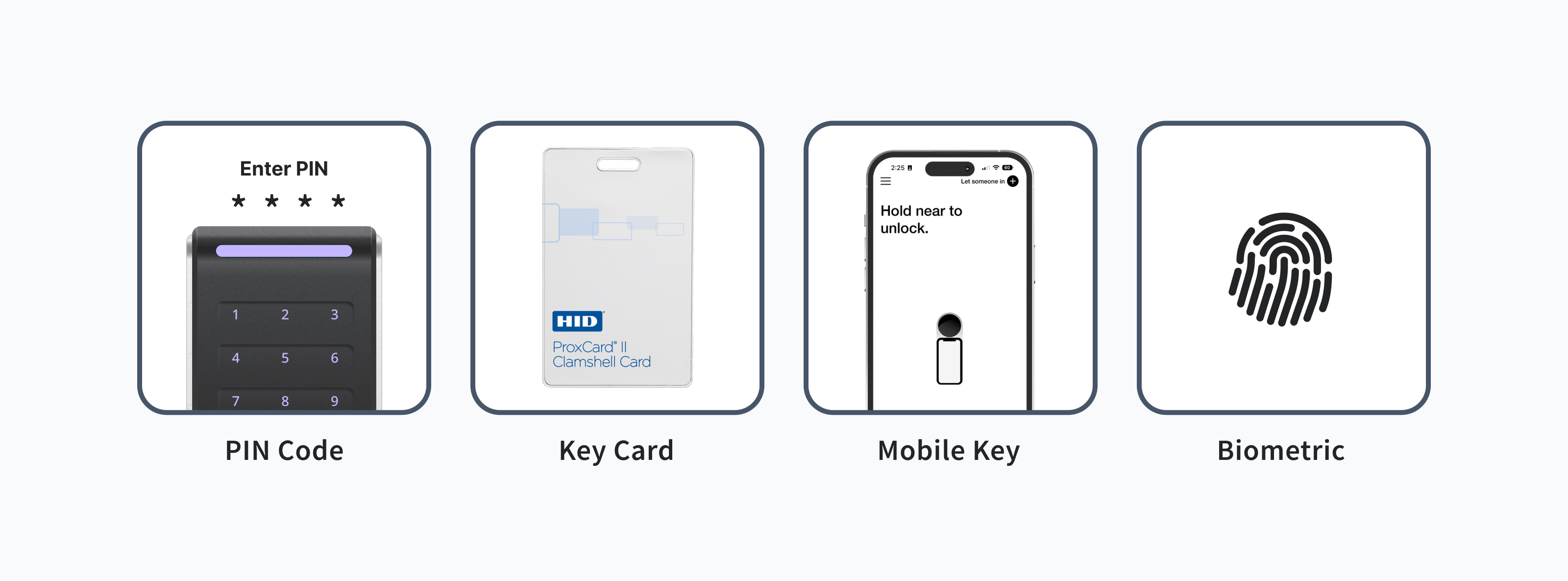
* The access mechanism—PIN codes, mobile keys, or plastic cards—for each access grant

***

## Managing Your ACS with Seam

Seam enables you to manage your ACS in a logical, efficient manner.

1. Create ACS users.
2. Configure access for your ACS users.

   For each user, specify the entrances to which the user has access and the schedule for this access.
3. Define credentials, which are the digital means of granting access, such as PIN codes, mobile keys, and plastic (RFID) cards.\
   If you are developing a mobile app to provide access for your ACS users, you can also use [Seam's iOS and Android SDKs](https://docs.seam.co/latest/~/revisions/DFdrUdS2jQOnbJTNDT5a/developer-tools/mobile-sdks) that pair with the Seam API to create and manage mobile keys.

<figure><img src="https://2727122207-files.gitbook.io/~/files/v0/b/gitbook-x-prod.appspot.com/o/spaces%2FxnN2A67918om1UthYWsF%2Fuploads%2FHQA7RgXHJ1QaRRRcDPXe%2Facs-credential-types.png?alt=media&#x26;token=b8c9e6f9-3253-41c7-aa1d-b82546043e9e" alt="Seam provides the flexibility to grant access to ACS users, using the access methods that best suit your users&#x27; needs."><figcaption><p>Seam provides the flexibility to grant access to ACS users, using the access methods that best suit your users' needs.</p></figcaption></figure>

### Seam's API Handles ACS Differences

Seam's universal API provides the flexibility to manage a variety of [access control systems](https://docs.seam.co/latest/~/revisions/DFdrUdS2jQOnbJTNDT5a/capability-guides/access-systems/connect-an-acs-to-seam/understanding-access-control-system-differences), each of which may have manufacturer-specific differences. For example, depending on your ACS, you configure access permissions by [assigning ACS users to access groups](https://docs.seam.co/latest/~/revisions/DFdrUdS2jQOnbJTNDT5a/capability-guides/connect-an-acs-to-seam/understanding-access-control-system-differences#access-group-based-access-control-systems) or by [specifying access permissions for each ACS user or credential](https://docs.seam.co/latest/~/revisions/DFdrUdS2jQOnbJTNDT5a/capability-guides/connect-an-acs-to-seam/understanding-access-control-system-differences#credential-based-access-control-systems).

For details specific to your access control system, see the [system integration guide](https://docs.seam.co/latest/~/revisions/DFdrUdS2jQOnbJTNDT5a/device-and-system-integration-guides/overview#access-control-systems) for your ACS.

***

## **Getting Started**

Create your first credentials! See the [ACS Quick Starts](https://docs.seam.co/latest/~/revisions/DFdrUdS2jQOnbJTNDT5a/capability-guides/access-systems/acs-quick-starts).

<table data-view="cards"><thead><tr><th></th><th data-hidden data-card-cover data-type="files"></th><th data-hidden data-card-target data-type="content-ref"></th></tr></thead><tbody><tr><td>Create your first PIN code credential. →</td><td><a href="https://2727122207-files.gitbook.io/~/files/v0/b/gitbook-x-prod.appspot.com/o/spaces%2FxnN2A67918om1UthYWsF%2Fuploads%2FY0WalA5bAYZRT22x3Q5U%2Fpin-code.png?alt=media&#x26;token=0505c608-fe63-4247-8b97-a64935cb9852">pin-code.png</a></td><td><a href="access-systems/acs-quick-starts/pin-code-quick-start">pin-code-quick-start</a></td></tr><tr><td>Create your first encodable key card credential. →</td><td><a href="https://2727122207-files.gitbook.io/~/files/v0/b/gitbook-x-prod.appspot.com/o/spaces%2FxnN2A67918om1UthYWsF%2Fuploads%2FebW5vjPJI2RFyqCznTgd%2Fkey-card.png?alt=media&#x26;token=40a5aea8-51e3-4b78-a768-698debbf239d">key-card.png</a></td><td><a href="access-systems/acs-quick-starts/encodable-key-card-quick-start">encodable-key-card-quick-start</a></td></tr><tr><td>Create your first mobile key credential. →</td><td><a href="https://2727122207-files.gitbook.io/~/files/v0/b/gitbook-x-prod.appspot.com/o/spaces%2FxnN2A67918om1UthYWsF%2Fuploads%2FWGhFfDh6fgXoLGOfKVef%2Fmobile-key.png?alt=media&#x26;token=5f288f49-1432-4579-9442-a91a94575919">mobile-key.png</a></td><td><a href="access-systems/acs-quick-starts/mobile-key-quick-start">mobile-key-quick-start</a></td></tr></tbody></table>

***

## Learn More

Find out more about using Seam to manage access control system resources. See the following guides:

1. Connect your ACS to Seam.
   * [Connect an ACS to Seam](https://docs.seam.co/latest/~/revisions/DFdrUdS2jQOnbJTNDT5a/capability-guides/access-systems/connect-an-acs-to-seam)
2. Learn about ACS concepts.
   * [Access Control System Resources](https://docs.seam.co/latest/~/revisions/DFdrUdS2jQOnbJTNDT5a/capability-guides/access-systems/connect-an-acs-to-seam/access-control-system-resources)
   * [Understanding ACS Differences](https://docs.seam.co/latest/~/revisions/DFdrUdS2jQOnbJTNDT5a/capability-guides/access-systems/connect-an-acs-to-seam/understanding-access-control-system-differences)
3. Get your ACS system ID.
   * [Retrieving ACS System Details](https://docs.seam.co/latest/~/revisions/DFdrUdS2jQOnbJTNDT5a/capability-guides/access-systems/connect-an-acs-to-seam/retrieving-acs-system-details)
4. Create ACS users.
   * [Managing ACS Users](https://docs.seam.co/latest/~/revisions/DFdrUdS2jQOnbJTNDT5a/capability-guides/access-systems/user-management)
5. For relevant access control systems, assign ACS users to access groups.
   * [Assigning ACS Users to Access Groups](https://docs.seam.co/latest/~/revisions/DFdrUdS2jQOnbJTNDT5a/capability-guides/access-systems/user-management/assigning-users-to-access-groups)
6. Learn about available entrances.
   * [Retrieving Entrance Details](https://docs.seam.co/latest/~/revisions/DFdrUdS2jQOnbJTNDT5a/capability-guides/access-systems/retrieving-entrance-details)
7. Create credentials for ACS users.
   * [Managing Credentials](https://docs.seam.co/latest/~/revisions/DFdrUdS2jQOnbJTNDT5a/capability-guides/access-systems/managing-credentials)
8. See the Seam [Access Control Systems API reference](https://docs.seam.co/latest/~/revisions/DFdrUdS2jQOnbJTNDT5a/api/acs).