> ## Documentation Index
> Fetch the complete documentation index at: https://docs.seam.co/llms.txt
> Use this file to discover all available pages before exploring further.
# Get Started with Nuki Locks
> Learn how to connect and control your Nuki locks with the Seam API.
## Overview
Seam provides a universal API to connect and control many brands of locks, including Nuki. This guide provides a rapid introduction to connecting and controlling your [Nuki](https://www.seam.co/manufacturers/nuki) locks using the Seam API. To learn more about other device brands supported by the Seam API, such as Yale, Schlage, and August, head over to our [integration page](https://www.seam.co/supported-devices-and-systems).
## 1 — Install Seam SDK
Seam provides client libraries for many languages, such as JavaScript, Python, Ruby, PHP, and others, as well as a Postman collection and [OpenAPI](https://connect.getseam.com/openapi.json) spec.
* JavaScript / TypeScript ([npm](https://www.npmjs.com/package/seam), [GitHub](https://github.com/seamapi/javascript))
* Python ([pip](https://pypi.org/project/seam/), [GitHub](https://github.com/seamapi/python))
* Ruby Gem ([rubygem](https://rubygems.org/gems/seam), [GitHub](https://github.com/seamapi/ruby))
* PHP ([packagist](https://packagist.org/packages/seamapi/seam), [GitHub](https://github.com/seamapi/php))
* C# ([nuget](https://www.nuget.org/packages/Seam), [GitHub](https://github.com/seamapi/csharp))
```bash theme={null}
npm i seam
```
```bash theme={null}
pip install seam
# For some development environments, use pip3 in this command instead of pip.
```
```bash theme={null}
bundle add seam
```
```bash theme={null}
composer require seamapi/seam
```
Install using [nuget](https://www.nuget.org/packages/Seam).
Once installed, [sign-up for Seam](https://console.seam.co/) to get your API key, and export it as an environment variable:
```
$ export SEAM_API_KEY=seam_test2ZTo_0mEYQW2TvNDCxG5Atpj85Ffw
```
This guide uses a Sandbox Workspace. Only virtual devices can be connected. If
you need to connect a real Nuki device, use a non-sandbox workspace and API
key.
## 2 — Link Your Nuki Account with Seam
To control your Nuki locks via the Seam API, you must first authorize your Seam workspace against your Nuki KS account. To do so, Seam provides[ Connect Webviews](/core-concepts/connect-webviews): pre-built UX flows that walk you through authorizing your application to control your Nuki sites.
#### Request a Connect Webview
```javascript JavaScript theme={null}
// Use Seam SDK to create a connect webview with the provider nuki
const createdConnectWebview = await seam.connectWebviews.create({
accepted_providers: ["nuki"]
});
// Print the created webview URL
console.log(createdConnectWebview.url);
```
```python Python theme={null}
# Create a webview with Nuki as the provider
created_webview = seam.connect_webviews.create(accepted_providers=["nuki"])
# Assert that login is not yet successful
assert created_webview.login_successful is False
# Print the URL of the webview
print(created_webview.url)
```
```ruby Ruby theme={null}
# Create a connect webview with the provider "nuki"
created_webview = seam.connect_webviews.create(accepted_providers: ["nuki"])
# The webview will not be logged in, which can be confirmed
raise 'Login should not be succesful' unless !created_webview.login_successful
# Retrieve and print out the url of the webview
puts created_webview.url
```
```php PHP theme={null}
connect_webviews->create([
'accepted_providers' => ['nuki']
]);
// check if the login was successful
assert($connect_webview->login_successful === false);
// print the connect webview URL
print($connect_webview->url);
?>
```
#### Authorize Your Workspace
Navigate to the URL returned by the Webview object. Since you are using a sandbox workspace, complete the login flow by entering the Nuki [sandbox test accounts ](/device-and-system-integration-guides/nuki-locks/nuki-sample-data)credentials below:
* **email:** [john@example.com](mailto:john@example.com)
* **password:** 1234
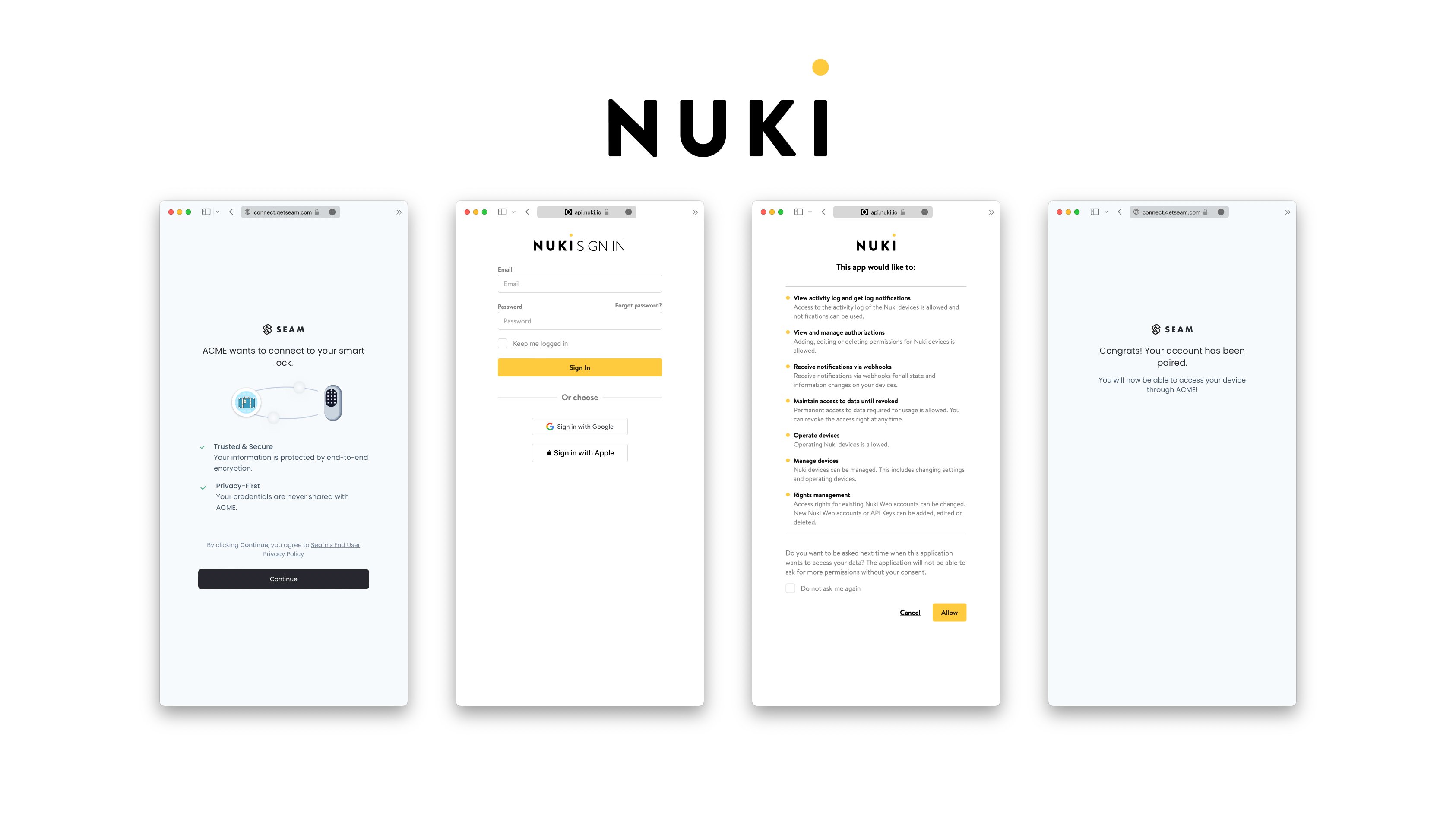 Confirm the Connect Webview was successful by querying its status:
```javascript JavaScript theme={null}
const updatedWebview = await seam.connectWebviews.get(
connectWebview.connect_webview_id
)
console.log(updatedWebview.login_successful) // true
```
```python Python theme={null}
updated_webview = seam.connect_webviews.get(connect_webview_id: webview.connect_webview_id)
assert updated_webview.login_successful # true
```
```ruby Ruby theme={null}
updated_webview = seam.connect_webviews.get(connect_webview_id: webview.connect_webview_id)
puts updated_webview.login_successful # true
```
```php PHP theme={null}
$webview = $seam->connect_webviews->get($webview->id);
echo json_encode($webview);
```
## 3 — Retrieve Nuki Devices
After a Nuki account is linked with Seam, you can retrieve devices for this Nuki account. The Seam API exposes most of the device's properties such as battery level.
```javascript JavaScript theme={null}
const allLocks = await seam.locks.list()
const someLock = allLocks[0]
console.log(someLock.properties.online) // true
console.log(someLock.properties.locked) // true
console.log(someLock)
/_
{
device_id: '60d0f1b6-26ae-4366-8d1b-d20ad0d6a62e',
device_type: 'nuki_lock',
capabilities_supported: [ 'access_code', 'lock' ],
properties: {
locked: false,
online: true,
manufacturer: 'nuki',
battery_level: 0.86,
nuki_metadata: { device_id: '545636388', device_name: 'Office Lock' },
max_active_codes_supported: 100,
supported_code_lengths: [ 6 ],
name: 'Office Lock'
},
location: null,
connected_account_id: '32e92b46-7978-4d48-a3e7-9b04662151b3',
workspace_id: 'd7418ff3-a476-4f48-9a4b-211d1d21a03d',
created_at: '2023-02-11T00:46:12.940Z',
errors: [],
warnings: []
}
_/
```
```python Python theme={null}
all_locks = seam.locks.list()
some_lock = all_locks[0]
assert some_lock.properties["online"] is True
assert some_lock.properties["battery_level"] is True
print(some_lock)
# Device(device_id='60d0f1b6-26ae-4366-8d1b-d20ad0d6a62e', device_type='nuki_lock', location=None, properties={'locked': False, 'online': True, 'manufacturer': 'nuki', 'battery_level': 0.86, 'nuki_metadata': {'device_id': '545636388', 'device_name': 'Office Lock'}, 'max_active_codes_supported': 100, 'supported_code_lengths': [6], 'name': 'Office Lock'}, capabilities_supported=['access_code', 'lock'], errors=[])
```
```ruby Ruby theme={null}
some_lock = seam.locks.list.first
puts some_lock.properties.online # true
puts some_lock.properties.locked # true
puts some_lock
# false, "online"=>true, "manufacturer"=>"nuki", "battery_level"=>0.86, "nuki_metadata"=>{"device_id"=>"545636388", "device_name"=>"Office Lock"}, "max_active_codes_supported": 100, "supported_code_lengths"=>[6], "name"=>"Office Lock"}
# created_at=2023-02-11 00:46:12.94 UTC
# errors=[]
# warnings=[]>
```
```php PHP theme={null}
use Seam\SeamClient;
$seam = new SeamClient('YOUR_API_KEY');
$locks = $seam->locks->list();
echo json_encode($locks);
/*
[{"device_id":"60d0f1b6-26ae-4366-8d1b-d20ad0d6a62e","workspace_id":"d7418ff3-a476-4f48-9a4b-211d1d21a03d","connected_account_id":"32e92b46-7978-4d48-a3e7-9b04662151b3","device_type":"nuki_lock","properties":{"online":true,"locked":false,"door_open":null,"battery_level":0.86,"name":"Office Lock","manufacturer":"nuki","august_metadata":null,"schlage_metadata":null,"smartthings_metadata":null},"location":null,"created_at":"2023-02-11T00:46:12.940Z","capabilities_supported":["access_code","lock"],"errors":[]}]
*/
```
### 4 — Locking & Unlocking a Door
Next, you can perform the basic action of locking and unlocking a door.
> **`POST`** `/locks/lock_door`
>
> See the [API Reference](/api/locks/lock_door) for details.
## Unlock a door
`POST`
`https://connect.getseam.com/locks/unlock_door`
#### Request Body
| Name | Type | Description |
| ---------- | ------ | ----------- |
| device\_id | String | |
```javascript JavaScript theme={null}
// lock the door
await seam.locks.lockDoor(someLock.device_id)
const updatedLock = await seam.locks.get(someLock.device_id)
console.log(updatedLock.properties.locked) // true
// unlock the door
await seam.locks.unlockDoor(someLock.device_id)
updatedLock = await seam.locks.get(someLock.device_id)
console.log(updatedLock.properties.locked) // false
```
```python Python theme={null}
# lock the door
seam.locks.lock_door(device_id: some_lock.device_id)
updated_lock = seam.locks.get(device_id: some_lock.device_id)
assert updated_lock.properties["locked"] is True
# Now unlock the door
seam.locks.unlock_door(device_id: some_lock.device_id)
updated_lock = seam.locks.get(device_id: some_lock.device_id)
assert updated_lock.properties["locked"] is False
```
```ruby Ruby theme={null}
# lock the door
seam.locks.lock_door(device_id: some_lock.device_id)
updated_lock = seam.locks.get(device_id: some_lock.device_id)
puts updated_lock.properties.locked # true
# unlock the door
seam.locks.unlock_door(device_id: some_lock.device_id)
updated_lock = seam.locks.get(device_id: some_lock.device_id)
puts updated_lock.properties.locked # false
```
```php PHP theme={null}
use Seam\SeamClient;
$seam = new SeamClient('YOUR_API_KEY');
$some_lock = $seam->locks->list()[0];
# unlock the door
$seam->locks->unlock_door($lock->device_id);
# lock the door
$seam->locks->lock_door($lock->device_id);
```
### 5 — Setting Access Code on Nuki Lock
Some Nuki locks also have a keypad paired to them to program access codes. These codes can then be entered to unlock a Nuki lock.
The Seam API makes it easy to program both `ongoing` codes and `timebound` codes on a Nuki lock. You can find out more about Nuki lock access code in our [core concept section on access codes.](/low-level-apis/smart-locks/access-codes)
Nuki does not let you create a code starting with the digits "12". Codes
cannot contain the digit 0.
```javascript JavaScript theme={null}
// create an ongoing code
await seam.accessCodes.create({
device_id: someLock.device_id,
code: "123456",
name: "Personal Access Code",
})
// create a timebound code
await seam.accessCodes.create({
device_id: someLock.device_id,
code: "888888",
name: "My Temp Access Code",
starts_at: "2028-11-12T19:23:42+0000",
ends_at: "2028-11-13T19:23:42+0000",
})
// use a device_id as the "device_id" parameter
await seam.accessCodes.list({
device_id: someLock.device_id,
})
```
```python Python theme={null}
# create an ongoing code
seam.access_codes.create(
device=some_lock,
code="492332",
name="Personal Access Code")
# create a timebound code
seam.access_codes.create(
device=some_lock,
code="498882",
name="My Temp Access Code",
starts_at="2028-08-12T19:23:42+0000",
ends_at="2028-08-13T19:23:42+0000")
# you can use a device or a device_id as the "device" parameter
seam.access_codes.list(device=some_lock)
```
```ruby Ruby theme={null}
# create an ongoing code
seam.access_codes.create(
device_id: some_lock.device_id, code: '123456', name: 'Personal Access Code'
)
# create a timebound code
seam.access_codes.create(
device_id: some_lock.device_id,
code: '888888',
name: 'My Temp Access Code',
starts_at: '2028-08-12T19:23:42+0000',
ends_at: '2028-08-13T19:23:42+0000'
)
seam.access_codes.list(device_id: some_lock.device_id)
```
```php PHP theme={null}
use Seam\SeamClient;
$seam = new SeamClient("YOUR_API_KEY");
$some_lock = $seam->locks->list()[0];
$seam->access_codes->create(
device_id: $some_lock->device_id, code: '123456', name: 'Personal Access Code'
);
$seam->access_codes->create(
device_id: $some_lock->device_id,
name: 'My Temp Access Code',
code: '888888',
starts_at: '2028-08-12T19:23:42+0000',
ends_at: '2028-08-13T19:23:42+0000'
);
```
## Next Steps
Now that you've completed this guide, you can try to connect a real Nuki device. To do so, make sure to switch to a non-sandbox workspace and API key as real devices cannot be connected to sandbox workspaces.
In addition, if you'd like to explore other aspects of Seam, here is a list of helpful resources:
* [Schlage Getting Started Guide](../schlage-locks/get-started-with-schlage-locks)
* [Yale Getting Started Guide](../yale-locks/get-started-with-yale-locks)
* [SmartThings Getting Started Guide](../smartthings-hubs-+-devices/get-started-with-smartthings-hubs-+-smart-locks)
* [Receiving webhook](/developer-tools/webhooks) for [device events](/api/events/list)
* [Core Concepts](/core-concepts/overview)
If you have any questions or want to report an issue, email us at [support@seam.co](mailto:support@seam.co).
Confirm the Connect Webview was successful by querying its status:
```javascript JavaScript theme={null}
const updatedWebview = await seam.connectWebviews.get(
connectWebview.connect_webview_id
)
console.log(updatedWebview.login_successful) // true
```
```python Python theme={null}
updated_webview = seam.connect_webviews.get(connect_webview_id: webview.connect_webview_id)
assert updated_webview.login_successful # true
```
```ruby Ruby theme={null}
updated_webview = seam.connect_webviews.get(connect_webview_id: webview.connect_webview_id)
puts updated_webview.login_successful # true
```
```php PHP theme={null}
$webview = $seam->connect_webviews->get($webview->id);
echo json_encode($webview);
```
## 3 — Retrieve Nuki Devices
After a Nuki account is linked with Seam, you can retrieve devices for this Nuki account. The Seam API exposes most of the device's properties such as battery level.
```javascript JavaScript theme={null}
const allLocks = await seam.locks.list()
const someLock = allLocks[0]
console.log(someLock.properties.online) // true
console.log(someLock.properties.locked) // true
console.log(someLock)
/_
{
device_id: '60d0f1b6-26ae-4366-8d1b-d20ad0d6a62e',
device_type: 'nuki_lock',
capabilities_supported: [ 'access_code', 'lock' ],
properties: {
locked: false,
online: true,
manufacturer: 'nuki',
battery_level: 0.86,
nuki_metadata: { device_id: '545636388', device_name: 'Office Lock' },
max_active_codes_supported: 100,
supported_code_lengths: [ 6 ],
name: 'Office Lock'
},
location: null,
connected_account_id: '32e92b46-7978-4d48-a3e7-9b04662151b3',
workspace_id: 'd7418ff3-a476-4f48-9a4b-211d1d21a03d',
created_at: '2023-02-11T00:46:12.940Z',
errors: [],
warnings: []
}
_/
```
```python Python theme={null}
all_locks = seam.locks.list()
some_lock = all_locks[0]
assert some_lock.properties["online"] is True
assert some_lock.properties["battery_level"] is True
print(some_lock)
# Device(device_id='60d0f1b6-26ae-4366-8d1b-d20ad0d6a62e', device_type='nuki_lock', location=None, properties={'locked': False, 'online': True, 'manufacturer': 'nuki', 'battery_level': 0.86, 'nuki_metadata': {'device_id': '545636388', 'device_name': 'Office Lock'}, 'max_active_codes_supported': 100, 'supported_code_lengths': [6], 'name': 'Office Lock'}, capabilities_supported=['access_code', 'lock'], errors=[])
```
```ruby Ruby theme={null}
some_lock = seam.locks.list.first
puts some_lock.properties.online # true
puts some_lock.properties.locked # true
puts some_lock
# false, "online"=>true, "manufacturer"=>"nuki", "battery_level"=>0.86, "nuki_metadata"=>{"device_id"=>"545636388", "device_name"=>"Office Lock"}, "max_active_codes_supported": 100, "supported_code_lengths"=>[6], "name"=>"Office Lock"}
# created_at=2023-02-11 00:46:12.94 UTC
# errors=[]
# warnings=[]>
```
```php PHP theme={null}
use Seam\SeamClient;
$seam = new SeamClient('YOUR_API_KEY');
$locks = $seam->locks->list();
echo json_encode($locks);
/*
[{"device_id":"60d0f1b6-26ae-4366-8d1b-d20ad0d6a62e","workspace_id":"d7418ff3-a476-4f48-9a4b-211d1d21a03d","connected_account_id":"32e92b46-7978-4d48-a3e7-9b04662151b3","device_type":"nuki_lock","properties":{"online":true,"locked":false,"door_open":null,"battery_level":0.86,"name":"Office Lock","manufacturer":"nuki","august_metadata":null,"schlage_metadata":null,"smartthings_metadata":null},"location":null,"created_at":"2023-02-11T00:46:12.940Z","capabilities_supported":["access_code","lock"],"errors":[]}]
*/
```
### 4 — Locking & Unlocking a Door
Next, you can perform the basic action of locking and unlocking a door.
> **`POST`** `/locks/lock_door`
>
> See the [API Reference](/api/locks/lock_door) for details.
## Unlock a door
`POST`
`https://connect.getseam.com/locks/unlock_door`
#### Request Body
| Name | Type | Description |
| ---------- | ------ | ----------- |
| device\_id | String | |
```javascript JavaScript theme={null}
// lock the door
await seam.locks.lockDoor(someLock.device_id)
const updatedLock = await seam.locks.get(someLock.device_id)
console.log(updatedLock.properties.locked) // true
// unlock the door
await seam.locks.unlockDoor(someLock.device_id)
updatedLock = await seam.locks.get(someLock.device_id)
console.log(updatedLock.properties.locked) // false
```
```python Python theme={null}
# lock the door
seam.locks.lock_door(device_id: some_lock.device_id)
updated_lock = seam.locks.get(device_id: some_lock.device_id)
assert updated_lock.properties["locked"] is True
# Now unlock the door
seam.locks.unlock_door(device_id: some_lock.device_id)
updated_lock = seam.locks.get(device_id: some_lock.device_id)
assert updated_lock.properties["locked"] is False
```
```ruby Ruby theme={null}
# lock the door
seam.locks.lock_door(device_id: some_lock.device_id)
updated_lock = seam.locks.get(device_id: some_lock.device_id)
puts updated_lock.properties.locked # true
# unlock the door
seam.locks.unlock_door(device_id: some_lock.device_id)
updated_lock = seam.locks.get(device_id: some_lock.device_id)
puts updated_lock.properties.locked # false
```
```php PHP theme={null}
use Seam\SeamClient;
$seam = new SeamClient('YOUR_API_KEY');
$some_lock = $seam->locks->list()[0];
# unlock the door
$seam->locks->unlock_door($lock->device_id);
# lock the door
$seam->locks->lock_door($lock->device_id);
```
### 5 — Setting Access Code on Nuki Lock
Some Nuki locks also have a keypad paired to them to program access codes. These codes can then be entered to unlock a Nuki lock.
The Seam API makes it easy to program both `ongoing` codes and `timebound` codes on a Nuki lock. You can find out more about Nuki lock access code in our [core concept section on access codes.](/low-level-apis/smart-locks/access-codes)
Nuki does not let you create a code starting with the digits "12". Codes
cannot contain the digit 0.
```javascript JavaScript theme={null}
// create an ongoing code
await seam.accessCodes.create({
device_id: someLock.device_id,
code: "123456",
name: "Personal Access Code",
})
// create a timebound code
await seam.accessCodes.create({
device_id: someLock.device_id,
code: "888888",
name: "My Temp Access Code",
starts_at: "2028-11-12T19:23:42+0000",
ends_at: "2028-11-13T19:23:42+0000",
})
// use a device_id as the "device_id" parameter
await seam.accessCodes.list({
device_id: someLock.device_id,
})
```
```python Python theme={null}
# create an ongoing code
seam.access_codes.create(
device=some_lock,
code="492332",
name="Personal Access Code")
# create a timebound code
seam.access_codes.create(
device=some_lock,
code="498882",
name="My Temp Access Code",
starts_at="2028-08-12T19:23:42+0000",
ends_at="2028-08-13T19:23:42+0000")
# you can use a device or a device_id as the "device" parameter
seam.access_codes.list(device=some_lock)
```
```ruby Ruby theme={null}
# create an ongoing code
seam.access_codes.create(
device_id: some_lock.device_id, code: '123456', name: 'Personal Access Code'
)
# create a timebound code
seam.access_codes.create(
device_id: some_lock.device_id,
code: '888888',
name: 'My Temp Access Code',
starts_at: '2028-08-12T19:23:42+0000',
ends_at: '2028-08-13T19:23:42+0000'
)
seam.access_codes.list(device_id: some_lock.device_id)
```
```php PHP theme={null}
use Seam\SeamClient;
$seam = new SeamClient("YOUR_API_KEY");
$some_lock = $seam->locks->list()[0];
$seam->access_codes->create(
device_id: $some_lock->device_id, code: '123456', name: 'Personal Access Code'
);
$seam->access_codes->create(
device_id: $some_lock->device_id,
name: 'My Temp Access Code',
code: '888888',
starts_at: '2028-08-12T19:23:42+0000',
ends_at: '2028-08-13T19:23:42+0000'
);
```
## Next Steps
Now that you've completed this guide, you can try to connect a real Nuki device. To do so, make sure to switch to a non-sandbox workspace and API key as real devices cannot be connected to sandbox workspaces.
In addition, if you'd like to explore other aspects of Seam, here is a list of helpful resources:
* [Schlage Getting Started Guide](../schlage-locks/get-started-with-schlage-locks)
* [Yale Getting Started Guide](../yale-locks/get-started-with-yale-locks)
* [SmartThings Getting Started Guide](../smartthings-hubs-+-devices/get-started-with-smartthings-hubs-+-smart-locks)
* [Receiving webhook](/developer-tools/webhooks) for [device events](/api/events/list)
* [Core Concepts](/core-concepts/overview)
If you have any questions or want to report an issue, email us at [support@seam.co](mailto:support@seam.co).