> ## Documentation Index
> Fetch the complete documentation index at: https://docs.seam.co/llms.txt
> Use this file to discover all available pages before exploring further.
# Get started with Minut Sensors
> Learn how to connect and control your Minut sensors with the Seam API
## Overview
Seam provides a universal API to connect and control many brands of devices such as smart locks, thermostats, and sensors. This guide provides a rapid introduction to connecting and controlling your [Minut](https://www.seam.co/manufacturers/minut) sensors using the Seam API. To learn more about other brands of devices supported by Seam, head over to our [integration page](https://www.seam.co/supported-devices-and-systems).
## 1. Install Seam SDK
Seam provides client libraries for many languages, such as JavaScript, Python, Ruby, PHP, and others, as well as a Postman collection and [OpenAPI](https://connect.getseam.com/openapi.json) spec.
* JavaScript / TypeScript ([npm](https://www.npmjs.com/package/seam), [GitHub](https://github.com/seamapi/javascript))
* Python ([pip](https://pypi.org/project/seam/), [GitHub](https://github.com/seamapi/python))
* Ruby Gem ([rubygem](https://rubygems.org/gems/seam), [GitHub](https://github.com/seamapi/ruby))
* PHP ([packagist](https://packagist.org/packages/seamapi/seam), [GitHub](https://github.com/seamapi/php))
* C# ([nuget](https://www.nuget.org/packages/Seam), [GitHub](https://github.com/seamapi/csharp))
```bash theme={null}
npm i seam
```
```bash theme={null}
pip install seam
# For some development environments, use pip3 in this command instead of pip.
```
```bash theme={null}
bundle add seam
```
```bash theme={null}
composer require seamapi/seam
```
Install using [nuget](https://www.nuget.org/packages/Seam).
Once installed, [sign-up for Seam](https://console.seam.co/) to get your API key, and export it as an environment variable:
```
$ export SEAM_API_KEY=seam_test2ZTo_0mEYQW2TvNDCxG5Atpj85Ffw
```
This guide uses a Sandbox Workspace. Only virtual sensors can be connected. If
you need to connect a real Minut sensor, use a non-sandbox workspace and API
key.
## 2. Link Minut Account with Seam
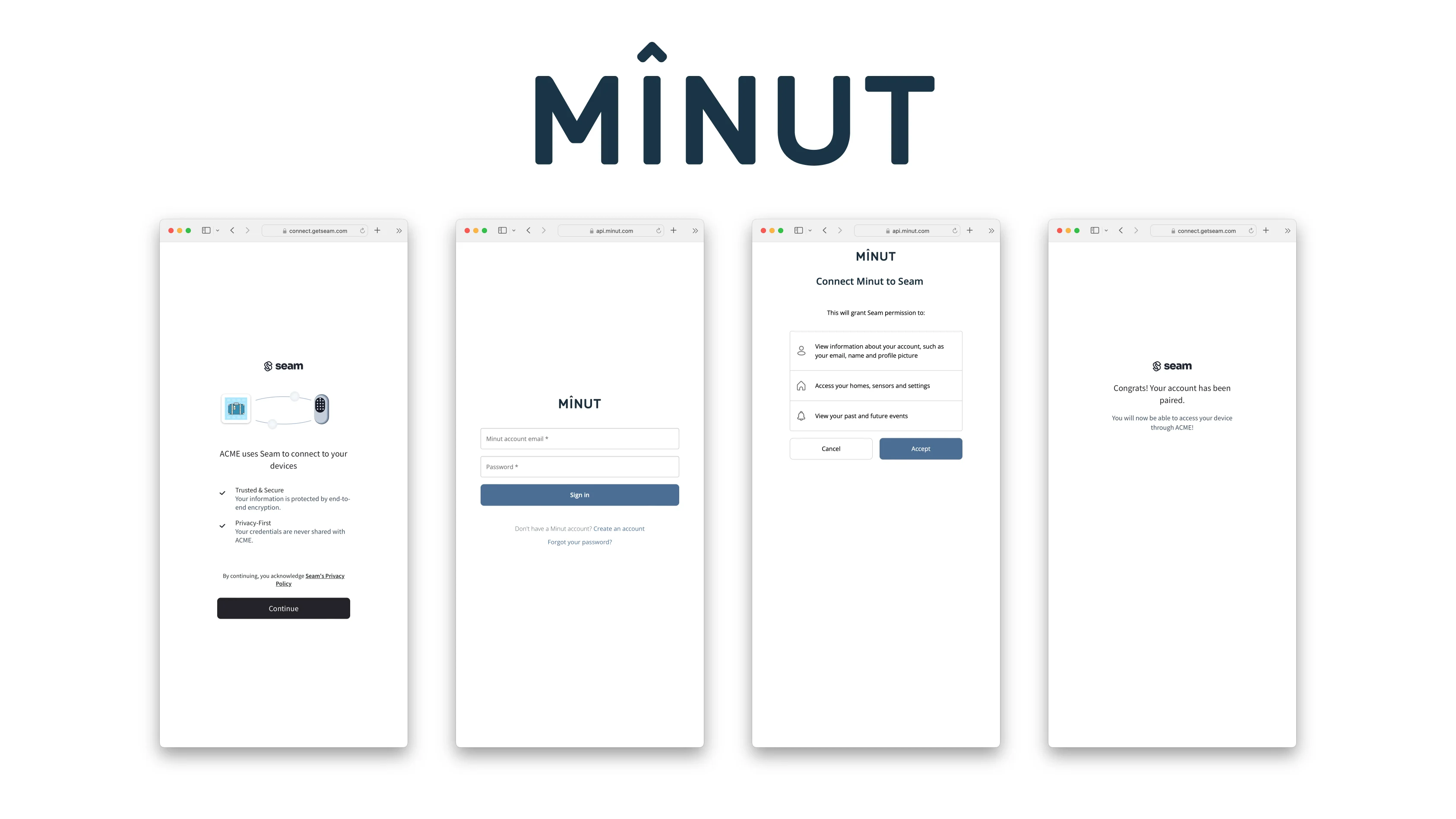
To control your Minut sensor via the Seam API, you must first authorize your Seam workspace against your Minut account. To do so, Seam provides[ Connect Webviews](/core-concepts/connect-webviews): pre-built UX flows that walk you through authorizing your application to control your Minut sensor.
### Create a Connect Webview
```javascript JavaScript theme={null}
import { Seam } from 'seam'
const seam = new Seam()
const connectWebview = await seam.connectWebviews.create({
accepted_providers: ["minut"],
})
console.log(connectWebview.login_successful) // false
// Send the webview URL to your user
console.log(connectWebview.url)
```
```python Python theme={null}
from seam import Seam
seam = Seam()
webview = seam.connect_webviews.create(accepted_providers=["minut"])
assert webview.login_successful is False
# Send this webview url to your user!
print(webview.url)
```
```ruby Ruby theme={null}
require "seam"
seam = Seam.new(api_key: "MY_API_KEY")
webview = seam.connect_webviews.create(
accepted_providers: ["minut"]
)
puts webview.login_successful # false
# Send the webview URL to your user
puts webview.url
```
```php PHP theme={null}
use Seam\SeamClient;
$seam = new SeamClient("YOUR_API_KEY");
$webview = $seam->connect_webviews->create(
accepted_providers: ["minut"]
);
echo json_encode($webview)
/*
{"connect_webview_id":"70c4df9e-1070-441f-92f8-fd6524062cec","workspace_id":"d7418ff3-a476-4f48-9a4b-211d1d21a03d","url":"https:\/\/connect.getseam.com\/connect_webviews\/view?connect_webview_id=70c4df9e-1070-441f-92f8-fd6524062cec&auth_token=9HJbwWKbD5aJLifZcozU9WWZXxropn9Bg","connected_account_id":null,"status":"pending","custom_redirect_url":null,"custom_redirect_failure_url":null,"created_at":"2023-02-09T02:14:06.147745+00:00","error":null}
*/
```
### Authorize Your Workspace
Navigate to the URL returned by the Webview object. Since you are using a sandbox workspace, complete the login flow by entering the Minut [sandbox test accounts ](./minut-noise-sensor-sample-data)credentials below:
* **email**: [jane@example.com](mailto:jane@example.com)
* **password**: 1234
 ### Get the New Webview
After you complete the login above, you'll get an event for [`connected_account.created`](/api/events/object)if you set up a [webhook handler](/developer-tools/webhooks). Otherwise you can just poll for the webview until it's status changes, as shown below:
```javascript JavaScript theme={null}
const updatedWebview = await seam.connectWebviews.get(
connectWebview.connect_webview_id,
)
console.log(updatedWebview.login_successful) // true
```
```python Python theme={null}
updated_webview = seam.connect_webviews.get(
webview.connect_webview_id
)
assert updated_webview.login_successful # true
```
```ruby Ruby theme={null}
updated_webview = seam.connect_webviews.get(connect_webview_id: webview.connect_webview_id)
puts updated_webview.login_successful # true
```
```php PHP theme={null}
$webview = $seam->connect_webviews->get($webview->id);
echo json_encode($webview);
```
## 3. Retrieve Minut Noise Sensors
Minut noise sensors appear with the `device_type` `"minut_sensor"`. The Minut noise sensors report properties in addition to noise levels, namely `temperature` and `humidity`.
```javascript JavaScript theme={null}
const devices = await seam.devices.list({
device_type: 'minut_sensor',
})
console.log(devices[0])
/*
{
"device_id": "1efc294e-3a85-403a-8a2a-21b8f8b27cfa",
"device_type": "minut_sensor",
"capabilities_supported": [
"noise_detection"
],
"properties": {
"online": true,
"manufacturer": "minut",
"battery_level": 1,
"minut_metadata": {
"home_id": "f53026ff7c5e314521f285f9",
"device_id": "e0d8283f314c5ad10b82571e",
"home_name": "Jane's Test Home",
"device_name": "Living Room",
"home_address": {
"city": "San Francisco",
"notes": "string",
"region": "San Francisco County",
"country": "US",
"post_code": "44210",
"street_name1": "2258 24th Street",
"street_name2": ""
},
"home_location": {
"latitude": 0,
"longitude": 0
},
"device_location": {
"latitude": 0,
"longitude": 0
},
"latest_sensor_values": {
"sound": {
"time": "1970-01-01T00:00:00.000Z",
"value": 47.7117919921875
},
"humidity": {
"time": "1970-01-01T00:00:00.000Z",
"value": 31.110000610351562
},
"pressure": {
"time": "1970-01-01T00:00:00.000Z",
"value": 101923
},
"temperature": {
"time": "1970-01-01T00:00:00.000Z",
"value": 21.270000457763672
},
"accelerometer_z": {
"time": "1970-01-01T00:00:00.000Z",
"value": -1.00390625
}
}
},
"name": "Living Room",
"battery": {
"level": 1,
"status": "full"
},
"image_url": "https://connect.getseam.com/assets/images/devices/minut_gen-3_front.png",
"image_alt_text": "Minut Sensor"
},
"location": {
"timezone": "America/Los_Angeles",
"location_name": "Jane's Test Home"
},
"connected_account_id": "257160cb-c2f0-4ee0-9c76-be80b3751f28",
"workspace_id": "2c5f5397-37b9-4236-beac-f47f050d42cd",
"created_at": "2023-05-08T17:01:43.650Z",
"errors": [],
"warnings": []
}
*/
```
```python Python theme={null}
sensors = seam.devices.list(device_type="minut_sensor")
sensors[0]
# Device(
# device_id='fd200f4b-3815-497a-8520-10725c597e0c',
# device_type='minut_sensor',
# location={
# 'timezone': 'America/Los_Angeles',
# 'location_name': "Jane's Test Home"
# },
# properties={
# 'online': True,
# 'manufacturer': 'minut',
# 'battery_level': 0.5,
# 'minut_metadata': {
# 'home_id': 'f53026ff7c5e314521f285f9',
# 'device_id': '5bb32b83525d243950a92ab8',
# 'home_name': "Jane's Test Home",
# 'device_name': 'Living Room',
# 'home_address': {
# 'city': 'San Francisco',
# 'notes': 'string',
# 'region': 'San Francisco County',
# 'country': 'US',
# 'post_code': '44210',
# 'street_name1': '2258 24th Street',
# 'street_name2': ''
# },
# 'home_location': {
# 'latitude': 0,
# 'longitude': 0
# },
# 'device_location': {
# 'latitude': 0,
# 'longitude': 0
# },
# 'latest_sensor_values': {
# 'sound': {
# 'time': '1970-01-01T00:00:00.000Z',
# 'value': 47.7117919921875
# },
# 'humidity': {
# 'time': '1970-01-01T00:00:00.000Z',
# 'value': 31.110000610351562
# },
# 'pressure': {
# 'time': '1970-01-01T00:00:00.000Z',
# 'value': 101923
# },
# 'temperature': {
# 'time': '1970-01-01T00:00:00.000Z',
# 'value': 21.270000457763672
# },
# 'accelerometer_z': {
# 'time': '1970-01-01T00:00:00.000Z',
# 'value': -1.00390625
# }
# }
# },
# 'name': 'Living Room',
# 'battery': {
# 'level': 0.5,
# 'status': 'good'
# },
# 'image_url': 'https://connect.getseam.com/assets/images/devices/minut_gen-3_front.png',
# 'image_alt_text': 'Minut Sensor'
# },
# capabilities_supported=['noise_detection'],
# errors=[]
# )
```
```ruby Ruby theme={null}
seam.devices.list(
device_type: "minut_sensor"
).first
# true,
# "manufacturer"=>"minut",
# "battery_level"=>1,
# "minut_metadata"=>{
# "home_id"=>"2978b6d5dba395ec08300e45",
# "device_id"=>"770bd3153deca3dee0fe0614",
# "home_name"=>"Jane's Test Home",
# "device_name"=>"Living Room",
# "home_address"=>{
# "city"=>"San Francisco",
# "notes"=>"string",
# "region"=>"San Francisco County",
# "country"=>"US",
# "post_code"=>"44210",
# "street_name1"=>"2258 24th Street",
# "street_name2"=>""
# },
# "home_location"=>{
# "latitude"=>0,
# "longitude"=>0
# },
# "device_location"=>{
# "latitude"=>0,
# "longitude"=>0
# },
# "latest_sensor_values"=>{
# "sound"=>{
# "time"=>"1970-01-01T00:00:00.000Z",
# "value"=>47.7117919921875
# },
# "humidity"=>{
# "time"=>"1970-01-01T00:00:00.000Z",
# "value"=>31.110000610351562
# },
# "pressure"=>{
# "time"=>"1970-01-01T00:00:00.000Z",
# "value"=>101923
# },
# "temperature"=>{
# "time"=>"1970-01-01T00:00:00.000Z",
# "value"=>21.270000457763672
# },
# "accelerometer_z"=>{
# "time"=>"1970-01-01T00:00:00.000Z",
# "value"=>-1.00390625
# }
# }
# },
# "name"=>"Living Room",
# "battery"=>{
# "level"=>1,
# "status"=>"full"
# },
# "image_url"=>"https://connect.getseam.com/assets/images/devices/minut_gen-3_front.png",
# "image_alt_text"=>"Minut Sensor"
# }
# created_at=2023-05-08 17:01:45.79 UTC
# errors=[]
# warnings=[]>
```
```php PHP theme={null}
$devices = $seam->devices->list(device_type: 'minut_sensor');
echo json_encode($device[0]);
/*
{
"device_id": "1efc294e-3a85-403a-8a2a-21b8f8b27cfa",
"device_type": "minut_sensor",
"capabilities_supported": [
"noise_detection"
],
"properties": {
"online": true,
"manufacturer": "minut",
"battery_level": 1,
"minut_metadata": {
"home_id": "f53026ff7c5e314521f285f9",
"device_id": "e0d8283f314c5ad10b82571e",
"home_name": "Jane's Test Home",
"device_name": "Living Room",
"home_address": {
"city": "San Francisco",
"notes": "string",
"region": "San Francisco County",
"country": "US",
"post_code": "44210",
"street_name1": "2258 24th Street",
"street_name2": ""
},
"home_location": {
"latitude": 0,
"longitude": 0
},
"device_location": {
"latitude": 0,
"longitude": 0
},
"latest_sensor_values": {
"sound": {
"time": "1970-01-01T00:00:00.000Z",
"value": 47.7117919921875
},
"humidity": {
"time": "1970-01-01T00:00:00.000Z",
"value": 31.110000610351562
},
"pressure": {
"time": "1970-01-01T00:00:00.000Z",
"value": 101923
},
"temperature": {
"time": "1970-01-01T00:00:00.000Z",
"value": 21.270000457763672
},
"accelerometer_z": {
"time": "1970-01-01T00:00:00.000Z",
"value": -1.00390625
}
}
},
"name": "Living Room",
"battery": {
"level": 1,
"status": "full"
},
"image_url": "https://connect.getseam.com/assets/images/devices/minut_gen-3_front.png",
"image_alt_text": "Minut Sensor"
},
"location": {
"timezone": "America/Los_Angeles",
"location_name": "Jane's Test Home"
},
"connected_account_id": "257160cb-c2f0-4ee0-9c76-be80b3751f28",
"workspace_id": "2c5f5397-37b9-4236-beac-f47f050d42cd",
"created_at": "2023-05-08T17:01:43.650Z",
"errors": [],
"warnings": []
}
*/
```
## 4. Receive Noise Events
Minut users can define noise thresholds at which noise alerts are sent.
You'll get an event for `noise_threshold.noise_threshold_triggered` when you set up a [webhook handler](/developer-tools/webhooks). You can also [poll for events](/api/events/list).
Minut has a builtin threshold that can be triggered multiple times. Each Minut notice will trigger a `noise_threshold_triggered` event with the `minut_metadata.event_name` containing the Minut event name, which can be any of the following:
* `disturbance_first_notice`
* `disturbance_second_notice`
* `disturbance_third_notice`
* `disturbance_ended`
```javascript JavaScript theme={null}
app.post('/my_webhook_endpoint', (req, res) => {
const event = req.body.event;
// {
// "event_id": "d8ffcf85-73f7-4383-b832-ed65db93c802",
// "device_id": "617415c6-2aa4-43ac-b436-879951f891b0",
// "event_type": "noise_sensor.noise_threshold_triggered",
// "workspace_id": "2c5f5397-37b9-4236-beac-f47f050d42cd",
// "created_at": "2023-03-14T05:00:35.451Z"
// "occurred_at": "2023-05-20T00:01:31.273Z",
// "minut_metadata": {
// "minut_event_id": "2690d0909b90a06e1ceac185"
// "minut_event_type": "disturbance_first_notice"
// "minut_home_id": "f53026ff7c5e314521f285f9",
// "minut_user_id": "d3bd127911d71d7d7da85bd3"
// }
});
```
```python Python theme={null}
@app.route("/my_webhook_endpoint", methods=["POST"])
def endpoint():
event = request.json["event"]
# {
# noise_threshold_id: "...",
# noise_threshold_name: "builtin_disturbance"
# minut_metadata: {
# "event_name": "disturbance_first_notice",
# },
# device_id: "...";
# noise_level_decibels: 40,
# created_at: "2023-03-14T05:00:35.451Z"
# }
```
```ruby Ruby theme={null}
post '/my_webhook_endpoint' do
request.body.rewind
payload = JSON.parse(request.body.read)
event = payload['event']
# {
# "event_id": "d8ffcf85-73f7-4383-b832-ed65db93c802",
# "device_id": "617415c6-2aa4-43ac-b436-879951f891b0",
# "event_type": "noise_sensor.noise_threshold_triggered",
# "workspace_id": "2c5f5397-37b9-4236-beac-f47f050d42cd",
# "created_at": "2023-03-14T05:00:35.451Z"
# "occurred_at": "2023-05-20T00:01:31.273Z",
# "noiseaware_metadata": {
# "minut_event_id": "2690d0909b90a06e1ceac185"
# "minut_event_type": "disturbance_first_notice"
# "minut_home_id": "f53026ff7c5e314521f285f9",
# "minut_user_id": "d3bd127911d71d7d7da85bd3"
# }
# }
end
```
```php PHP theme={null}
$app->post('/my_webhook_endpoint', function (Request $request, Response $response) {
$data = $request->getParsedBody();
$event = $data['event'];
// {
// "event_id": "d8ffcf85-73f7-4383-b832-ed65db93c802",
// "device_id": "617415c6-2aa4-43ac-b436-879951f891b0",
// "event_type": "noise_sensor.noise_threshold_triggered",
// "workspace_id": "2c5f5397-37b9-4236-beac-f47f050d42cd",
// "created_at": "2023-03-14T05:00:35.451Z",
// "occurred_at": "2023-05-20T00:01:31.273Z",
// "minut_metadata": {
// "minut_event_id": "2690d0909b90a06e1ceac185"
// "minut_event_type": "disturbance_first_notice"
// "minut_home_id": "f53026ff7c5e314521f285f9",
// "minut_user_id": "d3bd127911d71d7d7da85bd3"
// }
});
```
## Next Steps
Now that you've completed this guide, you can try to connect a real Minut device. To do so, make sure to switch to a non-sandbox workspace and API key as real devices cannot be connected to sandbox workspaces.
If you have any questions or want to report an issue, email us at [support@seam.co](mailto:support@seam.co)
### Get the New Webview
After you complete the login above, you'll get an event for [`connected_account.created`](/api/events/object)if you set up a [webhook handler](/developer-tools/webhooks). Otherwise you can just poll for the webview until it's status changes, as shown below:
```javascript JavaScript theme={null}
const updatedWebview = await seam.connectWebviews.get(
connectWebview.connect_webview_id,
)
console.log(updatedWebview.login_successful) // true
```
```python Python theme={null}
updated_webview = seam.connect_webviews.get(
webview.connect_webview_id
)
assert updated_webview.login_successful # true
```
```ruby Ruby theme={null}
updated_webview = seam.connect_webviews.get(connect_webview_id: webview.connect_webview_id)
puts updated_webview.login_successful # true
```
```php PHP theme={null}
$webview = $seam->connect_webviews->get($webview->id);
echo json_encode($webview);
```
## 3. Retrieve Minut Noise Sensors
Minut noise sensors appear with the `device_type` `"minut_sensor"`. The Minut noise sensors report properties in addition to noise levels, namely `temperature` and `humidity`.
```javascript JavaScript theme={null}
const devices = await seam.devices.list({
device_type: 'minut_sensor',
})
console.log(devices[0])
/*
{
"device_id": "1efc294e-3a85-403a-8a2a-21b8f8b27cfa",
"device_type": "minut_sensor",
"capabilities_supported": [
"noise_detection"
],
"properties": {
"online": true,
"manufacturer": "minut",
"battery_level": 1,
"minut_metadata": {
"home_id": "f53026ff7c5e314521f285f9",
"device_id": "e0d8283f314c5ad10b82571e",
"home_name": "Jane's Test Home",
"device_name": "Living Room",
"home_address": {
"city": "San Francisco",
"notes": "string",
"region": "San Francisco County",
"country": "US",
"post_code": "44210",
"street_name1": "2258 24th Street",
"street_name2": ""
},
"home_location": {
"latitude": 0,
"longitude": 0
},
"device_location": {
"latitude": 0,
"longitude": 0
},
"latest_sensor_values": {
"sound": {
"time": "1970-01-01T00:00:00.000Z",
"value": 47.7117919921875
},
"humidity": {
"time": "1970-01-01T00:00:00.000Z",
"value": 31.110000610351562
},
"pressure": {
"time": "1970-01-01T00:00:00.000Z",
"value": 101923
},
"temperature": {
"time": "1970-01-01T00:00:00.000Z",
"value": 21.270000457763672
},
"accelerometer_z": {
"time": "1970-01-01T00:00:00.000Z",
"value": -1.00390625
}
}
},
"name": "Living Room",
"battery": {
"level": 1,
"status": "full"
},
"image_url": "https://connect.getseam.com/assets/images/devices/minut_gen-3_front.png",
"image_alt_text": "Minut Sensor"
},
"location": {
"timezone": "America/Los_Angeles",
"location_name": "Jane's Test Home"
},
"connected_account_id": "257160cb-c2f0-4ee0-9c76-be80b3751f28",
"workspace_id": "2c5f5397-37b9-4236-beac-f47f050d42cd",
"created_at": "2023-05-08T17:01:43.650Z",
"errors": [],
"warnings": []
}
*/
```
```python Python theme={null}
sensors = seam.devices.list(device_type="minut_sensor")
sensors[0]
# Device(
# device_id='fd200f4b-3815-497a-8520-10725c597e0c',
# device_type='minut_sensor',
# location={
# 'timezone': 'America/Los_Angeles',
# 'location_name': "Jane's Test Home"
# },
# properties={
# 'online': True,
# 'manufacturer': 'minut',
# 'battery_level': 0.5,
# 'minut_metadata': {
# 'home_id': 'f53026ff7c5e314521f285f9',
# 'device_id': '5bb32b83525d243950a92ab8',
# 'home_name': "Jane's Test Home",
# 'device_name': 'Living Room',
# 'home_address': {
# 'city': 'San Francisco',
# 'notes': 'string',
# 'region': 'San Francisco County',
# 'country': 'US',
# 'post_code': '44210',
# 'street_name1': '2258 24th Street',
# 'street_name2': ''
# },
# 'home_location': {
# 'latitude': 0,
# 'longitude': 0
# },
# 'device_location': {
# 'latitude': 0,
# 'longitude': 0
# },
# 'latest_sensor_values': {
# 'sound': {
# 'time': '1970-01-01T00:00:00.000Z',
# 'value': 47.7117919921875
# },
# 'humidity': {
# 'time': '1970-01-01T00:00:00.000Z',
# 'value': 31.110000610351562
# },
# 'pressure': {
# 'time': '1970-01-01T00:00:00.000Z',
# 'value': 101923
# },
# 'temperature': {
# 'time': '1970-01-01T00:00:00.000Z',
# 'value': 21.270000457763672
# },
# 'accelerometer_z': {
# 'time': '1970-01-01T00:00:00.000Z',
# 'value': -1.00390625
# }
# }
# },
# 'name': 'Living Room',
# 'battery': {
# 'level': 0.5,
# 'status': 'good'
# },
# 'image_url': 'https://connect.getseam.com/assets/images/devices/minut_gen-3_front.png',
# 'image_alt_text': 'Minut Sensor'
# },
# capabilities_supported=['noise_detection'],
# errors=[]
# )
```
```ruby Ruby theme={null}
seam.devices.list(
device_type: "minut_sensor"
).first
# true,
# "manufacturer"=>"minut",
# "battery_level"=>1,
# "minut_metadata"=>{
# "home_id"=>"2978b6d5dba395ec08300e45",
# "device_id"=>"770bd3153deca3dee0fe0614",
# "home_name"=>"Jane's Test Home",
# "device_name"=>"Living Room",
# "home_address"=>{
# "city"=>"San Francisco",
# "notes"=>"string",
# "region"=>"San Francisco County",
# "country"=>"US",
# "post_code"=>"44210",
# "street_name1"=>"2258 24th Street",
# "street_name2"=>""
# },
# "home_location"=>{
# "latitude"=>0,
# "longitude"=>0
# },
# "device_location"=>{
# "latitude"=>0,
# "longitude"=>0
# },
# "latest_sensor_values"=>{
# "sound"=>{
# "time"=>"1970-01-01T00:00:00.000Z",
# "value"=>47.7117919921875
# },
# "humidity"=>{
# "time"=>"1970-01-01T00:00:00.000Z",
# "value"=>31.110000610351562
# },
# "pressure"=>{
# "time"=>"1970-01-01T00:00:00.000Z",
# "value"=>101923
# },
# "temperature"=>{
# "time"=>"1970-01-01T00:00:00.000Z",
# "value"=>21.270000457763672
# },
# "accelerometer_z"=>{
# "time"=>"1970-01-01T00:00:00.000Z",
# "value"=>-1.00390625
# }
# }
# },
# "name"=>"Living Room",
# "battery"=>{
# "level"=>1,
# "status"=>"full"
# },
# "image_url"=>"https://connect.getseam.com/assets/images/devices/minut_gen-3_front.png",
# "image_alt_text"=>"Minut Sensor"
# }
# created_at=2023-05-08 17:01:45.79 UTC
# errors=[]
# warnings=[]>
```
```php PHP theme={null}
$devices = $seam->devices->list(device_type: 'minut_sensor');
echo json_encode($device[0]);
/*
{
"device_id": "1efc294e-3a85-403a-8a2a-21b8f8b27cfa",
"device_type": "minut_sensor",
"capabilities_supported": [
"noise_detection"
],
"properties": {
"online": true,
"manufacturer": "minut",
"battery_level": 1,
"minut_metadata": {
"home_id": "f53026ff7c5e314521f285f9",
"device_id": "e0d8283f314c5ad10b82571e",
"home_name": "Jane's Test Home",
"device_name": "Living Room",
"home_address": {
"city": "San Francisco",
"notes": "string",
"region": "San Francisco County",
"country": "US",
"post_code": "44210",
"street_name1": "2258 24th Street",
"street_name2": ""
},
"home_location": {
"latitude": 0,
"longitude": 0
},
"device_location": {
"latitude": 0,
"longitude": 0
},
"latest_sensor_values": {
"sound": {
"time": "1970-01-01T00:00:00.000Z",
"value": 47.7117919921875
},
"humidity": {
"time": "1970-01-01T00:00:00.000Z",
"value": 31.110000610351562
},
"pressure": {
"time": "1970-01-01T00:00:00.000Z",
"value": 101923
},
"temperature": {
"time": "1970-01-01T00:00:00.000Z",
"value": 21.270000457763672
},
"accelerometer_z": {
"time": "1970-01-01T00:00:00.000Z",
"value": -1.00390625
}
}
},
"name": "Living Room",
"battery": {
"level": 1,
"status": "full"
},
"image_url": "https://connect.getseam.com/assets/images/devices/minut_gen-3_front.png",
"image_alt_text": "Minut Sensor"
},
"location": {
"timezone": "America/Los_Angeles",
"location_name": "Jane's Test Home"
},
"connected_account_id": "257160cb-c2f0-4ee0-9c76-be80b3751f28",
"workspace_id": "2c5f5397-37b9-4236-beac-f47f050d42cd",
"created_at": "2023-05-08T17:01:43.650Z",
"errors": [],
"warnings": []
}
*/
```
## 4. Receive Noise Events
Minut users can define noise thresholds at which noise alerts are sent.
You'll get an event for `noise_threshold.noise_threshold_triggered` when you set up a [webhook handler](/developer-tools/webhooks). You can also [poll for events](/api/events/list).
Minut has a builtin threshold that can be triggered multiple times. Each Minut notice will trigger a `noise_threshold_triggered` event with the `minut_metadata.event_name` containing the Minut event name, which can be any of the following:
* `disturbance_first_notice`
* `disturbance_second_notice`
* `disturbance_third_notice`
* `disturbance_ended`
```javascript JavaScript theme={null}
app.post('/my_webhook_endpoint', (req, res) => {
const event = req.body.event;
// {
// "event_id": "d8ffcf85-73f7-4383-b832-ed65db93c802",
// "device_id": "617415c6-2aa4-43ac-b436-879951f891b0",
// "event_type": "noise_sensor.noise_threshold_triggered",
// "workspace_id": "2c5f5397-37b9-4236-beac-f47f050d42cd",
// "created_at": "2023-03-14T05:00:35.451Z"
// "occurred_at": "2023-05-20T00:01:31.273Z",
// "minut_metadata": {
// "minut_event_id": "2690d0909b90a06e1ceac185"
// "minut_event_type": "disturbance_first_notice"
// "minut_home_id": "f53026ff7c5e314521f285f9",
// "minut_user_id": "d3bd127911d71d7d7da85bd3"
// }
});
```
```python Python theme={null}
@app.route("/my_webhook_endpoint", methods=["POST"])
def endpoint():
event = request.json["event"]
# {
# noise_threshold_id: "...",
# noise_threshold_name: "builtin_disturbance"
# minut_metadata: {
# "event_name": "disturbance_first_notice",
# },
# device_id: "...";
# noise_level_decibels: 40,
# created_at: "2023-03-14T05:00:35.451Z"
# }
```
```ruby Ruby theme={null}
post '/my_webhook_endpoint' do
request.body.rewind
payload = JSON.parse(request.body.read)
event = payload['event']
# {
# "event_id": "d8ffcf85-73f7-4383-b832-ed65db93c802",
# "device_id": "617415c6-2aa4-43ac-b436-879951f891b0",
# "event_type": "noise_sensor.noise_threshold_triggered",
# "workspace_id": "2c5f5397-37b9-4236-beac-f47f050d42cd",
# "created_at": "2023-03-14T05:00:35.451Z"
# "occurred_at": "2023-05-20T00:01:31.273Z",
# "noiseaware_metadata": {
# "minut_event_id": "2690d0909b90a06e1ceac185"
# "minut_event_type": "disturbance_first_notice"
# "minut_home_id": "f53026ff7c5e314521f285f9",
# "minut_user_id": "d3bd127911d71d7d7da85bd3"
# }
# }
end
```
```php PHP theme={null}
$app->post('/my_webhook_endpoint', function (Request $request, Response $response) {
$data = $request->getParsedBody();
$event = $data['event'];
// {
// "event_id": "d8ffcf85-73f7-4383-b832-ed65db93c802",
// "device_id": "617415c6-2aa4-43ac-b436-879951f891b0",
// "event_type": "noise_sensor.noise_threshold_triggered",
// "workspace_id": "2c5f5397-37b9-4236-beac-f47f050d42cd",
// "created_at": "2023-03-14T05:00:35.451Z",
// "occurred_at": "2023-05-20T00:01:31.273Z",
// "minut_metadata": {
// "minut_event_id": "2690d0909b90a06e1ceac185"
// "minut_event_type": "disturbance_first_notice"
// "minut_home_id": "f53026ff7c5e314521f285f9",
// "minut_user_id": "d3bd127911d71d7d7da85bd3"
// }
});
```
## Next Steps
Now that you've completed this guide, you can try to connect a real Minut device. To do so, make sure to switch to a non-sandbox workspace and API key as real devices cannot be connected to sandbox workspaces.
If you have any questions or want to report an issue, email us at [support@seam.co](mailto:support@seam.co)