> ## Documentation Index
> Fetch the complete documentation index at: https://docs.seam.co/llms.txt
> Use this file to discover all available pages before exploring further.
# Get started with Kwikset Wi-Fi Locks
> Learn how to connect and control your Kwikset Halo lock with the Seam API.
## Overview
Seam provides a universal API to connect and control many brands of smart locks. This guide provides a rapid introduction to connecting and controlling your [Kwikset Halo](https://www.seam.co/manufacturers/kwikset) lock using the Seam API. To learn more about other smart lock brands supported by Seam such as Yale, Schlage, and August, head over to our [integration page](https://www.seam.co/supported-devices-and-systems).
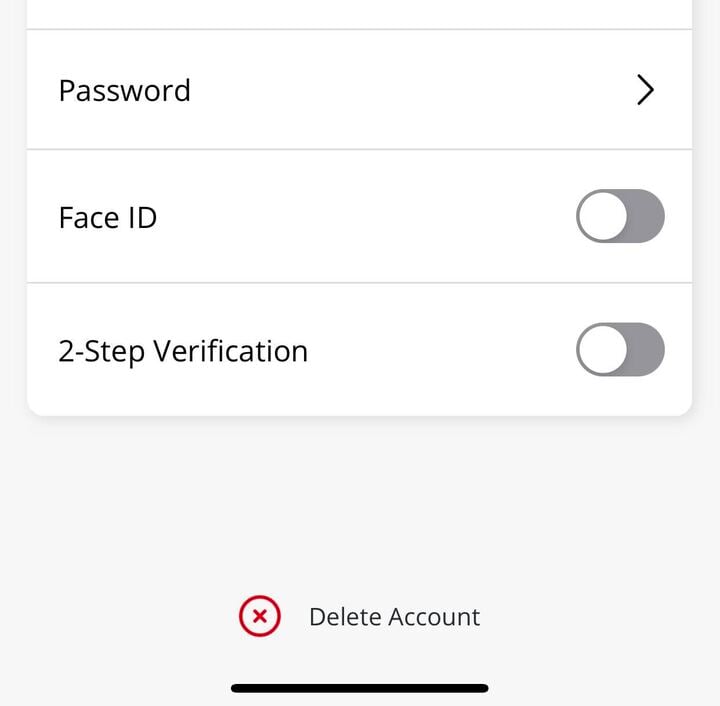
Enabling MFA (Multi-Factor Authentication) on your Kwikset app can block our login flow from successfully authorizing with your account.
Please ensure your Kwikset MFA settings are disabled before attempting to connect your account with Seam. After connecting your account, you can re-enable your MFA settings.
To disable MFA, head to **Account Settings** in your Kwikset app:
 ## 1 — Install Seam SDK
Seam provides client libraries for many languages, such as JavaScript, Python, Ruby, PHP, and others, as well as a Postman collection and [OpenAPI](https://connect.getseam.com/openapi.json) spec.
* JavaScript / TypeScript ([npm](https://www.npmjs.com/package/seam), [GitHub](https://github.com/seamapi/javascript))
* Python ([pip](https://pypi.org/project/seam/), [GitHub](https://github.com/seamapi/python))
* Ruby Gem ([rubygem](https://rubygems.org/gems/seam), [GitHub](https://github.com/seamapi/ruby))
* PHP ([packagist](https://packagist.org/packages/seamapi/seam), [GitHub](https://github.com/seamapi/php))
* C# ([nuget](https://www.nuget.org/packages/Seam), [GitHub](https://github.com/seamapi/csharp))
```bash theme={null}
npm i seam
```
```bash theme={null}
pip install seam
# For some development environments, use pip3 in this command instead of pip.
```
```bash theme={null}
bundle add seam
```
```bash theme={null}
composer require seamapi/seam
```
Install using [nuget](https://www.nuget.org/packages/Seam).
Once installed, [sign-up for Seam](https://console.seam.co/) to get your API key, and export it as an environment variable:
```
$ export SEAM_API_KEY=seam_test2ZTo_0mEYQW2TvNDCxG5Atpj85Ffw
```
This guide uses a Sandbox Workspace. Only virtual devices can be connected. If
you need to connect a real Kwikset Halo Lock, use a non-sandbox workspace and
API key.
## 2 — Link Kwikset Account with Seam
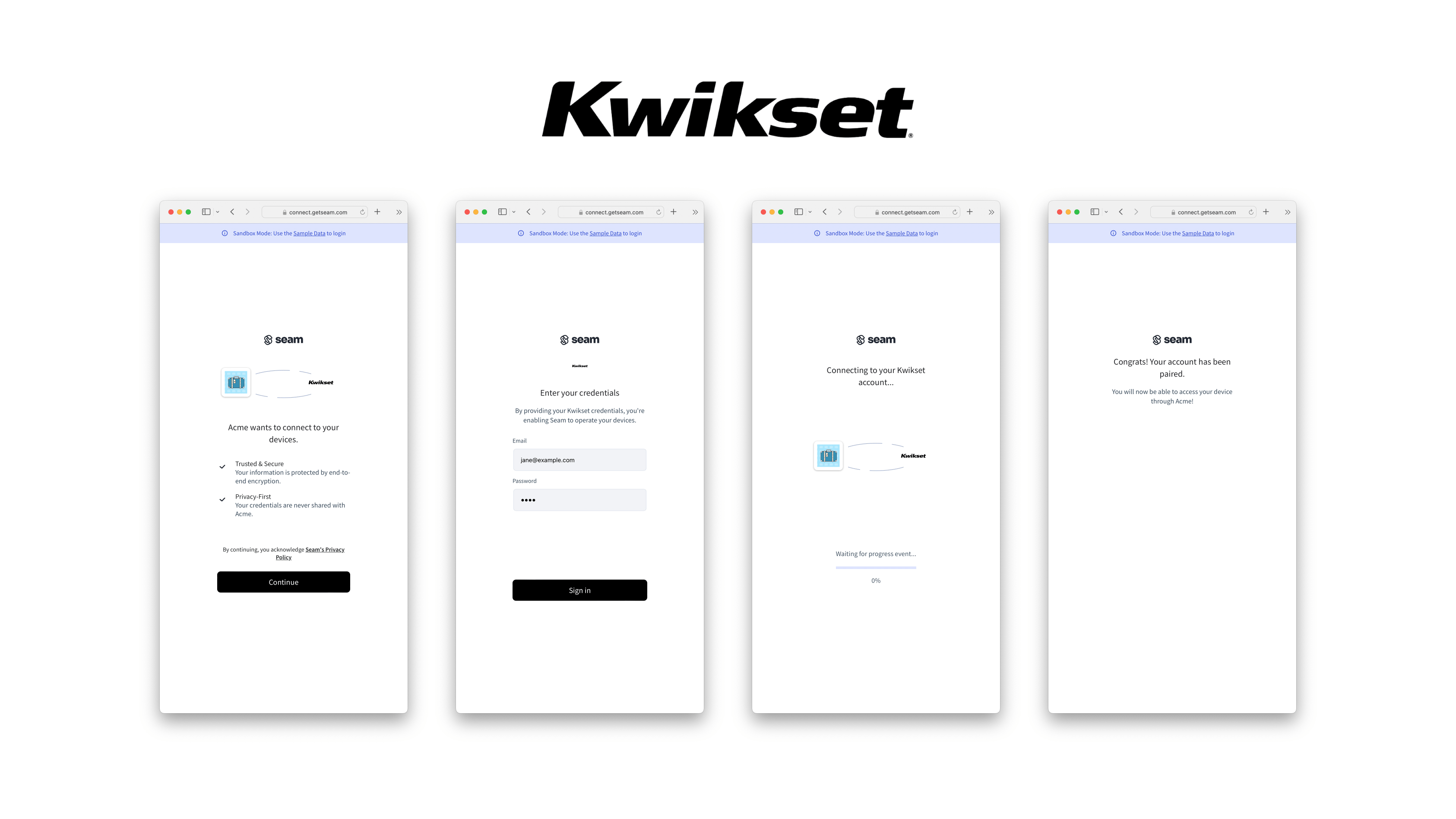
To control your Kwikset Halo lock via the Seam API, you must first authorize your Seam workspace against your Kwikset account. To do so, Seam provides[ Connect Webviews](/core-concepts/connect-webviews): pre-built UX flows that walk you through authorizing your application to control your Kwikset Halo lock.
#### Request a Connect Webview
```javascript JavaScript theme={null}
import { Seam } from 'seam'
const seam = new Seam()
const connectWebview = await seam.connectWebviews.create({
accepted_providers: ['kwikset'],
})
console.log(connectWebview.login_successful) // false
// Send the webview URL to your user
console.log(connectWebview.url)
```
```python Python theme={null}
from seam import Seam
seam = Seam()
webview = seam.connect_webviews.create(accepted_providers=["kwikset"])
assert webview.login_successful is False
# Send the webview URL to your user
print(webview.url)
```
```ruby Ruby theme={null}
require "seam"
seam = Seam.new(api_key: "MY_API_KEY")
webview = seam.connect_webviews.create(
accepted_providers: ["kwikset"]
)
puts webview.login_successful # false
# Send the webview URL to your user
puts webview.url
```
#### Authorize Your Workspace
Navigate to the URL returned by the Webview object. Since you are using a sandbox workspace, complete the login flow by entering the Kwikset [sandbox test accounts ](./kwikset-locks-sample-data)credentials below:
* **email:** [jane@example.com](mailto:jane@example.com)
* **password:** 1234
Enabling MFA (Multi-Factor Authentication) on your Kwikset app can block our login flow from successfully authorizing with your account.
Please ensure your Kwikset MFA settings are disabled before attempting to connect your account with Seam. After connecting your account, you can re-enable your MFA settings.
To disable MFA, head to **Account Settings** in your Kwikset app:
## 1 — Install Seam SDK
Seam provides client libraries for many languages, such as JavaScript, Python, Ruby, PHP, and others, as well as a Postman collection and [OpenAPI](https://connect.getseam.com/openapi.json) spec.
* JavaScript / TypeScript ([npm](https://www.npmjs.com/package/seam), [GitHub](https://github.com/seamapi/javascript))
* Python ([pip](https://pypi.org/project/seam/), [GitHub](https://github.com/seamapi/python))
* Ruby Gem ([rubygem](https://rubygems.org/gems/seam), [GitHub](https://github.com/seamapi/ruby))
* PHP ([packagist](https://packagist.org/packages/seamapi/seam), [GitHub](https://github.com/seamapi/php))
* C# ([nuget](https://www.nuget.org/packages/Seam), [GitHub](https://github.com/seamapi/csharp))
```bash theme={null}
npm i seam
```
```bash theme={null}
pip install seam
# For some development environments, use pip3 in this command instead of pip.
```
```bash theme={null}
bundle add seam
```
```bash theme={null}
composer require seamapi/seam
```
Install using [nuget](https://www.nuget.org/packages/Seam).
Once installed, [sign-up for Seam](https://console.seam.co/) to get your API key, and export it as an environment variable:
```
$ export SEAM_API_KEY=seam_test2ZTo_0mEYQW2TvNDCxG5Atpj85Ffw
```
This guide uses a Sandbox Workspace. Only virtual devices can be connected. If
you need to connect a real Kwikset Halo Lock, use a non-sandbox workspace and
API key.
## 2 — Link Kwikset Account with Seam
To control your Kwikset Halo lock via the Seam API, you must first authorize your Seam workspace against your Kwikset account. To do so, Seam provides[ Connect Webviews](/core-concepts/connect-webviews): pre-built UX flows that walk you through authorizing your application to control your Kwikset Halo lock.
#### Request a Connect Webview
```javascript JavaScript theme={null}
import { Seam } from 'seam'
const seam = new Seam()
const connectWebview = await seam.connectWebviews.create({
accepted_providers: ['kwikset'],
})
console.log(connectWebview.login_successful) // false
// Send the webview URL to your user
console.log(connectWebview.url)
```
```python Python theme={null}
from seam import Seam
seam = Seam()
webview = seam.connect_webviews.create(accepted_providers=["kwikset"])
assert webview.login_successful is False
# Send the webview URL to your user
print(webview.url)
```
```ruby Ruby theme={null}
require "seam"
seam = Seam.new(api_key: "MY_API_KEY")
webview = seam.connect_webviews.create(
accepted_providers: ["kwikset"]
)
puts webview.login_successful # false
# Send the webview URL to your user
puts webview.url
```
#### Authorize Your Workspace
Navigate to the URL returned by the Webview object. Since you are using a sandbox workspace, complete the login flow by entering the Kwikset [sandbox test accounts ](./kwikset-locks-sample-data)credentials below:
* **email:** [jane@example.com](mailto:jane@example.com)
* **password:** 1234
Enabling MFA (Multi-Factor Authentication) on your Kwikset app can block our login flow from successfully authorizing with your account.
Please ensure your Kwikset MFA settings are disabled before attempting to connect your account with Seam. After connecting your account, you can re-enable your MFA settings.
To disable MFA, head to **Account Settings** in your Kwikset app:
 Confirm the Connect Webview was successful by querying its status:
```javascript JavaScript theme={null}
const updatedWebview = await seam.connectWebviews.get(
connectWebview.connect_webview_id,
)
console.log(updatedWebview.login_successful) // true
```
```python Python theme={null}
updated_webview = seam.connect_webviews.get(connect_webview_id: webview.connect_webview_id)
assert updated_webview.login_successful # true
```
```ruby Ruby theme={null}
updated_webview = seam.connect_webviews.get(connect_webview_id: webview.connect_webview_id)
puts updated_webview.login_successful # true
```
## 3 — Retrieve Kwikset Halo Lock Devices
After a Kwikset account is linked with Seam, you can retrieve devices for this Kwikset account. The Seam API exposes most of the device's properties such as battery level or door lock status.
```javascript JavaScript theme={null}
const allLocks = await seam.locks.list()
const someLock = allLocks[0]
console.log(someLock.properties.online) // true
console.log(someLock.properties.locked) // true
console.log(someLock)
/*
{
device_id: '10891c43-29e0-4b93-b071-34749025a123',
device_type: 'kwikset_lock',
capabilities_supported: [
'lock'
],
properties: {
locked: true,
online: true,
manufacturer: 'kwikset',
battery_level: 0.65,
kwikset_metadata: {
device_id: '10d221f8e8445dbe07',
device_name: 'Kwikset Halo Touch',
model_number: 'HALO-01'
},
name: 'Kwikset Halo Touch',
battery: {
level: 0.65,
status: 'good'
},
image_url: 'https://connect.getseam.com/assets/images/devices/kwikset_halo_touchscreen-wi-fi-enabled-smart-lock_polished-chrome_front.png',
image_alt_text: 'Kwikset Halo Touchscreen Wifi Enabled Smart Lock, Polished Chrome, Front'
},
location: null,
}
*/
```
```python Python theme={null}
all_locks = seam.locks.list()
some_lock = all_locks[0]
assert some_lock.properties["online"] is True
assert some_lock.properties["locked"] is True
print(some_lock)
# Device(
# device_id='10891c43-29e0-4b93-b071-34749025a123',
# device_type='kwikset_lock',
# location=None,
# properties={
# 'locked': True,
# 'online': True,
# 'manufacturer': 'kwikset',
# 'battery_level': 0.65,
# 'kwikset_metadata': {
# 'device_id': '10d221f8e8445dbe07',
# 'device_name': 'Kwikset Halo Touch',
# 'model_number': 'HALO-01'
# },
# 'name': 'Kwikset Halo Touch',
# 'battery': {
# 'level': 0.65,
# 'status': 'good'
# },
# 'image_url': 'https://connect.getseam.com/assets/images/devices/kwikset_halo_touchscreen-wi-fi-enabled-smart-lock_polished-chrome_front.png',
# 'image_alt_text': 'Kwikset Halo Touchscreen Wifi Enabled Smart Lock, Polished Chrome, Front'
# },
# capabilities_supported=['lock']
# )
```
```ruby Ruby theme={null}
some_lock = seam.locks.list.first
puts some_lock.properties.online # true
puts some_lock.properties.locked # true
puts some_lock.inspect
# true,
# "online"=>true,
# "manufacturer"=>"kwikset",
# "battery_level"=>0.65,
# "kwikset_metadata"=>{"device_id"=>"10d221f8e8445dbe07", "device_name"=>"Kwikset Halo Touch", "model_number"=>"HALO-01"},
# "name"=>"Kwikset Halo Touch",
# "battery"=>{"level"=>0.65, "status"=>"good"},
# "image_url"=>"https://connect.getseam.com/assets/images/devices/kwikset_halo_touchscreen-wi-fi-enabled-smart-lock_polished-chrome_front.png",
# "image_alt_text"=>"Kwikset Halo Touchscreen Wifi Enabled Smart Lock, Polished Chrome, Front"
# }
>
```
**4 — Locking & Unlocking a Door**
Next, you can perform the basic action of locking and unlocking the door.
> **`POST`** `/locks/lock_door`
>
> See the [API Reference](/api/locks/lock_door) for details.
#### Unlock a door
`POST` `https://connect.getseam.com/locks/unlock_door`
**Request Body**
| Name | Type | Description |
| ---------- | ------ | ----------- |
| device\_id | String | |
```javascript JavaScript theme={null}
// lock the door
await seam.locks.lockDoor(someLock.device_id)
const updatedLock = await seam.locks.get(someLock.device_id)
console.log(updatedLock.properties.locked) // true
// unlock the door
await seam.locks.unlockDoor(someLock.device_id)
updatedLock = await seam.locks.get(someLock.device_id)
console.log(updatedLock.properties.locked) // false
```
```python Python theme={null}
# lock the door
seam.locks.lock_door(device_id: some_lock.device_id)
updated_lock = seam.locks.get(device_id: some_lock.device_id)
assert updated_lock.properties["locked"] is True
# Now unlock the door
seam.locks.unlock_door(device_id: some_lock.device_id)
updated_lock = seam.locks.get(device_id: some_lock.device_id)
assert updated_lock.properties["locked"] is False
```
```ruby Ruby theme={null}
# lock the door
seam.locks.lock_door(device_id: some_lock.device_id)
updated_lock = seam.locks.get(device_id: some_lock.device_id)
puts updated_lock.properties.locked # true
# unlock the door
seam.locks.unlock_door(device_id: some_lock.device_id)
updated_lock = seam.locks.get(device_id: some_lock.device_id)
puts updated_lock.properties.locked # false
```
**5 — Setting Access Code on Kwikset Lock**
In the Kwikset app, you cannot see access codes that were set from an external source (such as Seam) unless you are connected through Bluetooth to the lock.
If you're connected through Wi-Fi and not Bluetooth, the Kwikset app *only* shows the access codes that you have set from the app itself and not the codes set from Seam.
Some Kwikset locks have a keypad paired to them to program access codes. These codes can then be entered to unlock a Kwikset lock.
The Seam API makes it easy to program both `ongoing` codes and `timebound` codes on a Kwikset lock. You can find out more about Kwikset lock access code in our [core concept section on access codes.](/low-level-apis/smart-locks/access-codes)
**Access Code Constraints**
Kwikset locks place the following constraints on access code attributes:
* Access code name must contain 2-14 characters.
You can create a Seam access code for Kwikset with a name longer than 14 characters. The full name is stored in Seam, but on the Kwikset device, the name is truncated to 14 characters.
* PIN code length must be 4-8 digits.
* A `timebound` code requires both a `starts_at` timestamp and an `ends_at` timestamp.
* A `timebound` code's `starts_at` timestamp must be greater than the current time. For best results, set `starts_at` at least 15 minutes ahead of the current time.
```javascript JavaScript theme={null}
// create an ongoing code
await seam.accessCodes.create({
device_id: someLock.device_id,
code: '123456',
name: 'My Access Code',
})
// create a timebound code
await seam.accessCodes.create({
device_id: someLock.device_id,
code: '888888',
name: 'Scheduled Code',
starts_at: '2028-11-12T19:23:42+0000',
ends_at: '2028-11-13T19:23:42+0000',
})
// use a device_id as the "device_id" parameter
await seam.accessCodes.list({
device_id: someLock.device_id,
})
/*
[
{
code: '1988',
type: 'ongoing',
status: 'setting',
created_at: '2022-08-26T12:50:17.858Z',
access_code_id: '26d6138c-6524-4f3c-ac96-43cc3bea0a8d'
},
{
type: 'timebound',
code: '888888',
starts_at: '2028-08-12T19:24:00.000Z',
ends_at: '2028-08-13T19:24:00.000Z',
access_code_id: '8c2db4da-b137-4c08-a2c3-d611e6ff91b3',
}
]
*/
```
```python Python theme={null}
# create an ongoing code
seam.access_codes.create(
device=some_lock, code="123456", name="My Access Code"
)
# create a timebound code
seam.access_codes.create(
device=some_lock,
code="888888",
name="Scheduled Code",
starts_at="2028-08-12T19:23:42+0000",
ends_at="2028-08-13T19:23:42+0000"
)
# you can use a device or a device_id as the "device" parameter
seam.access_codes.list(device=some_lock)
# [
# AccessCode(
# access_code_id='af5272b1-2a49-4eb5-9388-2447fc7b5bd1',
# type='ongoing',
# code='123459'
# ),
# AccessCode(
# access_code_id='8c2db4da-b137-4c08-a2c3-d611e6ff91b3',
# type='timebound',
# code='888888',
# starts_at='2028-08-12T19:24:00.000Z',
# ends_at='2028-08-13T19:24:00.000Z',
# )
# ]
```
```ruby Ruby theme={null}
# create an ongoing code
seam.access_codes.create(
device_id: some_lock.device_id, code: '123456', name: 'My Access Code'
)
# create a timebound code
seam.access_codes.create(
device_id: some_lock.device_id,
code: '888888',
name: 'Scheduled Code',
starts_at: '2028-08-12T19:23:42+0000',
ends_at: '2028-08-13T19:23:42+0000'
)
seam.access_codes.list(device_id: some_lock.device_id)
# [, , , ]
```
```php PHP theme={null}
use Seam\SeamClient;
$seam = new SeamClient("YOUR_API_KEY");
$some_lock = $seam->locks->list()[0];
$seam->access_codes->create(
device_id: $some_lock->device_id, code: '123456', name: 'My Access Code'
);
$seam->access_codes->create(
device_id: $some_lock->device_id,
name: 'Scheduled Code',
code: '888888',
starts_at: '2028-08-12T19:23:42+0000',
ends_at: '2028-08-13T19:23:42+0000'
);
```
## Next Steps
Now that you've completed this guide, you can try to connect a real Kwikset Halo device. To do so, make sure to switch to a non-sandbox workspace and API key as real devices cannot be connected to sandbox workspaces.
In addition, if you'd like to explore other aspects of Seam, here is a list of helpful resources:
* [Yale Getting Started Guide](../yale-locks/get-started-with-yale-locks)
* [August Getting Started Guide](../august-locks/get-started-with-august-locks)
* [Schlage Getting Started Guide](../schlage-locks/get-started-with-schlage-locks)
* [SmartThings Getting Started Guide](../smartthings-hubs-+-devices/get-started-with-smartthings-hubs-+-smart-locks)
* [Receiving webhook](/developer-tools/webhooks) for [device events](/api/events/list)
* [Core Concepts](/core-concepts/overview)
If you have any questions or want to report an issue, email us at [support@seam.co](mailto:support@seam.co).
Confirm the Connect Webview was successful by querying its status:
```javascript JavaScript theme={null}
const updatedWebview = await seam.connectWebviews.get(
connectWebview.connect_webview_id,
)
console.log(updatedWebview.login_successful) // true
```
```python Python theme={null}
updated_webview = seam.connect_webviews.get(connect_webview_id: webview.connect_webview_id)
assert updated_webview.login_successful # true
```
```ruby Ruby theme={null}
updated_webview = seam.connect_webviews.get(connect_webview_id: webview.connect_webview_id)
puts updated_webview.login_successful # true
```
## 3 — Retrieve Kwikset Halo Lock Devices
After a Kwikset account is linked with Seam, you can retrieve devices for this Kwikset account. The Seam API exposes most of the device's properties such as battery level or door lock status.
```javascript JavaScript theme={null}
const allLocks = await seam.locks.list()
const someLock = allLocks[0]
console.log(someLock.properties.online) // true
console.log(someLock.properties.locked) // true
console.log(someLock)
/*
{
device_id: '10891c43-29e0-4b93-b071-34749025a123',
device_type: 'kwikset_lock',
capabilities_supported: [
'lock'
],
properties: {
locked: true,
online: true,
manufacturer: 'kwikset',
battery_level: 0.65,
kwikset_metadata: {
device_id: '10d221f8e8445dbe07',
device_name: 'Kwikset Halo Touch',
model_number: 'HALO-01'
},
name: 'Kwikset Halo Touch',
battery: {
level: 0.65,
status: 'good'
},
image_url: 'https://connect.getseam.com/assets/images/devices/kwikset_halo_touchscreen-wi-fi-enabled-smart-lock_polished-chrome_front.png',
image_alt_text: 'Kwikset Halo Touchscreen Wifi Enabled Smart Lock, Polished Chrome, Front'
},
location: null,
}
*/
```
```python Python theme={null}
all_locks = seam.locks.list()
some_lock = all_locks[0]
assert some_lock.properties["online"] is True
assert some_lock.properties["locked"] is True
print(some_lock)
# Device(
# device_id='10891c43-29e0-4b93-b071-34749025a123',
# device_type='kwikset_lock',
# location=None,
# properties={
# 'locked': True,
# 'online': True,
# 'manufacturer': 'kwikset',
# 'battery_level': 0.65,
# 'kwikset_metadata': {
# 'device_id': '10d221f8e8445dbe07',
# 'device_name': 'Kwikset Halo Touch',
# 'model_number': 'HALO-01'
# },
# 'name': 'Kwikset Halo Touch',
# 'battery': {
# 'level': 0.65,
# 'status': 'good'
# },
# 'image_url': 'https://connect.getseam.com/assets/images/devices/kwikset_halo_touchscreen-wi-fi-enabled-smart-lock_polished-chrome_front.png',
# 'image_alt_text': 'Kwikset Halo Touchscreen Wifi Enabled Smart Lock, Polished Chrome, Front'
# },
# capabilities_supported=['lock']
# )
```
```ruby Ruby theme={null}
some_lock = seam.locks.list.first
puts some_lock.properties.online # true
puts some_lock.properties.locked # true
puts some_lock.inspect
# true,
# "online"=>true,
# "manufacturer"=>"kwikset",
# "battery_level"=>0.65,
# "kwikset_metadata"=>{"device_id"=>"10d221f8e8445dbe07", "device_name"=>"Kwikset Halo Touch", "model_number"=>"HALO-01"},
# "name"=>"Kwikset Halo Touch",
# "battery"=>{"level"=>0.65, "status"=>"good"},
# "image_url"=>"https://connect.getseam.com/assets/images/devices/kwikset_halo_touchscreen-wi-fi-enabled-smart-lock_polished-chrome_front.png",
# "image_alt_text"=>"Kwikset Halo Touchscreen Wifi Enabled Smart Lock, Polished Chrome, Front"
# }
>
```
**4 — Locking & Unlocking a Door**
Next, you can perform the basic action of locking and unlocking the door.
> **`POST`** `/locks/lock_door`
>
> See the [API Reference](/api/locks/lock_door) for details.
#### Unlock a door
`POST` `https://connect.getseam.com/locks/unlock_door`
**Request Body**
| Name | Type | Description |
| ---------- | ------ | ----------- |
| device\_id | String | |
```javascript JavaScript theme={null}
// lock the door
await seam.locks.lockDoor(someLock.device_id)
const updatedLock = await seam.locks.get(someLock.device_id)
console.log(updatedLock.properties.locked) // true
// unlock the door
await seam.locks.unlockDoor(someLock.device_id)
updatedLock = await seam.locks.get(someLock.device_id)
console.log(updatedLock.properties.locked) // false
```
```python Python theme={null}
# lock the door
seam.locks.lock_door(device_id: some_lock.device_id)
updated_lock = seam.locks.get(device_id: some_lock.device_id)
assert updated_lock.properties["locked"] is True
# Now unlock the door
seam.locks.unlock_door(device_id: some_lock.device_id)
updated_lock = seam.locks.get(device_id: some_lock.device_id)
assert updated_lock.properties["locked"] is False
```
```ruby Ruby theme={null}
# lock the door
seam.locks.lock_door(device_id: some_lock.device_id)
updated_lock = seam.locks.get(device_id: some_lock.device_id)
puts updated_lock.properties.locked # true
# unlock the door
seam.locks.unlock_door(device_id: some_lock.device_id)
updated_lock = seam.locks.get(device_id: some_lock.device_id)
puts updated_lock.properties.locked # false
```
**5 — Setting Access Code on Kwikset Lock**
In the Kwikset app, you cannot see access codes that were set from an external source (such as Seam) unless you are connected through Bluetooth to the lock.
If you're connected through Wi-Fi and not Bluetooth, the Kwikset app *only* shows the access codes that you have set from the app itself and not the codes set from Seam.
Some Kwikset locks have a keypad paired to them to program access codes. These codes can then be entered to unlock a Kwikset lock.
The Seam API makes it easy to program both `ongoing` codes and `timebound` codes on a Kwikset lock. You can find out more about Kwikset lock access code in our [core concept section on access codes.](/low-level-apis/smart-locks/access-codes)
**Access Code Constraints**
Kwikset locks place the following constraints on access code attributes:
* Access code name must contain 2-14 characters.
You can create a Seam access code for Kwikset with a name longer than 14 characters. The full name is stored in Seam, but on the Kwikset device, the name is truncated to 14 characters.
* PIN code length must be 4-8 digits.
* A `timebound` code requires both a `starts_at` timestamp and an `ends_at` timestamp.
* A `timebound` code's `starts_at` timestamp must be greater than the current time. For best results, set `starts_at` at least 15 minutes ahead of the current time.
```javascript JavaScript theme={null}
// create an ongoing code
await seam.accessCodes.create({
device_id: someLock.device_id,
code: '123456',
name: 'My Access Code',
})
// create a timebound code
await seam.accessCodes.create({
device_id: someLock.device_id,
code: '888888',
name: 'Scheduled Code',
starts_at: '2028-11-12T19:23:42+0000',
ends_at: '2028-11-13T19:23:42+0000',
})
// use a device_id as the "device_id" parameter
await seam.accessCodes.list({
device_id: someLock.device_id,
})
/*
[
{
code: '1988',
type: 'ongoing',
status: 'setting',
created_at: '2022-08-26T12:50:17.858Z',
access_code_id: '26d6138c-6524-4f3c-ac96-43cc3bea0a8d'
},
{
type: 'timebound',
code: '888888',
starts_at: '2028-08-12T19:24:00.000Z',
ends_at: '2028-08-13T19:24:00.000Z',
access_code_id: '8c2db4da-b137-4c08-a2c3-d611e6ff91b3',
}
]
*/
```
```python Python theme={null}
# create an ongoing code
seam.access_codes.create(
device=some_lock, code="123456", name="My Access Code"
)
# create a timebound code
seam.access_codes.create(
device=some_lock,
code="888888",
name="Scheduled Code",
starts_at="2028-08-12T19:23:42+0000",
ends_at="2028-08-13T19:23:42+0000"
)
# you can use a device or a device_id as the "device" parameter
seam.access_codes.list(device=some_lock)
# [
# AccessCode(
# access_code_id='af5272b1-2a49-4eb5-9388-2447fc7b5bd1',
# type='ongoing',
# code='123459'
# ),
# AccessCode(
# access_code_id='8c2db4da-b137-4c08-a2c3-d611e6ff91b3',
# type='timebound',
# code='888888',
# starts_at='2028-08-12T19:24:00.000Z',
# ends_at='2028-08-13T19:24:00.000Z',
# )
# ]
```
```ruby Ruby theme={null}
# create an ongoing code
seam.access_codes.create(
device_id: some_lock.device_id, code: '123456', name: 'My Access Code'
)
# create a timebound code
seam.access_codes.create(
device_id: some_lock.device_id,
code: '888888',
name: 'Scheduled Code',
starts_at: '2028-08-12T19:23:42+0000',
ends_at: '2028-08-13T19:23:42+0000'
)
seam.access_codes.list(device_id: some_lock.device_id)
# [, , , ]
```
```php PHP theme={null}
use Seam\SeamClient;
$seam = new SeamClient("YOUR_API_KEY");
$some_lock = $seam->locks->list()[0];
$seam->access_codes->create(
device_id: $some_lock->device_id, code: '123456', name: 'My Access Code'
);
$seam->access_codes->create(
device_id: $some_lock->device_id,
name: 'Scheduled Code',
code: '888888',
starts_at: '2028-08-12T19:23:42+0000',
ends_at: '2028-08-13T19:23:42+0000'
);
```
## Next Steps
Now that you've completed this guide, you can try to connect a real Kwikset Halo device. To do so, make sure to switch to a non-sandbox workspace and API key as real devices cannot be connected to sandbox workspaces.
In addition, if you'd like to explore other aspects of Seam, here is a list of helpful resources:
* [Yale Getting Started Guide](../yale-locks/get-started-with-yale-locks)
* [August Getting Started Guide](../august-locks/get-started-with-august-locks)
* [Schlage Getting Started Guide](../schlage-locks/get-started-with-schlage-locks)
* [SmartThings Getting Started Guide](../smartthings-hubs-+-devices/get-started-with-smartthings-hubs-+-smart-locks)
* [Receiving webhook](/developer-tools/webhooks) for [device events](/api/events/list)
* [Core Concepts](/core-concepts/overview)
If you have any questions or want to report an issue, email us at [support@seam.co](mailto:support@seam.co).