> ## Documentation Index
> Fetch the complete documentation index at: https://docs.seam.co/llms.txt
> Use this file to discover all available pages before exploring further.

# Displaying Device Power Status

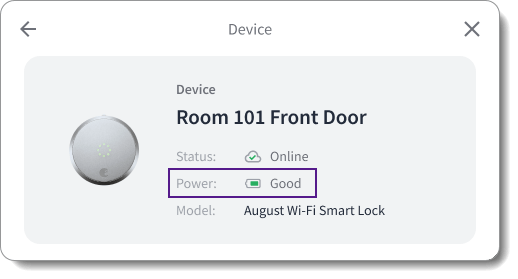
> You can display the power status of your end users' devices in your app.

<img src="https://mintcdn.com/seam/jFDJm5w7cskrO1tW/images/seam-component-device-power-status-display-example.png?fit=max&auto=format&n=jFDJm5w7cskrO1tW&q=85&s=959d8fab8e7cb2f9de25e93d2d9e58d9" alt="Display the power status of your end users' devices in your app." width="518" height="279" data-path="images/seam-component-device-power-status-display-example.png" />

You can display the power status of your end users' devices in your app, including whether the device is wired or battery-powered. Further, for battery-powered devices, you can also display information about the battery status, such as the battery charge level and the battery status.

To display this information, use either of the following Seam mechanisms:

* [Use the `properties.has_direct_power`, and `properties.battery` properties of the `device` object.](#get-device-power-status-using-device-properties)
* [Use the `device.low_battery` and `device.battery_status_changed` events.](#get-device-power-status-using-battery-related-events)

## Get Device Power Status Using Device Properties

Seam polls connected devices and accounts every ten minutes and updates the following device properties accordingly:

<table>
  <thead>
    <tr>
      <th width="320">Property</th>
      <th width="137">Type</th>
      <th>Description</th>
    </tr>
  </thead>

  <tbody>
    <tr>
      <td>
        <code>properties.has\_direct\_power</code>
      </td>

      <td>Boolean</td>

      <td>
        Indicates whether the device has direct power, that is, whether the
        device is wired
      </td>
    </tr>

    <tr>
      <td>
        <code>properties.battery</code>
      </td>

      <td>Object</td>

      <td>
        Battery information, including <code>level</code> and{' '}
        <code>status</code>

        <br />

        If the device is offline, Seam does not return this property.
      </td>
    </tr>

    <tr>
      <td>
        <code>properties.battery.level</code>
      </td>

      <td>Number (0-1)</td>

      <td>
        Battery level of the device as a decimal value between 0 and 1,
        inclusive

        <br />

        If the device is offline, Seam does not return this property.
      </td>
    </tr>

    <tr>
      <td>
        <code>properties.battery.status</code>
      </td>

      <td>Enum (string)</td>

      <td>
        <p>
          Current status of the battery charge level.

          <br />

          If the device is offline, Seam does not return this property.
        </p>

        <p>Values are:</p>

        <p>
          <code>critical</code>: Indicates an extremely low level, suggesting
          imminent shutdown or an urgent need for charging.
        </p>

        <p>
          <code>low</code>: Signifies that the battery is under the preferred
          threshold and should be charged soon.
        </p>

        <p>
          <code>good</code>: Denotes a satisfactory charge level, adequate for
          normal use without the immediate need for recharging.
        </p>

        <p>
          <code>full</code>: Represents a battery that is fully charged,
          providing the maximum duration of usage.
        </p>
      </td>
    </tr>
  </tbody>
</table>

Use a [Get Device](/api/devices/get) request to retrieve the current power status of a device. First, determine whether the device is wired. If the device is battery-powered (that is, not wired), get the battery level and status. Then, display the retrieved device power status in your app.

<Info>
  You can also use the prebuilt [device details Seam
  Component](../../ui-components/overview/react-components/device-details),
  which includes a device power status display.
</Info>

**Request:**

<CodeGroup>
  ```javascript JavaScript theme={null}
  const device = await seam.devices.get({
    device_id: '36cf1a96-196d-41b0-9804-88154387f1f9',
  })
  if (device.properties.has_direct_power == true) {
    console.log('Power Source: Wired')
  } else {
    console.log('Power Source: Battery-powered')
    console.log('Battery Level: ' + device.properties.battery.level.toString())
    console.log('Battery Status: ' + device.properties.battery.status)
  }
  ```

  ```bash cURL theme={null}
  # Use GET or POST.
  curl -X 'GET' \
    'https://connect.getseam.com/devices/get' \
    -H 'accept: application/json' \
    -H 'Authorization: Bearer ${API_KEY}' \
    -H 'Content-Type: application/json' \
    -d '{
      "device_id": "36cf1a96-196d-41b0-9804-88154387f1f9"
  }' | jq -r '"Power Source: " +
    (if .device.properties.has_direct_power == true then "Wired" else "Battery-powered",
    "Battery Level: " + (.device.properties.battery.level | tostring),
    "Battery Status: " + .device.properties.battery.status end)'
  ```

  ```python Python theme={null}
  device = seam.devices.get("36cf1a96-196d-41b0-9804-88154387f1f9")
  if device.properties.has_direct_power == True:
    pprint("Power Source: Wired")
  else:
    pprint("Power Source: Battery-powered")
    pprint("Battery Level: " + str(device.properties.battery.level))
    pprint("Battery Status: " + device.properties.battery.status)
  ```

  ```ruby Ruby theme={null}
  device = client.devices.get(device_id: "36cf1a96-196d-41b0-9804-88154387f1f9")
  if(device.properties.has_direct_power == true)
    puts "Power Source: Wired"
  else
    puts "Power Source: Battery-powered"
    puts "Battery Level: " + device.properties.battery.level.to_s
    puts "Battery Status: " + device.properties.battery.status
  end
  ```

  ```php PHP theme={null}
  $device = $seam->devices->get("36cf1a96-196d-41b0-9804-88154387f1f9");
  if ($device->properties->has_direct_power === true) {
    echo "Power Source: Wired\n";
  } else {
    echo "Power Source: Battery-powered\n";
    // echo "Battery Level: " + $device->properties->battery->level + "\n";
    echo "Battery Level: {$device->properties->battery->level}\n";
    echo "Battery Status: {$device->properties->battery->status}\n";
  }
  ```

  ```csharp C# theme={null}
  var device = seam.Devices.Get(deviceId: "36cf1a96-196d-41b0-9804-88154387f1f9");
  if (device.Properties.HasDirectPower == true)
  {
    Console.WriteLine("Power Source: Wired");
  } else {
    Console.WriteLine("Power Source: Battery-powered");
    if (device.Properties.Battery != null)
    {
      Console.WriteLine("Battery Level: " + device.Properties.Battery.Level);
      Console.WriteLine("Battery Status: " + device.Properties.Battery.Status);
    }
  }
  ```
</CodeGroup>

**Response:**

<CodeGroup>
  ```json JavaScript theme={null}
  Power Source: Battery-powered
  Battery Level: 0.9999532347993827
  Battery Status: full
  ```

  ```json cURL theme={null}
  Power Source: Battery-powered
  Power Source: Battery Level: 0.9999532347993827
  Power Source: Battery Status: full
  ```

  ```json Python theme={null}
  'Power Source: Battery-powered'
  'Battery Level: 0.9999532347993827'
  'Battery Status: full'
  ```

  ```json Ruby theme={null}
  Power Source: Battery-powered
  Battery Level: 0.9999532347993827
  Battery Status: full
  ```

  ```json PHP theme={null}
  Power Source: Battery-powered
  Battery Level: 0.99995323479938
  Battery Status: full
  ```

  ```json C# theme={null}
  Power Source: Battery-powered
  Battery Level: 0.9999532
  Battery Status: Full
  ```
</CodeGroup>

## Get Device Power Status Using Battery-Related Events

Seam generates the following battery-related events:

* `device.low_battery`
* `device.battery_status_changed`

You can retrieve these events using a [List Events](/api/events/list) request or through [webhooks](../../developer-tools/webhooks) and then display the corresponding status in your app.

### Get Battery-Related Events Using a List Events Request

When issuing a [List Events](/api/events/list) request to retrieve [`device.low_battery`](/api/events/object) or [`device.battery_status_changed`](/api/events/object) events for a specific device, include the following parameters:

<table>
  <thead>
    <tr>
      <th width="162">Parameter</th>
      <th width="161">Type</th>
      <th>Description</th>
    </tr>
  </thead>

  <tbody>
    <tr>
      <td>
        <code>device\_id</code>
      </td>

      <td>String (UUID)</td>

      <td>
        ID of the device for which you want to retrieve{' '}
        <code>device.connected</code> or <code>device.disconnected</code> events
      </td>
    </tr>

    <tr>
      <td>
        <code>event\_type</code>
      </td>

      <td>String</td>

      <td>
        Event type that you want to retrieve, that is,{' '}
        <code>device.connected</code> or <code>device.disconnected</code>
      </td>
    </tr>

    <tr>
      <td>
        <code>since</code>
      </td>

      <td>String</td>

      <td>
        Desired starting event generation date and time

        <br />

        You must include <code>since</code> or <code>between</code>.
      </td>
    </tr>

    <tr>
      <td>
        <code>between</code>
      </td>

      <td>Set of two strings</td>

      <td>
        Desired starting and ending event generation dates and times

        <br />

        For example:

        <br />

        <code>\["2024-01-01T00:00:00Z", "2024-02-01T00:00:00Z"]</code>

        <br />

        You must include <code>between</code> or <code>since</code>.
      </td>
    </tr>
  </tbody>
</table>

The following example uses the List Events request to retrieve all `device.battery_status_changed` events for a specific device since January 1, 2024:

**Request:**

<CodeGroup>
  ```javascript JavaScript theme={null}
  const device_battery_status_changed_events = await seam.events.list({
    device_id: '36cf1a96-196d-41b0-9804-88154387f1f9',
    event_type: 'device.battery_status_changed',
    since: '2024-01-01T00:00:00Z',
  })
  console.log(device_battery_status_changed_events)
  ```

  ```bash cURL theme={null}
  # Use GET or POST.
  curl -X 'GET' \
    'https://connect.getseam.com/devices/list' \
    -H 'accept: application/json' \
    -H 'Authorization: Bearer ${API_KEY}' \
    -H 'Content-Type: application/json' \
    -d '{
    "device_id": "36cf1a96-196d-41b0-9804-88154387f1f9",
    "event_type": "device.battery_status_changed",
    "since": "2024-01-01T00:00:00Z"
  }'
  ```

  ```python Python theme={null}
  device_battery_status_changed_events = seam.events.list(
      device_id = "36cf1a96-196d-41b0-9804-88154387f1f9",
      event_type = "device.battery_status_changed",
      since = "2024-01-01T00:00:00Z"
  )
  pprint(device_battery_status_changed_events)
  ```

  ```ruby Ruby theme={null}
  device_battery_status_changed_events = client.events.list(
    device_id: "36cf1a96-196d-41b0-9804-88154387f1f9",
    event_type: "device.battery_status_changed",
    since: "2024-01-01T00:00:00Z"
  )
  puts device_battery_status_changed_events.inspect
  ```

  ```php PHP theme={null}
  $device_battery_status_changed_events = $seam->events->list(
    device_id: "36cf1a96-196d-41b0-9804-88154387f1f9",
    event_type: "device.battery_status_changed",
    since: "2024-01-01T00:00:00Z"
  );
  echo json_encode($device_battery_status_changed_events), "\n";
  ```

  ```csharp C# theme={null}
  var device_battery_status_changed_events = seam.Events.List(
      deviceId: "36cf1a96-196d-41b0-9804-88154387f1f9",
      eventType: Seam.Api.Events.ListRequest.EventTypeEnum.DeviceBatteryStatusChanged,
      since: "2024-01-01T00:00:00Z"
  );
  foreach (var device_battery_status_changed_event in device_battery_status_changed_events)
  {
    Console.WriteLine(device_battery_status_changed_event);
  }
  ```
</CodeGroup>

**Response:**

<CodeGroup>
  ```json JavaScript theme={null}
  [
    {
      "event_id": "de4314a2-903d-53e9-bb5e-ded5d19ad074",
      "device_id": "36cf1a96-196d-41b0-9804-88154387f1f9",
      "event_type": "device.battery_status_changed",
      "workspace_id": "398d80b7-3f96-47c2-b85a-6f8ba21d07be",
      "created_at": "2024-01-01T02:25:10.158Z",
      "occurred_at": "2024-01-01T02:25:10.158Z",
      "connected_account_id": "c1413928-f527-4e12-abf9-d5e18d92dd33"
    }
  ]
  ```

  ```json cURL theme={null}
  {
    "events": [
      {
        "event_id": "de4314a2-903d-53e9-bb5e-ded5d19ad074",
        "device_id": "36cf1a96-196d-41b0-9804-88154387f1f9",
        "event_type": "device.battery_status_changed",
        "workspace_id": "398d80b7-3f96-47c2-b85a-6f8ba21d07be",
        "created_at": "2024-01-01T02:25:10.158Z",
        "occurred_at": "2024-01-01T02:25:10.158Z",
        "connected_account_id": "c1413928-f527-4e12-abf9-d5e18d92dd33"
      }
    ],
    "ok": true
  }
  ```

  ```json Python theme={null}
  [{'connected_account_id': 'c1413928-f527-4e12-abf9-d5e18d92dd33',
    'created_at': '2024-01-01T02:25:10.158Z',
    'device_id': '36cf1a96-196d-41b0-9804-88154387f1f9',
    'event_id': 'de4314a2-903d-53e9-bb5e-ded5d19ad074',
    'event_type': 'device.battery_status_changed',
    'occurred_at': '2024-01-01T02:25:10.158Z',
    'workspace_id': '398d80b7-3f96-47c2-b85a-6f8ba21d07be'}]
  ```

  ```json Ruby theme={null}
  [<Seam::Event:0x00438
    event_id="de4314a2-903d-53e9-bb5e-ded5d19ad074"
    device_id="36cf1a96-196d-41b0-9804-88154387f1f9"
    event_type="device.battery_status_changed"
    workspace_id="398d80b7-3f96-47c2-b85a-6f8ba21d07be"
    created_at=2024-01-01 02:25:10.158Z]
  ```

  ```json PHP theme={null}
  [
    {
      "event_id": "de4314a2-903d-53e9-bb5e-ded5d19ad074",
      "device_id": "36cf1a96-196d-41b0-9804-88154387f1f9",
      "event_type": "device.battery_status_changed",
      "workspace_id": "398d80b7-3f96-47c2-b85a-6f8ba21d07be",
      "created_at": "2024-01-01T02:25:10.158Z",
      "occurred_at": "2024-01-01T02:25:10.158Z"
    }
  ]
  ```

  ```json C# theme={null}
  {
    "event_id": "de4314a2-903d-53e9-bb5e-ded5d19ad074",
    "device_id": "36cf1a96-196d-41b0-9804-88154387f1f9",
    "event_type": "device.battery_status_changed",
    "workspace_id": "398d80b7-3f96-47c2-b85a-6f8ba21d07be",
    "created_at": "2024-01-01T02:25:10.158Z",
    "occurred_at": "2024-01-01T02:25:10.158Z"
  }
  ```
</CodeGroup>

### Retrieve Battery-Related Events Using a Webhook

You can set up webhook endpoints to receive `device.battery_status_changed` and `device.low_battery` events. Then, you can use the receipt of these events to display the corresponding device status in your app. For more information about configuring webhooks, see [Webhooks](../../developer-tools/webhooks).
