> ## Documentation Index
> Fetch the complete documentation index at: https://docs.seam.co/llms.txt
> Use this file to discover all available pages before exploring further.

# Displaying Device Health

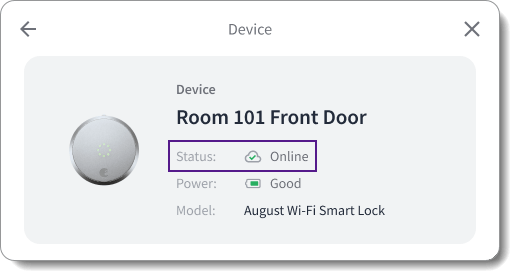
> You can display the health status of your end users' devices in your app.

<img src="https://mintcdn.com/seam/jFDJm5w7cskrO1tW/images/seam-component-device-status-display-example.png?fit=max&auto=format&n=jFDJm5w7cskrO1tW&q=85&s=2c7aad323ec15467eb014d7aea4c47b7" alt="Display the health status of your end users' devices in your app." width="518" height="279" data-path="images/seam-component-device-status-display-example.png" />

To display the health—that is, the online/offline status—of your end users' devices in your app, you can use the following Seam mechanisms:

* [Use the `properties.online` property of the `device` object.](#get-device-status-using-device-properties)
* [Use the `device.connected` and `device.disconnected` events.](#get-device-status-using-connection-related-events)

## Get Device Status Using Device Properties

Seam polls connected devices and accounts every ten minutes and updates the Boolean [`device.properties.online`](/core-concepts/devices) property accordingly. Use a [Get Device](/api/devices/get) request to retrieve the current online/offline status of a device. Then, display the device status in your app.

<Info>
  You can also use the prebuilt [device details Seam
  Component](../../ui-components/overview/react-components/device-details),
  which includes a device status display.
</Info>

**Request:**

<CodeGroup>
  ```javascript JavaScript theme={null}
  const device = await seam.devices.get({
    device_id: '36cf1a96-196d-41b0-9804-88154387f1f9',
  })
  console.log('Online:', device.properties.online)
  ```

  ```bash cURL theme={null}
  # Use GET or POST.
  curl -X 'GET' \
    'https://connect.getseam.com/devices/get' \
    -H 'accept: application/json' \
    -H 'Authorization: Bearer ${API_KEY}' \
    -H 'Content-Type: application/json' \
    -d '{
      "device_id": "36cf1a96-196d-41b0-9804-88154387f1f9"
  }' | jq -r '"Online: " + (.device.properties.online | tostring)'
  ```

  ```python Python theme={null}
  device = seam.devices.get("36cf1a96-196d-41b0-9804-88154387f1f9")
  pprint("Online: " + str(device.properties.online))
  ```

  ```ruby Ruby theme={null}
  device = client.devices.get(device_id: "36cf1a96-196d-41b0-9804-88154387f1f9")
  puts "Online: " + device.properties.online.to_s
  ```

  ```php PHP theme={null}
  $device = $seam->devices->get(device_id: "36cf1a96-196d-41b0-9804-88154387f1f9");
  if ($device->properties->online === true) {
    echo "Online: true\n";
  } else {
    echo "Online: false\n";
  }
  ```

  ```csharp C# theme={null}
  var device = seam.Devices.Get(deviceId: "36cf1a96-196d-41b0-9804-88154387f1f9");
  Console.WriteLine("Online: " + device.Properties.Online);
  ```
</CodeGroup>

**Response:**

<CodeGroup>
  ```json JavaScript theme={null}
  Online: true
  ```

  ```json cURL theme={null}
  Online: true
  ```

  ```json Python theme={null}
  'Online: True'
  ```

  ```json Ruby theme={null}
  Online: true
  ```

  ```json PHP theme={null}
  Online: true
  ```

  ```json C# theme={null}
  Online: True
  ```
</CodeGroup>

## Get Device Status Using Connection-Related Events

When a device connection or disconnection occurs, Seam generates a [`device.connected`](/api/events/object) or [`device.disconnected`](/api/events/object) event, respectively. You can retrieve these events using a [List Events](/api/events/list) request or through [webhooks](../../developer-tools/webhooks) and then display the corresponding status in your app.

<Info>
  To help you test your app against events—like device disconnection or
  removal—that are difficult to orchestrate in a QA environment using real
  devices, Seam provides a suite of `simulate` endpoints that you can use in a
  [sandbox workspace](/core-concepts/workspaces/index#sandbox-workspaces). See [Testing Your App
  Against Device Disconnection and
  Removal](/core-concepts/devices/testing-your-app-against-device-disconnection-and-removal).
</Info>

### Get Connection-Related Events Using a List Events Request

When issuing a [List Events](/api/events/list) request to retrieve [`device.connected`](/api/events/object) or [`device.disconnected`](/api/events/object) events for a specific device, include the following parameters:

<table>
  <thead>
    <tr>
      <th width="162">Parameter</th>
      <th width="161">Type</th>
      <th>Description</th>
    </tr>
  </thead>

  <tbody>
    <tr>
      <td>
        <code>device\_id</code>
      </td>

      <td>String (UUID)</td>

      <td>
        ID of the device for which you want to retrieve{' '}
        <code>device.connected</code> or <code>device.disconnected</code> events
      </td>
    </tr>

    <tr>
      <td>
        <code>event\_type</code>
      </td>

      <td>String</td>

      <td>
        Event type that you want to retrieve, that is,{' '}
        <code>device.connected</code> or <code>device.disconnected</code>
      </td>
    </tr>

    <tr>
      <td>
        <code>since</code>
      </td>

      <td>String</td>

      <td>
        Desired starting event generation date and time

        <br />

        You must include <code>since</code> or <code>between</code>.
      </td>
    </tr>

    <tr>
      <td>
        <code>between</code>
      </td>

      <td>Set of two strings</td>

      <td>
        Desired starting and ending event generation dates and times

        <br />

        For example:

        <br />

        <code>\["2024-01-01T00:00:00Z", "2024-02-01T00:00:00Z"]</code>

        <br />

        You must include <code>between</code> or <code>since</code>.
      </td>
    </tr>
  </tbody>
</table>

The following example uses the List Events request to retrieve all `device.connected` events for a specific device since January 1, 2024:

**Request:**

<CodeGroup>
  ```javascript JavaScript theme={null}
  const device_connected_events = await seam.events.list({
    device_id: '36cf1a96-196d-41b0-9804-88154387f1f9',
    event_type: 'device.connected',
    since: '2024-01-01T00:00:00Z',
  })
  console.log(device_connected_events)
  ```

  ```bash cURL theme={null}
  # Use GET or POST.
  curl -X 'GET' \
    'https://connect.getseam.com/events/list' \
    -H 'accept: application/json' \
    -H 'Authorization: Bearer ${API_KEY}' \
    -H 'Content-Type: application/json' \
    -d '{
    "device_id": "36cf1a96-196d-41b0-9804-88154387f1f9",
    "event_type": "device.connected",
    "since": "2024-01-01T00:00:00Z"
  }'
  ```

  ```python Python theme={null}
  device_connected_events = seam.events.list(
      device_id = "36cf1a96-196d-41b0-9804-88154387f1f9",
      event_type = "device.connected",
      since = "2024-01-01T00:00:00Z"
  )
  pprint(device_connected_events)
  ```

  ```ruby Ruby theme={null}
  device_connected_events = client.events.list(
    device_id: "36cf1a96-196d-41b0-9804-88154387f1f9",
    event_type: "device.connected",
    since: "2024-01-01T00:00:00Z"
  )
  puts device_connected_events.inspect
  ```

  ```php PHP theme={null}
  $device_connected_events = $seam->events->list(
    device_id: "36cf1a96-196d-41b0-9804-88154387f1f9",
    event_type: "device.connected",
    since: "2024-01-01T00:00:00Z"
  );
  echo json_encode($device_connected_events), "\n";
  ```

  ```csharp C# theme={null}
  var device_connected_events = seam.Events.List(
      deviceId: "36cf1a96-196d-41b0-9804-88154387f1f9",
      eventType: Seam.Api.Events.ListRequest.EventTypeEnum.DeviceConnected,
      since: "2024-01-01T00:00:00Z"
  );
  foreach (var device_connected_event in device_connected_events)
  {
    Console.WriteLine(device_connected_event);
  }
  ```
</CodeGroup>

**Response:**

<CodeGroup>
  ```json JavaScript theme={null}
  [
    {
      "event_id": "ca3114b2-088d-43f9-bb5e-ded5d19ad053",
      "device_id": "36cf1a96-196d-41b0-9804-88154387f1f9",
      "event_type": "device.connected",
      "workspace_id": "398d80b7-3f96-47c2-b85a-6f8ba21d07be",
      "created_at": "2024-02-04T21:55:09.681Z",
      "occurred_at": "2024-02-04T21:55:09.681Z",
      "connected_account_id": "c1413928-f527-4e12-abf9-d5e18d92dd33"
    },
    {
      "event_id": "39fcb512-82a4-431d-969f-3935eeba8929",
      "device_id": "36cf1a96-196d-41b0-9804-88154387f1f9",
      "event_type": "device.connected",
      "workspace_id": "398d80b7-3f96-47c2-b85a-6f8ba21d07be",
      "created_at": "2024-02-03T04:54:39.744Z",
      "occurred_at": "2024-02-03T04:54:39.744Z",
      "connected_account_id": "c1413928-f527-4e12-abf9-d5e18d92dd33"
    }
  ]
  ```

  ```json cURL theme={null}
  {
    "events": [
      {
        "event_id": "ca3114b2-088d-43f9-bb5e-ded5d19ad053",
        "device_id": "36cf1a96-196d-41b0-9804-88154387f1f9",
        "event_type": "device.connected",
        "workspace_id": "398d80b7-3f96-47c2-b85a-6f8ba21d07be",
        "created_at": "2024-02-04T21:55:09.681Z",
        "occurred_at": "2024-02-04T21:55:09.681Z",
        "connected_account_id": "c1413928-f527-4e12-abf9-d5e18d92dd33"
      },
      {
        "event_id": "39fcb512-82a4-431d-969f-3935eeba8929",
        "device_id": "36cf1a96-196d-41b0-9804-88154387f1f9",
        "event_type": "device.connected",
        "workspace_id": "398d80b7-3f96-47c2-b85a-6f8ba21d07be",
        "created_at": "2024-02-03T04:54:39.744Z",
        "occurred_at": "2024-02-03T04:54:39.744Z",
        "connected_account_id": "c1413928-f527-4e12-abf9-d5e18d92dd33"
      }
    ],
    "ok": true
  }
  ```

  ```json Python theme={null}
  [{'connected_account_id': 'c1413928-f527-4e12-abf9-d5e18d92dd33',
    'created_at': '2024-02-04T21:55:09.681Z',
    'device_id': '36cf1a96-196d-41b0-9804-88154387f1f9',
    'event_id': 'ca3114b2-088d-43f9-bb5e-ded5d19ad053',
    'event_type': 'device.connected',
    'occurred_at': '2024-02-04T21:55:09.681Z',
    'workspace_id': '398d80b7-3f96-47c2-b85a-6f8ba21d07be'},
   {'connected_account_id': 'c1413928-f527-4e12-abf9-d5e18d92dd33',
    'created_at': '2024-02-03T04:54:39.744Z',
    'device_id': '36cf1a96-196d-41b0-9804-88154387f1f9',
    'event_id': '39fcb512-82a4-431d-969f-3935eeba8929',
    'event_type': 'device.connected',
    'occurred_at': '2024-02-03T04:54:39.744Z',
    'workspace_id': '398d80b7-3f96-47c2-b85a-6f8ba21d07be'}]
  ```

  ```json Ruby theme={null}
  [<Seam::Event:0x00438
    event_id="ca3114b2-088d-43f9-bb5e-ded5d19ad053"
    device_id="36cf1a96-196d-41b0-9804-88154387f1f9"
    event_type="device.connected"
    workspace_id="398d80b7-3f96-47c2-b85a-6f8ba21d07be"
    created_at=2024-02-04 21:55:09.681 UTC>, <Seam::Event:0x00460
    event_id="39fcb512-82a4-431d-969f-3935eeba8929"
    device_id="36cf1a96-196d-41b0-9804-88154387f1f9"
    event_type="device.connected"
    workspace_id="398d80b7-3f96-47c2-b85a-6f8ba21d07be"
    created_at=2024-02-03 04:54:39.744 UTC>]
  ```

  ```json PHP theme={null}
  [
    {
      "event_id": "ca3114b2-088d-43f9-bb5e-ded5d19ad053",
      "device_id": "36cf1a96-196d-41b0-9804-88154387f1f9",
      "event_type": "device.connected",
      "workspace_id": "398d80b7-3f96-47c2-b85a-6f8ba21d07be",
      "created_at": "2024-02-04T21:55:09.681Z",
      "occurred_at": "2024-02-04T21:55:09.681Z"
    },
    {
      "event_id": "39fcb512-82a4-431d-969f-3935eeba8929",
      "device_id": "36cf1a96-196d-41b0-9804-88154387f1f9",
      "event_type": "device.connected",
      "workspace_id": "398d80b7-3f96-47c2-b85a-6f8ba21d07be",
      "created_at": "2024-02-03T04:54:39.744Z",
      "occurred_at": "2024-02-03T04:54:39.744Z"
    }
  ]
  ```

  ```json C# theme={null}
  {
    "event_id": "ca3114b2-088d-43f9-bb5e-ded5d19ad053",
    "device_id": "36cf1a96-196d-41b0-9804-88154387f1f9",
    "event_type": "device.connected",
    "workspace_id": "398d80b7-3f96-47c2-b85a-6f8ba21d07be",
    "created_at": "2024-02-04T21:55:09.681Z",
    "occurred_at": "2024-02-04T21:55:09.681Z"
  }
  {
    "event_id": "39fcb512-82a4-431d-969f-3935eeba8929",
    "device_id": "36cf1a96-196d-41b0-9804-88154387f1f9",
    "event_type": "device.connected",
    "workspace_id": "398d80b7-3f96-47c2-b85a-6f8ba21d07be",
    "created_at": "2024-02-03T04:54:39.744Z",
    "occurred_at": "2024-02-03T04:54:39.744Z"
  }
  ```
</CodeGroup>

### Receive Connection-Related Events Using a Webhook

You can set up webhook endpoints to receive `device.connected` and `device.disconnected` events. Then, you can use the receipt of these events to display the corresponding device status in your app. For more information about configuring webhooks, see [Webhooks](../../developer-tools/webhooks).
