> ## Documentation Index
> Fetch the complete documentation index at: https://docs.seam.co/llms.txt
> Use this file to discover all available pages before exploring further.
# Configuring Noise Threshold Settings
> Learn how to configure noise thresholds for noise sensors.
Seam enables you to configure the [noise thresholds](#set-up-noise-thresholds) of your noise sensor, as well as to receive events when a disturbance is detected. This guide walks you through how to configure noise thresholds with the Seam API.
## Set Up Noise Thresholds
First, create a threshold using the [Create a Noise Threshold](/api/noise_sensors/noise_thresholds/create) endpoint. For example:
**Request:**
```javascript JavaScript theme={null}
const deviceId = '98dc7c66-045d-49cb-a62b-4bb431b0a9fa'
const noiseThresholdAttempt = await seam.noiseThresholds.create({
device_id: deviceId,
starts_daily_at: '20:00:00[America/Los_Angeles]',
ends_daily_at: '06:00:00[America/Los_Angeles]',
noise_threshold_decibels: 70,
})
console.log(noiseThresholdAttempt)
```
```bash cURL theme={null}
curl -X 'POST' \
'https://connect.getseam.com/noise_sensors/noise_thresholds/create' \
-H 'accept: application/json' \
-H 'Authorization: Bearer ${API_KEY}' \
-H 'Content-Type: application/json' \
-d '{
"device_id": "98dc7c66-045d-49cb-a62b-4bb431b0a9fa",
"starts_daily_at": "20:00:00[America/Los_Angeles]",
"ends_daily_at": "06:00:00[America/Los_Angeles]",
"noise_threshold_decibels": 70
}'
```
```python Python theme={null}
device_id = "98dc7c66-045d-49cb-a62b-4bb431b0a9fa"
noise_threshold = seam.noise_sensors.noise_thresholds.create(
device_id = device_id,
starts_daily_at = "20:00:00[America/Los_Angeles]",
ends_daily_at = "06:00:00[America/Los_Angeles]",
noise_threshold_decibels = 70
)
pprint(noise_threshold)
```
```csharp C# theme={null}
var deviceId = "98dc7c66-045d-49cb-a62b-4bb431b0a9fa";
var noiseThresholdAttempt = seam.NoiseThresholdsNoiseSensors.Create(
deviceId: deviceId,
startsDailyAt: "20:00:00[America/Los_Angeles]",
endsDailyAt: "06:00:00[America/Los_Angeles]",
noiseThresholdDecibels: 70
);
Type t = noiseThresholdAttempt.GetType();
PropertyInfo[] props = t.GetProperties();
foreach (var prop in props)
{
Console.WriteLine(prop.Name + ": " + prop.GetValue(noiseThresholdAttempt));
}
```
**Response:**
```json JavaScript theme={null}
{
"action_attempt": {
"status": "pending",
"action_type": "CREATE_NOISE_THRESHOLD",
"action_attempt_id": "5e24ef90-8043-44d8-89f9-9f7ae60ec390",
"result": null,
"error": null
},
"ok": true
}
```
```json cURL theme={null}
{
"action_attempt": {
"status": "pending",
"action_type": "CREATE_NOISE_THRESHOLD",
"action_attempt_id": "64130fb6-94ed-4268-a7e5-ccba4165fab8",
"result": null,
"error": null
},
"ok": true
}
```
```json Python theme={null}
NoiseThreshold(noise_threshold_id='1b64e4b6-4d5d-4416-acca-dc3b1cbc00cd',
device_id='98dc7c66-045d-49cb-a62b-4bb431b0a9fa',
name='builtin_quiet_hours',
noise_threshold_decibels=70,
starts_daily_at='20:00:00[America/Los_Angeles]',
ends_daily_at='06:00:00[America/Los_Angeles]',
noise_threshold_nrs=None)
```
```json C# theme={null}
Status: pending
ActionType: CREATE_NOISE_THRESHOLD
ActionAttemptId: eb611597-64d2-4b1a-995b-fb00361922c6
Result:
Error:
```
This threshold creates a noise threshold of 70 decibels from 20:00-06:00 PST called `builtin_quiet_hours`.
Once you have created a threshold, connect it to a webhook to log events.
### Best Practices
* For Minut devices, you can configure two thresholds—one for quiet hours and one for the rest of the day.
* For NoiseAware devices, you can configure as many thresholds as you want, provided that they do not overlap during daytime hours.
## Set Up Webhooks
You can set up webhooks in the [Seam Console](https://console.seam.co).
1. In the left-hand navigation pane of Seam Console, click **Webhooks**.
2. On the **Webhooks** page, click **+ Add Webhook**.
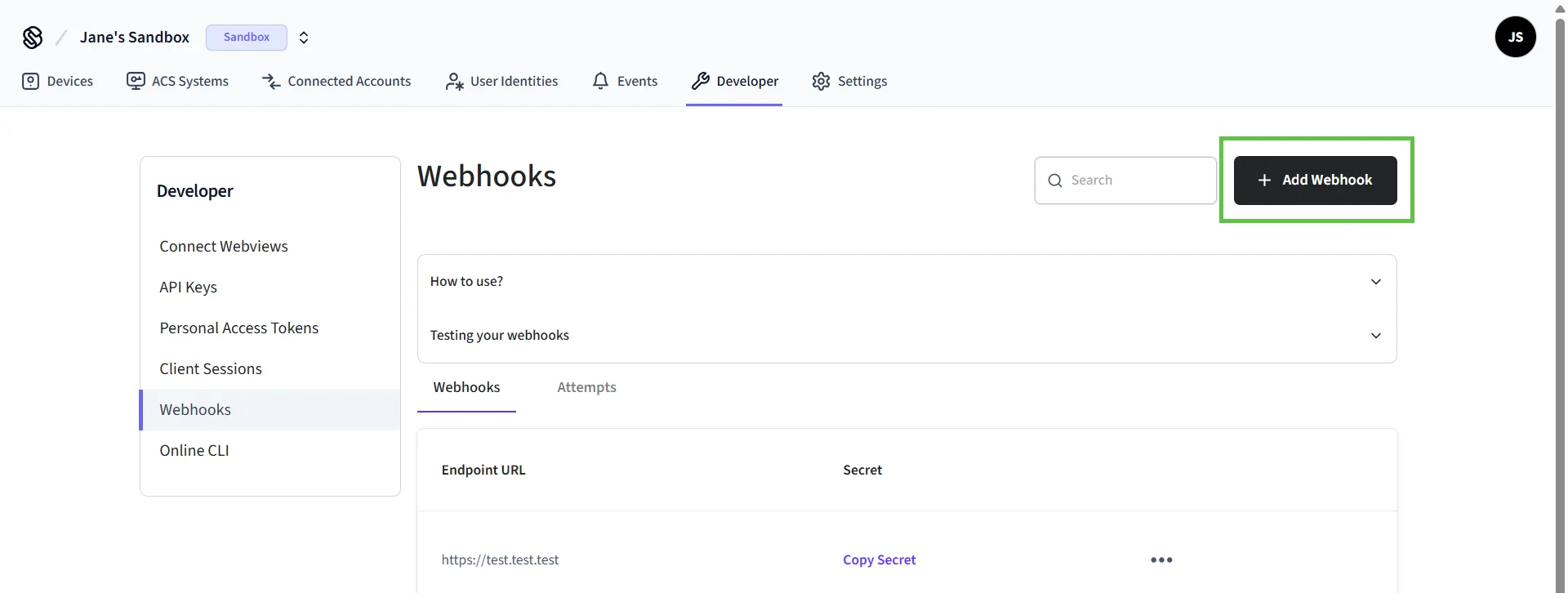 3. In the **Create Webhook** dialog:
1. Type your URL.
2. Select the event types for which you want to receive events.
3. Click **Create**.
The Seam Console displays the URL and secret for the newly-created webhook. To test your webhook, click **Test your webhook**.
## Monitor Events
Once you have configured your thresholds and webhooks, you can monitor events with the Seam API. The following sample shows how events look:
```json theme={null}
{
"created_at": "2023-01-09T18:54:32.737Z",
"device_id": "c1296d07-3e96-4ee9-8219-3cd33a09aa37",
"event_id": "c1296d07-3e96-4ee9-8219-3cd33a09aa37",
"event_type": "noise_sensors.noise_threshold_triggered",
"minut_metadata": {},
"noise_level_decibels": 50,
"noise_level_nrs": 40,
"noise_threshold_id": "c1296d07-3e96-4ee9-8219-3cd33a09aa37",
"noise_threshold_name": "builtin_first_disturbance",
"noiseaware_metadata": {}
}
```
For a detailed reference of event parameters, see [Events](/api/events/object).
3. In the **Create Webhook** dialog:
1. Type your URL.
2. Select the event types for which you want to receive events.
3. Click **Create**.
The Seam Console displays the URL and secret for the newly-created webhook. To test your webhook, click **Test your webhook**.
## Monitor Events
Once you have configured your thresholds and webhooks, you can monitor events with the Seam API. The following sample shows how events look:
```json theme={null}
{
"created_at": "2023-01-09T18:54:32.737Z",
"device_id": "c1296d07-3e96-4ee9-8219-3cd33a09aa37",
"event_id": "c1296d07-3e96-4ee9-8219-3cd33a09aa37",
"event_type": "noise_sensors.noise_threshold_triggered",
"minut_metadata": {},
"noise_level_decibels": 50,
"noise_level_nrs": 40,
"noise_threshold_id": "c1296d07-3e96-4ee9-8219-3cd33a09aa37",
"noise_threshold_name": "builtin_first_disturbance",
"noiseaware_metadata": {}
}
```
For a detailed reference of event parameters, see [Events](/api/events/object).