> ## Documentation Index
> Fetch the complete documentation index at: https://docs.seam.co/llms.txt
> Use this file to discover all available pages before exploring further.
# Managing Mobile App User Accounts with User Identities
> Learn how to use Seam user identities to manage mobile app user accounts.
## What is a User Identity?
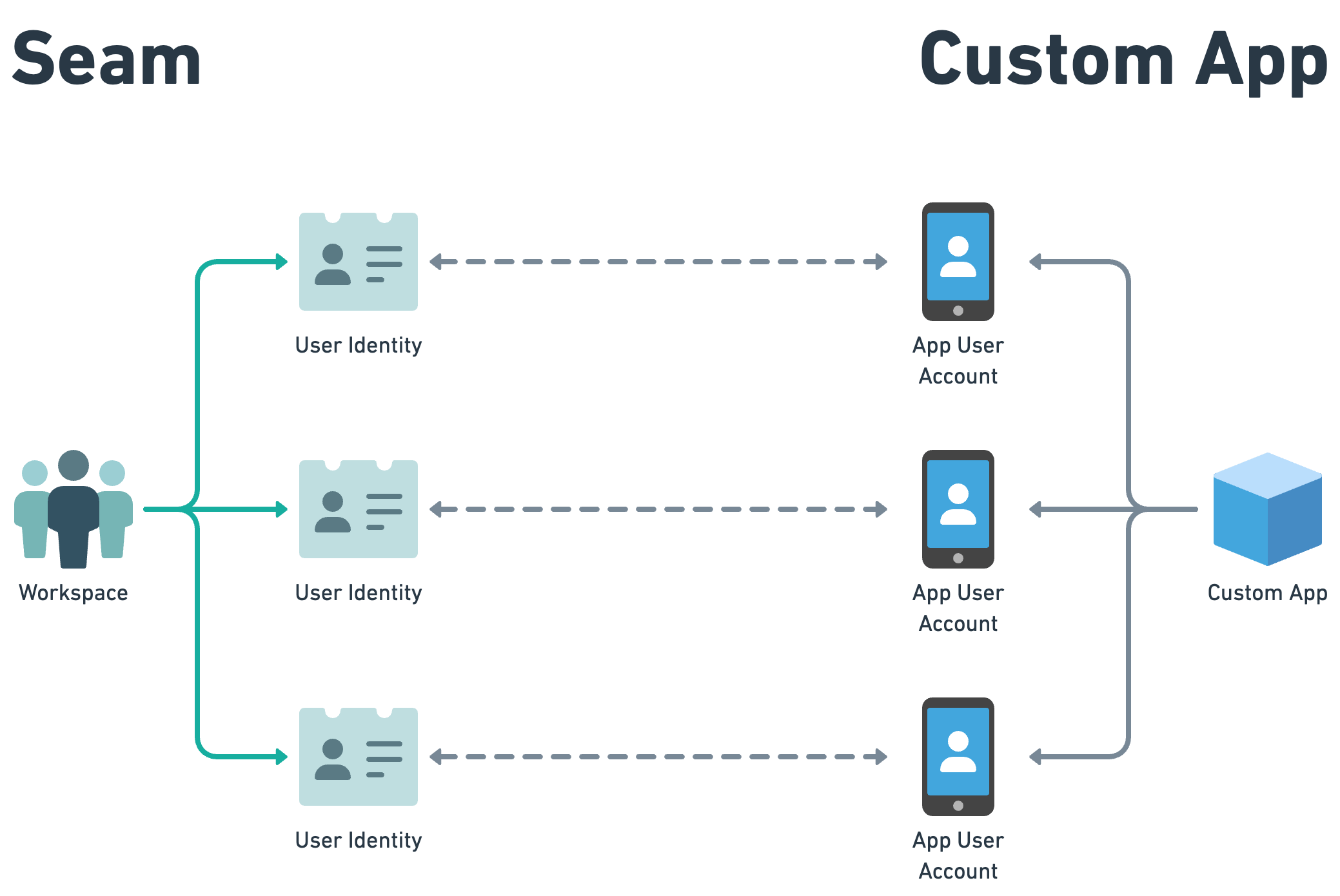
Seam user identities are a feature for tracking and managing user accounts in your application. This feature assigns unique identifiers to each of your users, enabling you to issue and manage their [mobile credentials](/capability-guides/mobile-access/issuing-mobile-credentials-from-an-access-control-system) and access permissions. Each user identity is mapped to a user account in your app.
 ### User Identities Can Be Connected to Users in Multiple Access Control Systems
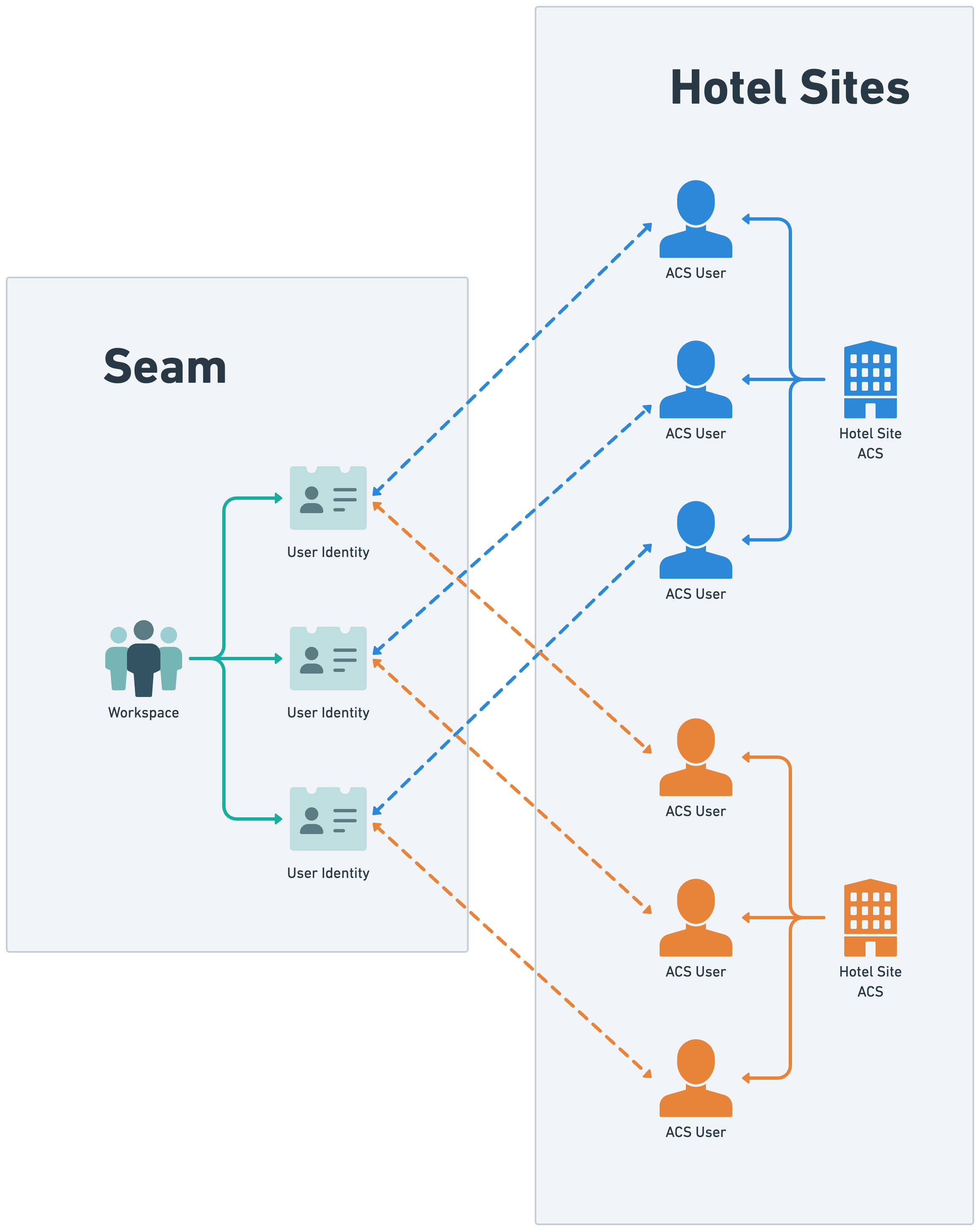
User identities can be linked to one [ACS user](/low-level-apis/access-systems/user-management) in each access control system. Any mobile credentials issued to these ACS users are consolidated under the user identity. Consequently, a user's mobile app account has access to these credentials through the user identity.
### User Identities Can Be Connected to Users in Multiple Access Control Systems
User identities can be linked to one [ACS user](/low-level-apis/access-systems/user-management) in each access control system. Any mobile credentials issued to these ACS users are consolidated under the user identity. Consequently, a user's mobile app account has access to these credentials through the user identity.
 ***
## Create a User Identity and Associate it with an ACS User
### 1. Create a User Identity
To [create a user identity](/api/user_identities/create), you can specify any of the following characteristics:
* Unique user identity key (`user_identity_key`)
* Unique email address (`email_address`)
* Unique phone number (`phone_number`)
* Full name (`full_name`)
Note that if you specify one or more of the `user_identity_key`, `email_address`, or `phone_number`, each of these values must be unique within your [workspace](/core-concepts/workspaces/index).
**Command:**
```javascript JavaScript theme={null}
await seam.userIdentities.create({
user_identity_key: 'jean_doe',
email_address: 'jean@example.com',
phone_number: '+15555550110',
full_name: 'Jean Doe',
})
```
```bash cURL theme={null}
curl -X 'POST' \
'https://connect.getseam.com/user_identities/create' \
-H 'accept: application/json' \
-H "Authorization: Bearer ${SEAM_API_KEY}" \
-H 'Content-Type: application/json' \
-d '{
"user_identity_key": "jean_doe",
"email_address": "jean@example.com",
"phone_number": "+15555550110",
"full_name": "Jean Doe"
}'
```
```python Python theme={null}
seam.user_identities.create(
user_identity_key = "jean_doe",
email_address = "jean@example.com",
phone_number = "+15555550110",
full_name = "Jean Doe"
)
```
```ruby Ruby theme={null}
seam.user_identities.create(
user_identity_key: "jean_doe",
email_address: "jean@example.com",
phone_number: "+15555550110",
full_name: "Jean Doe",
)
```
```php PHP theme={null}
$seam->user_identities->create(
user_identity_key: "jean_doe",
email_address: "jean@example.com",
phone_number: "+15555550110",
full_name: "Jean Doe"
);
```
```csharp C# theme={null}
Coming soon!
```
**Output:**
```json JavaScript theme={null}
{
"user_identity_id": "22222222-2222-2222-2222-222222222222",
"user_identity_key": "jean_doe",
"email_address": "jean@example.com",
"phone_number": "+15555550110",
"display_name": "Jean Doe",
"full_name": "Jean Doe",
...
}
```
```json cURL theme={null}
{
"user_identity": {
"user_identity_id": "22222222-2222-2222-2222-222222222222",
"user_identity_key": "jean_doe",
"email_address": "jean@example.com",
"phone_number": "+15555550110",
"display_name": "Jean Doe",
"full_name": "Jean Doe",
...
},
"ok": true
}
```
```json Python theme={null}
UserIdentity(
user_identity_id='22222222-2222-2222-2222-222222222222',
user_identity_key='jean_doe',
email_address='jean@example.com',
phone_number='+15555550110',
display_name='Jean Doe',
full_name='Jean Doe',
...
)
```
```json Ruby theme={null}
```
```json PHP theme={null}
{
"user_identity_id": "22222222-2222-2222-2222-222222222222",
"user_identity_key": "jean_doe",
"email_address": "jean@example.com",
"phone_number": "+15555550110",
"display_name": "Jean Doe",
"full_name": "Jean Doe",
...
}
```
```json C# theme={null}
Coming soon!
```
### 2. Assign an ACS User to the User Identity
To [link an ACS user with a user identity](/api/user_identities/add_acs_user), provide the ID of the user identity and the ID of the ACS user.
**Command:**
```javascript JavaScript theme={null}
const userIdentity = await seam.userIdentities.get({
email_address: 'jean@example.com',
})
const acsUser = await seam.acs.users.get({
email_address: 'jean@example.com',
})
await seam.userIdentities.addAcsUser({
user_identity_id: userIdentity.user_identity_id,
acs_user_id: acsUser.acs_user_id,
})
```
```bash cURL theme={null}
# Use GET or POST.
curl -X 'GET' \
'https://connect.getseam.com/user_identities/get' \
-H 'accept: application/json' \
-H "Authorization: Bearer ${SEAM_API_KEY}" \
-H 'Content-Type: application/json' \
-d "{
\"email_address\": \"jane@example.com\"
}")
# Use GET or POST.
curl -X 'GET' \
'https://connect.getseam.com/acs/users/get' \
-H 'accept: application/json' \
-H "Authorization: Bearer ${SEAM_API_KEY}" \
-H 'Content-Type: application/json' \
-d "{
\"email_address\": \"jane@example.com\"
}")
curl -X 'POST' \
'https://connect.getseam.com/user_identities/add_acs_user' \
-H 'accept: application/json' \
-H 'Authorization: Bearer ${API_KEY}' \
-H 'Content-Type: application/json' \
-d "{
\"user_identity_id\": \"$(jq -r '.user_identity.user_identity_id' <<< ${user_identity})\",
\"acs_user_id\": \"$(jq -r '.acs_user.acs_user_id' <<< ${acs_user})\",
}"
```
```python Python theme={null}
user_identity = seam.user_identities.get(
email_address = "jean@example.com"
)
acs_user = seam.acs.users.get(
email_address = "jean@example.com"
)
seam.user_identities.add_acs_user(
user_identity_id = user_identity.user_identity_id,
acs_user_id = acs_user.acs_user_id
)
```
```ruby Ruby theme={null}
user_identity = seam.user_identities.get(
email_address: "jane@example.com"
)
acs_user = seam.acs.users.get(
email_address: "jane@example.com"
)
seam.user_identities.add_acs_user(
user_identity_id: user_identity.user_identity_id,
acs_user_id: acs_user.acs_user_id,
)
```
```php PHP theme={null}
$user_identity = $seam->user_identities->get(
email_address: "jean@example.com",
);
$acs_user = $seam->acs->users->get(
email_address: "jean@example.com",
);
$seam->user_identities->add_acs_user(
user_identity_id: $user_identity->user_identity_id,
acs_user_id: $acs_user->acs_user_id
);
```
```csharp C# theme={null}
Coming soon!
```
**Output:**
```json JavaScript theme={null}
// void
```
```json cURL theme={null}
{
"ok": true
}
```
```json Python theme={null}
None
```
```json Ruby theme={null}
nil
```
```json PHP theme={null}
null
```
```json C# theme={null}
Coming soon!
```
***
## Removing a User Identity
When you [delete a user identity](/api/user_identities/delete), Seam automatically cleans up all other associated resources.
**Command:**
```javascript JavaScript theme={null}
await seam.userIdentities.delete({
user_identity_id: '22222222-2222-2222-2222-222222222222',
})
```
```bash cURL theme={null}
curl -X 'POST' \
'https://connect.getseam.com/user_identities/delete' \
-H 'accept: application/json' \
-H "Authorization: Bearer ${SEAM_API_KEY}" \
-H 'Content-Type: application/json' \
-d '{
"user_identity_id": "22222222-2222-2222-2222-222222222222"
}'
```
```python Python theme={null}
seam.user_identities.delete(
user_identity_id = "22222222-2222-2222-2222-222222222222"
)
```
```ruby Ruby theme={null}
seam.user_identities.delete(
user_identity_id: "22222222-2222-2222-2222-222222222222"
)
```
```php PHP theme={null}
$seam->user_identities->delete(
user_identity_id: "22222222-2222-2222-2222-222222222222"
);
```
```csharp C# theme={null}
Coming soon!
```
**Output:**
```json JavaScript theme={null}
// void
```
```json cURL theme={null}
{
"ok": true
}
```
```json Python theme={null}
None
```
```json Ruby theme={null}
nil
```
```json PHP theme={null}
null
```
```json C# theme={null}
Coming soon!
```
***
## Create a User Identity and Associate it with an ACS User
### 1. Create a User Identity
To [create a user identity](/api/user_identities/create), you can specify any of the following characteristics:
* Unique user identity key (`user_identity_key`)
* Unique email address (`email_address`)
* Unique phone number (`phone_number`)
* Full name (`full_name`)
Note that if you specify one or more of the `user_identity_key`, `email_address`, or `phone_number`, each of these values must be unique within your [workspace](/core-concepts/workspaces/index).
**Command:**
```javascript JavaScript theme={null}
await seam.userIdentities.create({
user_identity_key: 'jean_doe',
email_address: 'jean@example.com',
phone_number: '+15555550110',
full_name: 'Jean Doe',
})
```
```bash cURL theme={null}
curl -X 'POST' \
'https://connect.getseam.com/user_identities/create' \
-H 'accept: application/json' \
-H "Authorization: Bearer ${SEAM_API_KEY}" \
-H 'Content-Type: application/json' \
-d '{
"user_identity_key": "jean_doe",
"email_address": "jean@example.com",
"phone_number": "+15555550110",
"full_name": "Jean Doe"
}'
```
```python Python theme={null}
seam.user_identities.create(
user_identity_key = "jean_doe",
email_address = "jean@example.com",
phone_number = "+15555550110",
full_name = "Jean Doe"
)
```
```ruby Ruby theme={null}
seam.user_identities.create(
user_identity_key: "jean_doe",
email_address: "jean@example.com",
phone_number: "+15555550110",
full_name: "Jean Doe",
)
```
```php PHP theme={null}
$seam->user_identities->create(
user_identity_key: "jean_doe",
email_address: "jean@example.com",
phone_number: "+15555550110",
full_name: "Jean Doe"
);
```
```csharp C# theme={null}
Coming soon!
```
**Output:**
```json JavaScript theme={null}
{
"user_identity_id": "22222222-2222-2222-2222-222222222222",
"user_identity_key": "jean_doe",
"email_address": "jean@example.com",
"phone_number": "+15555550110",
"display_name": "Jean Doe",
"full_name": "Jean Doe",
...
}
```
```json cURL theme={null}
{
"user_identity": {
"user_identity_id": "22222222-2222-2222-2222-222222222222",
"user_identity_key": "jean_doe",
"email_address": "jean@example.com",
"phone_number": "+15555550110",
"display_name": "Jean Doe",
"full_name": "Jean Doe",
...
},
"ok": true
}
```
```json Python theme={null}
UserIdentity(
user_identity_id='22222222-2222-2222-2222-222222222222',
user_identity_key='jean_doe',
email_address='jean@example.com',
phone_number='+15555550110',
display_name='Jean Doe',
full_name='Jean Doe',
...
)
```
```json Ruby theme={null}
```
```json PHP theme={null}
{
"user_identity_id": "22222222-2222-2222-2222-222222222222",
"user_identity_key": "jean_doe",
"email_address": "jean@example.com",
"phone_number": "+15555550110",
"display_name": "Jean Doe",
"full_name": "Jean Doe",
...
}
```
```json C# theme={null}
Coming soon!
```
### 2. Assign an ACS User to the User Identity
To [link an ACS user with a user identity](/api/user_identities/add_acs_user), provide the ID of the user identity and the ID of the ACS user.
**Command:**
```javascript JavaScript theme={null}
const userIdentity = await seam.userIdentities.get({
email_address: 'jean@example.com',
})
const acsUser = await seam.acs.users.get({
email_address: 'jean@example.com',
})
await seam.userIdentities.addAcsUser({
user_identity_id: userIdentity.user_identity_id,
acs_user_id: acsUser.acs_user_id,
})
```
```bash cURL theme={null}
# Use GET or POST.
curl -X 'GET' \
'https://connect.getseam.com/user_identities/get' \
-H 'accept: application/json' \
-H "Authorization: Bearer ${SEAM_API_KEY}" \
-H 'Content-Type: application/json' \
-d "{
\"email_address\": \"jane@example.com\"
}")
# Use GET or POST.
curl -X 'GET' \
'https://connect.getseam.com/acs/users/get' \
-H 'accept: application/json' \
-H "Authorization: Bearer ${SEAM_API_KEY}" \
-H 'Content-Type: application/json' \
-d "{
\"email_address\": \"jane@example.com\"
}")
curl -X 'POST' \
'https://connect.getseam.com/user_identities/add_acs_user' \
-H 'accept: application/json' \
-H 'Authorization: Bearer ${API_KEY}' \
-H 'Content-Type: application/json' \
-d "{
\"user_identity_id\": \"$(jq -r '.user_identity.user_identity_id' <<< ${user_identity})\",
\"acs_user_id\": \"$(jq -r '.acs_user.acs_user_id' <<< ${acs_user})\",
}"
```
```python Python theme={null}
user_identity = seam.user_identities.get(
email_address = "jean@example.com"
)
acs_user = seam.acs.users.get(
email_address = "jean@example.com"
)
seam.user_identities.add_acs_user(
user_identity_id = user_identity.user_identity_id,
acs_user_id = acs_user.acs_user_id
)
```
```ruby Ruby theme={null}
user_identity = seam.user_identities.get(
email_address: "jane@example.com"
)
acs_user = seam.acs.users.get(
email_address: "jane@example.com"
)
seam.user_identities.add_acs_user(
user_identity_id: user_identity.user_identity_id,
acs_user_id: acs_user.acs_user_id,
)
```
```php PHP theme={null}
$user_identity = $seam->user_identities->get(
email_address: "jean@example.com",
);
$acs_user = $seam->acs->users->get(
email_address: "jean@example.com",
);
$seam->user_identities->add_acs_user(
user_identity_id: $user_identity->user_identity_id,
acs_user_id: $acs_user->acs_user_id
);
```
```csharp C# theme={null}
Coming soon!
```
**Output:**
```json JavaScript theme={null}
// void
```
```json cURL theme={null}
{
"ok": true
}
```
```json Python theme={null}
None
```
```json Ruby theme={null}
nil
```
```json PHP theme={null}
null
```
```json C# theme={null}
Coming soon!
```
***
## Removing a User Identity
When you [delete a user identity](/api/user_identities/delete), Seam automatically cleans up all other associated resources.
**Command:**
```javascript JavaScript theme={null}
await seam.userIdentities.delete({
user_identity_id: '22222222-2222-2222-2222-222222222222',
})
```
```bash cURL theme={null}
curl -X 'POST' \
'https://connect.getseam.com/user_identities/delete' \
-H 'accept: application/json' \
-H "Authorization: Bearer ${SEAM_API_KEY}" \
-H 'Content-Type: application/json' \
-d '{
"user_identity_id": "22222222-2222-2222-2222-222222222222"
}'
```
```python Python theme={null}
seam.user_identities.delete(
user_identity_id = "22222222-2222-2222-2222-222222222222"
)
```
```ruby Ruby theme={null}
seam.user_identities.delete(
user_identity_id: "22222222-2222-2222-2222-222222222222"
)
```
```php PHP theme={null}
$seam->user_identities->delete(
user_identity_id: "22222222-2222-2222-2222-222222222222"
);
```
```csharp C# theme={null}
Coming soon!
```
**Output:**
```json JavaScript theme={null}
// void
```
```json cURL theme={null}
{
"ok": true
}
```
```json Python theme={null}
None
```
```json Ruby theme={null}
nil
```
```json PHP theme={null}
null
```
```json C# theme={null}
Coming soon!
```